
Skywise - Airlang Training Manual
- Airlang Overview
- Creating AirLang Basic Rules
- Waypoint Restrictions
- Airway Restrictions
- FIR Restrictions
- SID / STAR Restrictions
- Approach Restrictions
- Runway Closure
- Airport Restrictions
- City-Pair Level Cap
- Restricted Regions
- Time Definitions
- Flight Level Restrictions
- Conditions
- Guards
Purpose and Scope
The purpose of this manual is to provide training guidelines for Analysts and Dispatchers who use Airlang.
It covers the main Airlang rule concepts, explains where and how to write them, and describes how they are applied within the N-Flight Planning system.
1. Airlang Overview
1.1 Accessing Airlang
As of the N-FP 23.7 release, a new business rules manager for customers will be available, and is located in the ALC Airlang Rules feature. This feature is intended to replace the legacy rule management system in Dispatch Express. Due to its advanced flight-planning capabilities, access should be restricted and only visible to customers who have trained and authorized users.
Note: This manual focuses exclusively on Airlang training. A separate training manual is available for customers who want to use this feature.
1.2 AirLang Functionality
Generally, AirLang can be understood as a program of “do” or “do not” rules that guide the route generator. It supplements the route generation process by adding an additional layer of route requirements that cannot be hard-coded in FOMS.
The logic of AirLang is that each rule is divided into three sections:
1) Condition;
2) Action; and
3) Consequence.
When integrated with the N-FP route generation process, N-FP initially determines all available route options based on airways and waypoints.
> It then applies AirLang restrictions to those generated routes, narrowing the results to options that are fully AirLang compliant. This ensures that the final route(s) comply with all navigational data and route restrictions/requirements. Finally, the route presented to the user is the most optimal option for that flight time based on navigational data, AirLang rules, winds, weather, and other factors.
As described above, AirLang affects the route generation process in N-FP; however, several programs within N-FP also influence the functionality of AirLang.
These are:
1) FOMS
2) N-FP Route Requirements & Rule Applicability
3) AirLang Database subsections
a. Primary AirLang database - controlled by Skywise.
i) AIP/AIM Rules
ii) NOTAM Rules
iii) SUA / Restricted Area Activations
b. ALC Specific AirLang database - controlled by the customer
4) The Ignore Rules Configuration list - also controlled by customers.
1.3 N-FP Rule Options
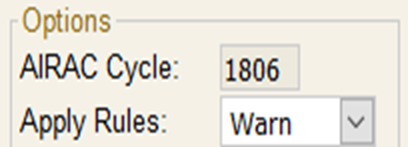
Both the N-FP Plan screen and Route screen allow users to choose whether or not Airlang rules are applied during route generation, including when using RAD only.
On the Route screen, this setting affects how the MTTA generates the route. On the Plan screen, the rules are checked during computation after actual performance data is applied to the flight plan. This confirms whether any rules are broken/violated. For example a flight level restriction is not met because the actual computed flight level is lower than the level specified in the route expansion.
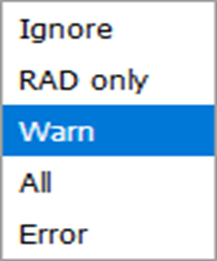
Ignore: If the flight does not comply with the rules, no warning or error message is received.
NOTE: Not recommended when planning flights in EuroControl airspace.
RAD Only: When selected, complex rules are not applied to the MTTA. Only ‘simple’ rules and NOTAMS are applied. A warning displays if route generation fails or if a rule is broken/violated.
NOTE: This option improves the N-FP system’s ability to generate a route through complex airspace.
Warn: If the flight does not comply with the rules, a warning displays in the notification box and the flight still computes.
All: Route analysis considers all rules, including rules that the airline set to ignore.
Error: If the flight does not comply with the rules, the flight does not compute and displays an error.
1.4 – AirLang Databases
The Master AirLang database is maintained by Skywise’s Flight Planning Navigational Data department (N-FP Data) and houses the following types of files:
- Route Availability Document (eRAD)
- Conditional Routes (CDR)
- AIP ENR 3 Remarks
- Preferred Routes, (transitioning city pair routes to FOMS 301)
- NOTAM
- Special Events (Supplements)
2. Creating AirLang Basic Rules
2.1 Conditions and Consequences
Conditions
A single condition consists of a sequence of route events.
Actions
Actions determine the outcome of the route requirement (“do” or “do not”).
Consequences
A consequence is the resulting route requirement.
2.2 Basic Rules
Basic Rule Structure
A basic rule is the most general rule type. It consists of two parts: a condition and a consequence, which end with a period (.) and semicolon (;), respectively. A basic rule is structured across three lines and can be combined to support multiple route scenarios.
CONDITION Route Event ORIGIN CYVR ARRIVAL CYYZ
ACTION Do, or Do Not Do MUST [NOT] USE ALWAYS
CONSEQUENCE Route Requirement BOOTH+CY+E.;
NOTE: When possible, avoid using basic rules, as they place a greater processing burden on route generation. Airway restrictions and point restrictions are more efficient alternatives.
2.3 Basic Rule Types
Basic Events
A basic rule can include any one type, or a combination of all three, as needed. Generally, the fewer types included, the stricter the rule.
- Departure event (keyword: ORIGIN)
- Destination event (keyword: ARRIVAL)
- Via airway / waypoint event (keyword: VIA)
Example:
ORIGIN CYYZ
MUST USE ALWAYS
RAGID+CY+E.;
Is much stricter than, say,
ORIGIN CYYZ ARRIVAL CYUL
MUST USE ALWAYS
RAGID+CY+E.;
OR,
ORIGIN CYYZ ARRIVAL CYUL (ATCALC CZM ACFT-TYPE A320 RNAV)
MUST NOT USE ALWAYS
RAGID+CY+E.
ALPHA+CY DCT BRAVO+CY+E.;
The second and third rules are less restrictive because they include additional conditions, such as an ORIGIN and ARRIVAL condition. The third rule also contains GUARDS–ATC ALC, Aircraft type, and RNAV requirements–all of which a flight must meet before the rule is enforced.
A basic rule with a single condition, such as the one above, is extremely restrictive because it forces all flights departing CYYZ to route through RAGID regardless of their direction of travel. Unless this outcome is intentional, such a rule can significantly impact MTTAs and fuel requirements–particularly when created without a full understanding of its operational impact.
3.0 Waypoint Restrictions
Waypoint restrictions can specify when points “can”, “cannot”, or “must” be used, including limits based on particular hours or altitudes. These rules function similarly to Basic Rules but require less computational processing during route generation.
3.1 Waypoint Restriction, Conditions, and Consequences
Consequence
A consequence is required because it identifies the waypoint (enroute or navaid) affected by the action of the AirLang rule.
Actions
There are a number of actions available for Waypoint Restrictions:
- Only Available For
- FL Only Available For
- Route Only Available For
- FL Required For
- Not Available [For]
- Compulsory For
Only Available For
The “Only Available For” action restricts the consequence to the specified route event when its condition is met. If the condition is not met, the consequence is unavailable for all other route options. This restriction applies to all available flight levels (FLs).
FL Only Available For
Similar to “Only Available For,” except the restriction applies only to the specified FLs. Airspace outside those FL remains unrestricted.
Route Only Available For
Similar to “FL Only Available For” with the exception that the airspace outside of the specified flight levels is unusable.
FL Required For
The “FL Required For” rule specifies that the flight level restriction/requirement must be adhered to when the parameters of the condition and consequence are met. If either is met, the flight level restriction does not apply.
Not Available [For]
There are two aspects to the “Not Available [For]” restrictions:
- “Not Available”
- This is an all-encompassing restriction: the consequence applies in all situations. There is no condition required.
- “Not Available For”
- This is a conditional restriction: it applies only when specified conditions are met, resulting in the stated consequence.
Compulsory For
If the condition is met, the route must use the consequence.
Conditions
The condition is the route event; however, it is not always required. When no condition is present, the action determines what happens to the waypoint (consequence) for all flights.
Defining Waypoint Restrictions
The primary keyword used to define a waypoint restriction rule is “pointdef.”
3.2 Pointdef
Each AirLang rule that affects a waypoint (enroute or navaid) must be preceded by the Pointdef keyword, as shown in the below example. Since each Pointdef is considered a single rule, then each Pointdef must end with a period ( . ) and semicolon ( ; ).
POINTDEF [Waypoint] CONSEQUENCE ACTION [ (CONDITION) ].;
POINTDEF TTEST+CY ONLY AVAILABLE FOR (ORIGIN CYVR).;
POINTDEF TEEST+CY FL190 TO FL290 FL ONLY AVAILABLE FOR (ORIGIN CYVR).;
POINTDEF TESST+CY FL190 TO FL290 ROUTE ONLY AVAILABLE FOR (ORIGIN CYVR).;
POINTDEF TESTT+CY FL250 FL REQUIRED FOR (ORIGIN CYVR).;
POINTDEF TESTA+CY NOT AVAILABLE.;
POINTDEF TESTB+CY NOT AVAILABLE FOR (ORIGIN CYVR).;
POINTDEF TESTC+CY COMPULSORY FOR (ORIGIN CYVR).;
4.0 Airway Restrictions
Airway restrictions can specify when segments of airways “can”, “cannot”, or “must” be used, including restrictions based on specific hours or altitude ranges. These rules function similarly to Basic Rules but require less computation during the route generation process. Each Awydef rule applies only to the segment and direction indicated in AirLang. Therefore, if the user wants to clos an airway in both directions, the AirLang rule must be created twice (A -> B and B -> A).
4.1 Airway Restrictions, Conditions, & Consequences
Consequence
A consequence is required because it identifies the airway ID and segment affected by the action of the AirLang rule.
Actions
There are a number of actions available for Airway Restrictions:
- Only Available For
- FL Only Available For
- Route Only Available For
- FL Required For
- Not Available [For]
- Compulsory For
Only Available For
The “Only Available For” action restricts the consequence, only if the route event in the condition is met. If the condition is not met, the consequence is unavailable for all other route options. This restriction applies to all available FLs.
FL Only Available For
Similar to “Only Available For,” except the restriction applies only to the specified FLs. Outside of those specified FLs, the airspace remains unrestricted.
Route Only Available For
Similar to “FL Only Available For,” except that airspace outside of the specified FLs is unavailable for use.
FL Required For
The “FL Required For” rule indicates that a FL restriction/requirement applies only when the specified parameters of the condition and consequence are met. If either is not met, the FL restriction does not apply.
Not Available [For]
There are two aspects to the “Not Available [For]” restrictions:
- “Not Available”
- This is an all-encompassing restriction: the consequence applies in all situations. There is no condition required.
- “Not Available For”
- This is a conditional restriction: it applies only when specified conditions and consequences are met.
Compulsory For
If the condition is met, the route must use the consequence.
Conditions
The condition is the route event; however, it is not always required. When no condition is present, the action determines what happens to the waypoint (consequence) for all flights.
4.2 Defining Airway Restrictions
The primary keyword used to identify the type of airway restriction rule is “awydef”.
AWYDEF
Each airway restriction rule must begin with the keyword “AWDEF,” as shown in the below example. Since each AWDEFis considered a single rule, each AWDEFmust end with a period ( . ) and semicolon ( ; ). An AWDEFrule applies only to the airway segment and direction indicated in AirLang. If a user wants the airway to be closed in both directions, the AirLang rule must be created twice (A -> B and B -> A).
AWYDEF [AIRWAY] [WYPT SEGMENT 1] [ WYPT SEGMENT 2] CONSEQUENCE ACTION [ (CONDITION) ].;
AWYDEF J123 WYPTA+CY WYPTB+CY ONLY AVAILABLE FOR (ORIGIN CYVR).;
AWYDEF J123 FL190 TO FL290 WYPTA+CY WYPTB+CY FL ONLY AVAILABLE FOR (ORIGIN CYVR).;
AWYDEF J123 FL190 TO FL290 WYPTA+CY WYPTB+CY ROUTE ONLY AVAILABLE FOR (ORIGIN CYVR).;
AWYDEF J123 FL250 WYPTA+CY WYPTB+CY FL REQUIRED FOR (ORIGIN CYVR).;
AWYDEF J123 WYPTA+CY WYPTB+CY NOT AVAILABLE.;
AWYDEF J123 WYPTA+CY WYPTB+CY NOT AVAILABLE FOR (ORIGIN CYVR).;
AWYDEF J123 WYPTA+CY WYPTB+CY COMPULSORY FOR (ORIGIN CYVR).;
5.0 FIR Restrictions
It is possible to specify restrictions of “can”, “cannot”, or “must” for flights operating through a FIR, including restrictions that apply during certain hours or at particular altitude. FIR restriction rules use a format similar to Airway restrictions, but they are not constrained by direction.
5.1 FIR Restriction, Conditions, and Consequences
Consequence
A consequence is required because it identifies the FIR ID affected by the action of the AirLang rule.
Actions
There are a number of actions available for FIR Restrictions:
- Only Available For
- FL Only Available For
- Route Only Available For
- FL Required For
- Not Available [For]
- Compulsory For
Only Available For
The “Only Available For” action restricts the consequence only to cases where the route event in the condition is met. If the condition is not met, the consequence is unavailable for all other route options. This restriction applies to all available FLs.
FL Only Available For
Similar to “Only Available For,” except the restriction applies only to the specified FL. Outside of the specified flight levels, the airspace remains unrestricted.
Route Only Available For
Similar to “FL Only Available For,” except when the airspace outside of the specified FLs is unavailable for use.
FL Required For
The “FL Required For” rule indicates that the FL restriction/requirement applies only when the parameters of the condition and consequence are met. If either the condition or consequence are not met, the FL restriction does not apply.
Not Available [For]
There are two aspects to the “Not Available [For]” restrictions:
- “Not Available”
- This is an all-encompassing restriction: the consequence applies in all situations. There is no condition required.
- “Not Available For”
- This is a conditional restriction: it applies only when specified conditions and consequences are met.
Compulsory For
If the condition is met, the route must use the consequence.
Conditions
The condition is triggered by the route event; however, a condition is not always required. When no condition is present, the action determines what happens in the FIR (consequence) to all flights.
5.2 Defining FIR Restrictions
The primary keyword that identifies the airway restriction rule type is “FIRDEF”.
FIRdef
Define each FIR restriction by placing the keyword “FIRDEF” before the restriction, as shown in the example. Since each FIRDEF is considered a single rule, it must end with a period ( . ) and semicolon ( ; ). Each FIRDEF rule applies only to the FIR ID specified within that AirLang rule.
FIRDEF [FIR ID] ACTION [ (CONDITION) ].;
FIRDEF CZVR ONLY AVAILABLE FOR (ORIGIN CYVR).;
FIRDEF CZVR FL190 TO FL290 FL ONLY AVAILABLE FOR (ORIGIN CYVR).;
FIRDEF CZVR FL190 TO FL290 ROUTE ONLY AVAILABLE FOR (ORIGIN CYVR).;
FIRDEF CZVR FL250 FL REQUIRED FOR (ORIGIN KLGA ARRIVAL KPHL).;
FIRDEF CZVR NOT AVAILABLE.;
FIRDEF CZVR NOT AVAILABLE FOR (ORIGIN CYVR).;
FIRDEF CZVR COMPULSORY FOR (ORIGIN CYVR).;
- “Not Available For”
- This restriction is only applicable if both the condition and consequence are met.
Compulsory For
If the condition is met, the route must use the consequence.
Conditions
The condition is triggered by the route event; however, the condition is not always required. If a condition is not present, then the action will dictate what happens to the consequence.
6.0 SID or STAR Restrictions
The SID / STAR restriction feature controls whether a SID/STAR may be used based on the defined condition. Since each SID or STAR can include multiple route options, AirLang lets users create rules for:
- A specific procedure, including all transition waypoints; or
- A specific procedure with one or more specified transition waypoints.
Consequence
The consequence (SID or STAR) is required in the AirLang rule; however, a condition is not always required. If no condition is specified, the action determines what happens whenever the consequence is used.
Actions
There are a number of actions available for SID/STAR Restrictions:
- Only Available For
- Not Available [For]
- Compulsory For
Only Available For
The “Only Available For”action restricts the consequence only if the route event in the condition is met. If the condition is not met, then the consequence is unavailable for all other route options.
Not Available [For]
There are two aspects to the “Not Available [For]” restrictions:
- “Not Available”
- This is an all-encompassing restriction: the consequence applies in all situations. There is no condition required.
- “Not Available For”
- This is a conditional restriction: it applies only when specified conditions and consequences are met.
Compulsory For
If the condition is met, the route must use the consequence.
Conditions
The condition is the route event; however, the condition is not always required. If a condition is not present, then the action will dictate what happens to the consequence.
6.1 Defining SID/STAR Restrictions
The primary keyword used to identify a SID or STAR restriction rule is “SIDDEF” or “STARDEF,” respectively.
SIDDEF or STARDEF
The SIDDEF or STARDEF allows for a single SID or STAR restriction to be created. The restriction begins with identifying the restriction type–“SIDDEF” or “STARDEF–followed by the required syntax.
Each SID/STAR restriction consists of:
- The AirLang rule type (SIDDEF or STARDEF)
- The ICAO of the SID/STAR airport
- The name of the SID/STAR (as identified in FOMS)
- The SID/STAR transition waypoint (optional)
- The action
- The condition (optional, depending on action)
- A semi-colon (;) to end the rule.
SIDDEF AIRPORT STAR NAME [TRANSITION WAYPOINT(S)] ACTION [(CONDITION)];
SIDDEF CYVR FSR6 NOT AVAILABLE;
SIDDEF CYVR FSR6 YVR+CY ONLY AVAILABLE FOR (ARRIVAL CYYJ);
SIDDEF CYVR FSR6 SEA+K1/YVR+CY COMPULSORY FOR (ARRIVAL KPDX);
SIDDEF CYVR FSR6 SEA+K1 NOT AVAILABLE FOR (ARRIVAL KSEA);
STARDEF AIRPORT STAR NAME [TRANSITION WAYPOINT(S)] ACTION CONDITION;
STARDEF CYVR DUXUM5 NOT AVAILABLE;
STARDEF CYVR DUXUM5 IMPOR+CY ONLY AVAILABLE FOR (ORIGIN CYYZ);
STARDEF CYVR DUXUM5 IMPOR+CY/YYJ+CY COMPULSORY FOR (ORIGIN CYYJ);
STARDEF CYVR DUXUM5 IMPOR+CY NOT AVAILABLE FOR (ORIGIN KSEA);
7.0 Approach Restrictions
The Approach Restriction feature limits the use of the approach. Since an approach may include multiple options, AirLang allows users to restrict either:
- The entire approach, including all IAFs; or
- A specific approach in combination with one or more specific IAF(s).
7.1 Defining Approach Restrictions
The primary keyword that identifies an approach restriction rule is “APPROACHDEF”.
Consequence
The consequence (Approach) is required in the AirLang rule; however, a condition is not always required. When no condition is present, the action determines what happens whenever the consequence (Approach) is used.
Actions
There are a number of actions available for Approach Restrictions:
- Only Available For
- Not Available [For]
- Compulsory For
Only Available For
The “Only Available For” action limits the consequence only if the route event in the condition is met. If the condition is not met, the consequence is unavailable for all other route options.
Not Available [For]
There are two aspects to the “Not Available [For]” restrictions:
- “Not Available”
- This is an all-encompassing restriction: the consequence applies in all situations. There is no condition required.
- “Not Available For”
- This is a conditional restriction: it applies only when specified conditions and consequences are met.
Compulsory For
If the condition is met, the route must use the consequence.
Conditions
The condition is triggered by the route event; however, the condition is not always required. If a condition is not present, the action determines what happens to the consequence.
APPROACHDEF
Each approach restriction consists of:
- The ICAO of the airport
- The runway ID for which the approach pertains
- The type of Approach (ILS, RNAV, GNSS, VOR, etc)
- The suffix if there is a duplicate approach type (Z, Y, X, etc) (optional)
- The transition waypoint (IAF) (optional)
- The Action
- The condition (optional)
- A semi-colon (;) to end the AirLang rule.
Note: AirLang allows for a combination of approach suffixes and transition (IAF) waypoints, separated by a hyphen ( - ). If no suffix is included, the hyphen must still be entered.
The APPROACHDEF allows for single approach restrictions to be created. The restriction starts with identifying the type of restriction “APPROACHDEF” followed by the syntax.
APPROACHDEF AIRPORT RUNWAY APPROACH TYPE-[SUFFIX]-[IAF] ACTION [(CONDITION)];
APPROACHDEF PHNL 04R I-Z-DEBRY NOT AVAILABLE;
APPROACHDEF PHNL 04R I-Z NOT AVAILABLE FOR (ORIGIN PHOG);
APPROACHDEF PHNL 04R I - - DEBRY COMPULSORY FOR (ORIGIN PHKO);
APPROACHDEF PHNL 04R I ONLY AVAILABLE FOR (ORIGIN PHLI);
8.0 Runway Closure
The runway closure feature prevents the affected runway(s) from being used by the route generator. Since there are multiple runway options, AirLang allows the user to close:
- multiple runways; or
- a specific runway.
8.1 Defining Runway Closures
Each runway closure consists of:
- The ICAO of the airport
- The runway ID (can be a specific runway end or the reciprocal end)
- Keyword “closed”
- A terminating semi-colon (;).
As with previous restrictions, the policy of Skywise is to use the keyword “RWYDEF”.
RWYDEF
The RWYDEF allows for single runway restrictions to be created. The restriction starts with identifying the type of restriction: “RWYDEF” followed by the syntax.
Note: The AirLang rule can only be created for one runway; if there are parallel or bisecting runways, a new RWYDEF rule will need to be created for the other runway(s).
RWYDEF AIRPORT RUNWAY CLOSED;
RWYDEF CYVR 08R CLOSED;
RWYDEF CYVR 08R/26L CLOSED;
RWYDEF CYVR 08L CLOSED;
RWYDEF CYVR 08L/26R CLOSED;
9.0 Airport Restrictions
The airport restriction feature limits the use of the airport(s) by the route generator.
9.1 Defining Airport Restrictions
Consequence
The consequence (Airport) is required in the AirLang rule; however, a condition is not always required. When no condition is specified, the action determines what happens whenever the consequence (Airport) is used.
Actions
Several actions are available for Airport Restrictions:
- Only Available For
- Not Available [For]
- Compulsory For
Only Available For
The “Only Available For” action limits the consequence if the route event in the condition is met. If the condition is not met, the consequence is not available for all other route options.
Not Available [For]
There are two aspects to the “Not Available [For]” restrictions:
- “Not Available”
- This is an all-encompassing restriction: the consequence applies in all situations. There is no condition required.
- “Not Available For”
- This is a conditional restriction: it applies only when specified conditions and consequences are met.
Compulsory For
If the condition is met, the route must use the consequence.
Conditions
The condition is the route event; however, the condition is not always required. If a condition is not present, then the action will dictate what happens to the consequence.
9.2 Defining Airport Restrictions
The primary keyword used to identify the airport restriction rule is “AIRPORTDEF”.
AIRPORTDEF
Each airport restriction consists of:
- The ICAO of the airport
- The Action
- The condition (optional)
- A semi-colon (;) to end the AirLang rule.
The AIRPORTDEF allows for single airport restrictions to be created. The restriction starts with identifying the type of restriction “AIRPORTDEF” followed by the syntax.
AIRPORTDEF
The AIRPORTDEF restriction is used to create restrictions for a single airport. The restriction begins by specifying the restriction type, “AIRPORTDEF,” followed by the syntax.
AIRPORTDEF ICAO ACTION [(CONDITION)];
AIRPORTDEF CYVR NOT AVAILABLE;
AIRPORTDEF CYVR NOT AVAILABLE FOR (ORIGIN CYYZ);
AIRPORTDEF CYVR ONLY AVAILABLE FOR (ORIGIN CYYZ);
AIRPORTDEF CYVR COMPULSORY FOR (ORIGIN CYYZ);
10.0 City-Pair Level Cap
Users can specify which altitudes can be used when traveling between two airports ("cities"). Although AirLang allows users to define a level cap for a single City-Pair, the capability is intended for multiple City-Pairs.
10.1 Defining City-Pair Level Capping
Each rule consists of two parts: a condition and the associated flight level cap, separated by the keyword “use”. The condition specifies the airport (or city) pairs to which the cap applies, first, by specifying the departure "cities" and then the destination "cities"--therefore the name "city-pair." Hence, the flight level capping is the required altitude(s).
Each city-pair level capping rule consists of:
- a departure specification (this can include a FIR)
- a destination specification (this can include a FIR)
- the keyword “use”
- a flight level constraint (can include above or below a specified altitude)
10.2 City-PairLevelDef
While the functionality is the same as the City-Pair Level Capping feature, the City-PairLevelDef is designed to allow a single city-pair flight level restriction. The restriction begins with identifying the restriction type, “CITY-PAIRLEVELDEF,” and once the restriction is created, it ends with a semicolon ( ; ).
CITY-PAIRLEVEDEF ORIGIN [FIR] ARRIVAL [FIR] USE [ABOVE / BELOW] FL Restriction
CITY-PAIRLEVELDEF ORIGIN CYVR ARRIVAL CYYZ USE FL230;
CITY-PAIRLEVELDEF ORIGIN FIR KZOA ARRIVAL FIR CZYZ USE ABOVE FL300;
CITY-PAIRLEVELDEF ORIGIN CYVR ARRIVAL CYUL/CYYZ USE BELOW FL410;
11.0 Restricted Regions
The Restricted Regions feature is primarily used for the NOTAM-based activation of military airspace, including published (named) military airspace, circle (radius) closures, and polygon (box) airspace restrictions.
11.1 Defining Restricted Regions
There are four (4) types of Restricted Region rules that can be created in AirLang:
- Published Area
- Circle (radius)
- Polygon (box)
- Linebuffer (line)
Each restricted region activation consists of:
- The restricted region identifier wrapped in double quotes
- The keyword active or inactive.
- A terminating semi-colon (;).
Optionally, custom (non-published) restricted regions include:
- Flight Level applicability
- Type of airspace closure (danger, warning, restricted, prohibited, etc)
- Circle (radius) or Polygon (box) with the required coordinates
- Time restriction.
As with previous restrictions, identify the Restricted Regions using the keyword “Areadef”.
11.2 Circle (Radius) Restrictions
A Circle restriction establishes an airspace closures around a defined point – such as navaid, enroute waypoint, or latitude/longitude coordinate– and extends outward to a specified radius.
When specifying a navpoint in the CIRCLE (radius), enter the complete navpoint identifier: Name+Country Code+Type. Alternatively, you may use pure coordinate latitude/longitude waypoints such as N4450W122050+A+P.
N4450W122050+A+P is broken down as follows:
- 44 degrees 50 minutes north
- 122 degrees 5 minutes west
- Country Code of “A” (however the country code is ignored for coordinate waypoints)
- A waypoint type of “P” (to indicate a pure coordinate waypoint)
AREADEF “NAME”
FL
TYPE (MILITARY)
CIRCLE ( [ Reference point+CC+T],RADIUS )
ACTIVE;
AREADEF "DEMO"
FL145 TO FL245
TYPE(PROHIBITED)
CIRCLE(25N155E+A+P, 25 NM)
ACTIVE;
11.3 Polygon (Box) Restrictions
A POLYGON (box) restriction creates a shape based on the number of points required. Like a circle, the points can consist of navaids, enroute waypoints, and latitude/longitude points. To complete the shape, the last point must be the same as the first point; in other words, the last waypoint must return to the starting point.
When specifying a navpoint within the POLYGON (box) restriction, the user must specify the complete navpoint identifier–Name+CountryCode+Type–and separate each waypoint with a comma ( , ).
AREADEF “[NAME]” AREADEF “DEMO”
FL FL140 TO FL240
TYPE (DANGER) TYPE(TRAINING)
POLYGON ([NAVAID+CC+T, POLYGON(YVR+CY+V,
LAT/LONG+A+P, 45N120W+A+P,
WAYPOINT+CC+T, BOOTH+CY+E,
NAVAID+CC+T]) YVR+Y+C)
ACTIVE; ACTIVE;
11.4 Linebuffer (Line) Restrictions
A POLYGON (box) restriction creates a shape using the required number of points. Like a polygon, these points can consist of navaids, enroute waypoints, and latitude/longitude points. However, rather than forming a fixed boundary between the points, the system dynamically creates a buffer around the line on the specified perpendicular distance from the waypoint(s).
When specifying a navpoint in the Linebuffer (line), the user must enter the complete navpoint identifier– Name + CountryCode + Type–and separate each waypoint with a comma ( , ).
AREADEF “[NAME]” AREADEF “DEMO”
FL FL140 TO FL240
TYPE (DANGER) TYPE(TRAINING)
LINEBUFFER (DISTANCE, LINEBUFFER(1NM,
NAVAID+CC+T, YVR+CY+V,
LAT/LONG+A+P, 45N120W+A+P,
WAYPOINT+CC+T, BOOTH+CY+E)
NAVAID+CC+T) ACTIVE;
ACTIVE;
12.0 Time Restrictions
AirLang allows users to specify one or more time(s) for individual or groups of restrictions. When entering multiple times, it is recommended that the user enter each timeframe on a new line in Airlang.
12.1 Types of Time Restrictions
Several options are available for creating time restrictions, including:
- Specific Times
- Day(s)/dates and time(s)
- Keyword.
12.2 Specific Times
AirLang allows users to specify single or multiple times for a restriction to occur. When the time is specified, each restriction is applied daily. To enter multiple time restrictions, separate each time period with a comma ( , ).
- A time range such as 16:00 to 08:00.
- A single time such as 01:24.
- Multiple times such as 16:00 to 08:00, 10:00 to 14:00.
12.3 Days/Dates and Time
AirLang allows users to specify specific dates and/or day(s) for when a time restriction applies. When the time is specified, the time restriction is applied to the date/days referenced in the rule.
- A time range spanning multiple days such as FRI 16:00 TO MON 08:00.
- A single day/time restriction such as TUE 22:00.
- A time range spanning multiple days and times such as:
FRI 16:00 to MON 08:00,
12:00,
14:00 TO 15:30.
- A time range spanning multiple days that applies to specific dates:
01 APR to 31 OCT: (FRI 15:00 TO MON 07:00),
01 NOV TO 31 MAR: (FRI 16:00 TO MON 08:00);
12.4 Keywords
A keyword restriction can be written to let the user insert a keyword into the rule rather than repeating the same time restriction across multiple rules. When creating a keyword time restriction, the keyword must be preceded by “TIMEDEF,” which indicates that the keyword refers to a specific time restriction.
Annual Time Restriction
A keyword definition specifies the time period during which a restriction applies throughout the year. It includes the date and month, along with the relevant days and time. In the example below, a weekend time restriction is created to account for different summer and winter operating hours:
TIMEDEF WEEKEND = 01 APR TO 31 OCT: (FRI 15:00 TO MON 07:00),
01 NOV TO 31 MAR: (FRI 16:00 TO MON 08:00);
It states that from April 01 to October 31, the weekend occurs from Friday at 15:00 to Monday at 07:00. From November 01 to March 31, the weekend occurs from Friday at 16:00 to Monday at 08:00.
Multiple Time Restrictions
This type of time restriction specifies actual dates and times. It can be structured as date ranges, specific dates and/or multiple time periods.
TIMEDEF KEYWORD = 05 OCT TO 07 OCT: (10:00 to 20:00),
05 OCT 2018 10:00 TO 07 OCT 2018 20:00,
WED 10:00 TO WED 20:00,
THU 10:00 TO THU 20:00,
FRI 10:00 TO FRI 20:00,
WED 10:00 TO FRI 20:00;
12.5 TIMEDEF Types
There are 6 types of TIMEDEFs that can be created:
- Known Start / End Time
- Known Start / End Time that occurs daily
- Known Start / End Time that occurs daily overlapping 2 days
- Known Start / End Time that occurs on specific days
- Known Start / End Time that occurs on specific days overlapping 2 days
- Known Start / Permanent (PERM) end time
Known Start / End Time
A timeframe with a known start and end time should be formatted as below.

Known Start / End Time that Occurs Daily
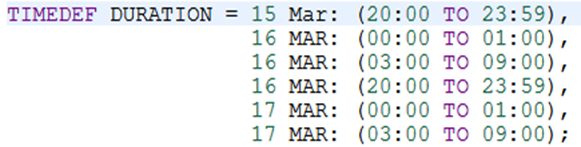
A timeframe with a known start and end time that occurs daily should be formatted with:
- Each daily time inserted between parenthesis
- Each time frame inserted on a new line
- Each daily time inserted in chronological order.
Known Start / End Time that Occurs Daily Overlapping 2 Days
A timeframe with a known start and end time that is effective daily but overlaps 2 days needs to be written in two parts:
- Create the entire reference timeframe
- Create the daily times in parenthesis.




Known Start / End Time that Occurs on Specific Days
A timeframe with a known start and end time that occurs on specific days need to be written in two parts:
- Create the entire reference timeframe
- Create the days and times in parenthesis.
Known Start / End Time that Occurs on Specific Days Overlapping 2 Days
A timeframe with a known start and end time that occurs on specific days that overlaps 2 days needs to be written in two parts:
- Create the entire reference timeframe
- Create the days and times in parenthesis.

Known Start / Permanent (PERM) End Time
A timeframe with a known start and permanent (PERM) end time, format it as shown below by adding X number of years to the end date.

12.6 Time Restrictions in AirLang
Basic Rule
ORIGIN [AERODROME] ARRIVAL [AERODROME]
MUST USE DURING [TIME]
ROUTE REQUIREMENT.;
Basic Rule + Timedef
TIMEDEF EXAMPLE = 05 OCT: 10:00 TO 20:00,
06 OCT: 12:00 TO 14:00,
07 OCT: 09:00 TO 17:00;
ORIGIN CYVR ARRIVAL CYYZ
MUST USE DURING EXAMPLE
YVR+CY+V.;
Basic Rule + Time Embedded
ORIGIN CYVR ARRIVAL CYYZ
MUST USE DURING 12:00 TO 14:00
YVR+CY+V.;
12.7 Waypoint Restriction
POINTDEF YVR+CY+V DURING [TIME] NOT AVAILABLE.;
Point Restriction + Timedef
TIMEDEF EXAMPLE = 05 OCT: 10:00 TO 20:00,
06 OCT: 12:00 TO 14:00,
07 OCT: 09:00 TO 17:00;
POINTDEF YVR+CY+V DURING EXAMPLE NOT AVAILABLE.;
Point Restriction + Time Embedded
POINTDEF YVR+CY+V DURING 10:00 TO 12:00,
14:00 TO 18:00 NOT AVAILABLE.;
12.8 Airway Restriction
AWYDEF [AWY] DURING [TIME] WYPTA+CY WYPTB+CY NOT AVAILABLE.;Airway Restriction + Timedef
TIMEDEF EXAMPLE = 05 OCT: 10:00 TO 20:00,
06 OCT: 12:00 TO 14:00,
07 OCT: 09:00 TO 17:00;
AWYDEF J500 DURING EXAMPLE YAZ+CY+N YVR+CY+V NOT AVAILABLE.;
Airway Restriction + Time Embedded
AWYDEF J500 DURING MON 16:00 TO MON 20:00,
WED 09:00 TO WED 11:00 YAZ+CY+N YVR+CY+V NOT AVAILABLE.;
12.9 FIR Restriction
FIRDEF [FIR ID] DURING [TIME] NOT AVAILABLE.;
FIR Restriction + Timedef
TIMEDEF EXAMPLE = 05 OCT: 10:00 TO 20:00,
06 OCT: 12:00 TO 14:00,
07 OCT: 09:00 TO 17:00;
FIRDEF CZVR DURING EXAMPLE NOT AVAILABLE.;
FIR Restriction + Time Embedded
FIRDEF CZVR DURING MON 16:00 TO MON 20:00, WED 09:00 TO WED 11:00 NOT AVAILABLE.;
12.10 SID / STAR Restriction
SIDDEF [AERODROME] [PROCEDURE NAME] [DURING TIME] ACTION [(CONDITION)];
SID Restriction + Timedef
TIMEDEF EXAMPLE = 05 OCT: 10:00 TO 20:00,
06 OCT: 12:00 TO 14:00,
07 OCT: 09:00 TO 17:00;
SIDDEF CYVR FSR6 DURING EXAMPLE NOT AVAILABLE;
STAR Restriction + Time Embedded
STARDEF CYVR DUXUM5 DURING 22:00 TO 05:00 NOT AVAILABLE;
12.11 Approach Restriction
APPROACHDEF AERODROME RWY APP-TYPE SUFFIX IAF [DURING TIME] ACTION [(CONDITION)];
Approach Restriction + Timedef
TIMEDEF EXAMPLE = 05 OCT: 10:00 TO 20:00,
06 OCT: 12:00 TO 14:00,
07 OCT: 09:00 TO 17:00;
APPROACHDEF CYWG 13 I-Z-AVSUN DURING EXAMPLE NOT AVAILABLE;
Approach Restriction + Time Embedded
APPROACHDEF CYVR 08L I - - DURING FRI 16:00 TO MON 05:00 NOT AVAILABLE;
12.12 Runway Closure
RWYDEF AERODROME RWY(S) CLOSED [TIME]
Runway Closure + Timedef
TIMEDEF EXAMPLE = 05 OCT: 10:00 TO 20:00,
06 OCT: 12:00 TO 14:00,
07 OCT: 09:00 TO 17:00;
RWYDEF CYVR 08L CLOSED EXAMPLE;
Runway Closure + Time Embedded
RWYDEF CYVR 08L/26R CLOSED 01 OCT 2018 22:00 TO 30 OCT 2018 06:00: (MON 22:00 TO TUE 06:00);
12.13 Airport Restrictions
AIRPORTDEF AERODROME [DURING TIME] ACTION [(CONDITION)];
Airport Restriction + Timedef
TIMEDEF EXAMPLE = 05 OCT: 10:00 TO 20:00,
06 OCT: 12:00 TO 14:00,
07 OCT: 09:00 TO 17:00;
AIRPORTDEF CYVR DURING EXAMPLE NOT AVAILABLE (ORIGIN CYYZ);
Airport Restriction + Time Embedded
AIRPORTDEF CYVR DURING 01 OCT 2018 22:00 TO 30 OCT 2018 06:00: (MON 22:00 TO TUE 06:00) NOT AVAILABLE;
12.14 Restricted Airspace Closure
AREADEF “NAME”
FL
TYPE ( [MILITARY, PROHIBITED, OTHER, etc] )
CIRCLE ( [REFERENCE POINT+CC+T], DISTANCE)
ACTIVE [TIME];
AREADEF “NAME”
FL
TYPE ( [ MILTARY, PROHIBITED, OTHER, etc] )
POLYGON ( [NAVAID+CC+T,
WAYPOINT+CC+T,
LAT/LONG+A+P,
NAVAID+CC+T] )
ACTIVE [TIME];
AREADEF “NAME”
FL
TYPE ( [ MILTARY, PROHIBITED, OTHER, etc] )
LINEBUFFER (DISTANCE,
NAVAID+CC+T,
WAYPOINT+CC+T,
LAT/LONG+A+P)
ACTIVE [TIME];
Restricted Airspace Closure + Timedef
TIMEDEF EXAMPLE = 05 OCT: 10:00 TO 20:00,
06 OCT: 12:00 TO 14:00,
07 OCT: 09:00 TO 17:00;
AREADEF “RANDOM”
FL145 TO FL245
TYPE (DANGER)
CIRCLE (YVR+CY+V, 20 NM)
ACTIVE EXAMPLE;
AREADEF “RANDOM”
ABOVE FL145
TYPE (RESTRICTED)
POLYGON (YVR+CY+V,
BOOTH+CY+E,
45N120W+A+P,
YVR+CY+V)
ACTIVE EXAMPLE;
12.15 Restricted Airspace Closure + Time Embedded
AREADEF “RANDOM”
FL145 TO FL245
TYPE (PROHIBITED)
CIRCLE (YVR+CY+V, 20 NM)
ACTIVE MON 14:00 TO MON 15:30,
TUE 14:00 TO TUE 15:30,
WED 14:00 TO WED 15:30;
AREADEF “RANDOM”
ABOVE FL145
TYPE (MILITARY)
POLYGON (YVR+CY+V,
BOOTH+CY+E,
45N120W+A+P,
YVR+CY+V)
ACTIVE 01 OCT 2018 10:00 TO 15 OCT 08:00: (TUE 10:00 TO TUE 14:00,
WED 15:00 TO WED 19:00,
FRI 22:00 TO SAT 08:00);
13.0 Flight Level Restrictions
Flight level constraints specify which altitudes a flight may use; in other words, they "constrain" the range of valid flight altitudes.
13.1 Type of FL Restrictions
Specific FL Restriction
By using a specific FL restriction, AirLang requires the flight to remain at the specific altitude in the consequence. This is indicated by the single Flight Level: FL280.
Above FL Restriction
The flight is restricted to altitudes above a specified level. This restriction is indicated by the keyword above, followed by the actual flight level–for example, above FL240. In this case, altitudes above Flight Level 240 should [not] be used; however, Flight Level 240 itself remains unrestricted.
Below FL Restriction
The flight is restricted to altitudes below a specific flight level. This restriction is indicated by the keyword below, followed by the actual flight level (for example, below FL240). In this case, flight levels below flight level 240 should [not] be used; however, Flight level 240 itself is not restricted.
FL and Above Restriction
The flight is required/restricted to use altitudes at or above a specified flight level. This is indicated by the keywords and above preceded by the actual flight level: FL240 and above. In this case, the AirLang rule applies from flight level 240 and above flight level 240; there is no upper limit on what altitude to use.
FL and Below Restriction
The flight is restricted to altitudes at or below specified Flight Level. This restriction is indicated by the keywords and below preceded by the actual Flight Level–for example, FL240 and below. In this case, the AirLang rule applies at Flight Level 240 and below flight level 240; there is no lower limit on what altitude is specified.
Block FL Restriction
The flight is restricted to use a block of airspace. This restriction can be indicated in two ways:
- Above FL Below FL;
- FL to FL
For example, if FL200 to FL250 is unavailable, it would be written as FL200 AND ABOVE FL250 AND BELOW or FL200 to FL250.
13.2 FL Restriction Examples
FL Restriction Format
FL280
ABOVE FL2450
BELOW FL240
FL240 AND ABOVE
FL240 AND BELOW
ABOVE FL240 BELOW FL290
BELOW FL230 ABOVE FL310
FL240 AND ABOVE FL290 AND BELOW
FL190 AND BELOW FL330 AND ABOVE
FL240 TO FL290
Basic Rule
ORIGIN [AERODROME] ARRIVAL [AERODROME]
MUST USE [TIME]
FL [REQUIREMENT/RESTRICTION] ROUTE REQUIREMENT.;
ORIGIN CYVR ARRIVAL CYYZ
MUST USE ALWAYS
FL290 AND BELOW YVR+CY+V.;
ORIGIN CYVR ARRIVAL CYYZ
MUST USE DURING 07:00 TO 19:00
FL120 AND ABOVE YVR+CY+V.;
Waypoint Restriction + FL
POINTDEF [WYPT+CC+T] FL TIME NOT AVAILABLE.;
POINTDEF YVR+CY+V FL120 TO FL190 DURING 03:00 TO 05:00 NOT AVAILABLE.;
Airway Restriction + FL
AWYDEF AWY FL TIME WYPTA+CC+T WYPTB+CC+T NOT AVAILABLE;
AWYDEF J500 FL190 TO FL270 DURING MON 07:00 TO MON 10:00 YAZ+CY+N YVR+CY+V NOT AVAILABLE.;
FIR Restriction + FL
FIRDEF FIR FL TIME NOT AVAILABLE;
FIRDEF CZVR FL190 TO FL270 DURING MON 07:00 TO MON 10:00 NOT AVAILABLE.;
Restricted Regions + FL
AREADEF “RANDOM”
FL140 TO FL240
TYPE (MILITARY)
CIRCLE (YVR+CY+V, 20 NM)
ACTIVE MON 14:00 TO MON 15:30,
WED 14:00 TO WED 15:30,
FRI 14:00 TO FRI 15:30;
AREADEF “RANDOM”
FL140 AND ABOVE
TYPE (DANGER)
POLYGON (YVR+CY+V,
BOOTH+CY+E,
45N120W+A+P,
YVR+CY+V)
ACTIVE 01 OCT 2018 10:00 TO 15 OCT 2018 08:00: (TUE 10:00 TO TUE 14:00, WED 15:00 TO WED 19:00,
FRI 22:00 TO SAT 08:00);
14.0 Conditions
A condition is a route that must be met before the consequence applies. In other words, once any part of the condition is flown, the corresponding consequence must occur.
14.1 Route Conditions
Route conditions apply to any combination of route events that could occur. These are defined as:
- Origin
- Arrival
- Via
- Entry
- Exit
- Overfly
- Border
14.2 Origin / Arrival / Via Conditions
For an origin event, the consequence route must be followed if the flight departs from the specified aerodrome. Conversely, for an Arrival event, the consequence route must be followed if the flight arrives at the specific aerodrome. If the flight passes through a specific waypoint, the consequence route must also be flown.
Origin, Arrival, and Via conditions can be used in any combination, provided they follow the flight sequence: Origin -> Via -> Arrival.
Origin and Destination conditions can be categorized as a single or multiple event and may be broad enough to include all aerodromes within [a] FIR(s).
ORIGIN CYVR
ORIGIN CYVR/CYYZ/CYUL
ORIGIN FIR CZVR EXCEPT CYVR
ORIGIN FIR CZVR/FIR CZEG EXCEPT CYVR/CYYJ
ARRIVAL CYYZ
ARRIVAL CYUL/CYOW
ARRIVAL FIR CZVR EXCEPT CYVR
ARRIVAL FIR CZYZ/FIR CZUL EXCEPT CYOW/CYYZ
Conditions can also be combined into multiple events. The AirLang syntax remains the same; however, each condition must (1) be encompassed in its own set of parenthesis; (2) be separated by the keyword “or”; and (3) have the entire set of conditions encompassed by a second set of parenthesis.
((ORIGIN CYVR) OR (VIA YVR+CY)).;
Basic Rule + Origin / Arrival / Via Conditions
CONDITION
MUST USE [TIME]
[FL] CONSEQUENCE
ORIGIN CYVR
MUST USE DURING 01:00 TO 04:00
FL240 AND BELOW YVR+CY+V.;
VIA YVR+CY ARRIVAL CYYZ
MUST USE ALWAYS
FL240 BOOTH+CY.;
(VIA BOOTH+CY) OR
(ARRIVAL CYVR/CYYJ)
MUST USE DURING MON 10:00 TO MON 12:30,
TUE 10:00 TO TUE 12:30,
THU 10:00 TO THU 12:30
YVR+CY+V.;
ORIGIN CYVR VIA YAZ+CY+N
MUST USE ALWAYS
YVR+CY+V J500 YAZ+CY+N.;
Waypoint Restrictions + Origin / Arrival / Via Conditions
For waypoint restrictions, the condition must begin and end in parenthesis “ ( “ and “ ) “. As with a Basic rule, the route of flight must be followed when creating the rule.
POINTDEF [WYPT+CC] FL DURING [TIME] ACTION ( CONDITION ).;
POINTDEF BOOTH+CY FL240 TO FL290 DURING 02:00 TO 14:00 COMPULSORY FOR (ARRIVAL CYVR).;
POINTDEF YVR+CY+N BELOW FL190 DURING MON 06:00 TO MON 08:00, TUE 06:00 TO TUE 08:00
NOT AVAILABLE FOR ((ORIGIN CYYZ ARRIVAL CYYZ) OR (VIA YYJ+CY+V) OR (VIA FIR CZEG)).;
POINTDEF YVR+CY+V FL170 DURING 07:00 TO 08:00, 19:00 TO 20:00 ONLY AVAILABLE FOR (VIA BOOTH+CY).;
Airway Restrictions + Origin / Arrival / Via Conditions
For an airway restriction, the condition must begin and end in parentheses “ ( “ and “ ) “. As with a Basic rule, the route of flight must be followed when creating the rule.
AWYDEF [AWY] FL DURING [TIME] WYPTA+CC WYPTB+CC ACTION ( CONDITION ).;
AWYDEF J500 FL120 AND ABOVE DURING 19:00 TO 21:00 YVR+CY+V YAZ+CY+N NOT AVAILABLE FOR
(ORIGIN CYVR VIA YVR+CY).;
AWYDEF J500 FL240 TO FL310 DURING 05 OCT TO 07 OCT: (13:00 TO 15:00) YVR+CY+V YAZ+CY+N COMPULSORY FOR (ORIGIN CYVR).;
AWYDEF J500 BELOW FL350 DURING TIMEDEF YAZ+CY+N YVR+CY+V NOT AVAILABLE FOR
((VIA YAZ+CY+V ARRIVAL CYVR) OR (ORIGIN FIR CZVR EXCEPT CYVR)).;
FIR Restrictions + Origin / Arrival / Via Conditions
For a FIR restriction, the condition must begin and end in parentheses “ ( “ and “ ) “. As with a Basic rule, the route of flight must be followed when creating the rule.
FIRDEF [FIR ID] FL DURING [TIME] ACTION ( CONDITION ).;
FIRDEF CZVR FL120 AND ABOVE DURING 19:00 TO 21:00 NOT AVAILABLE FOR (ORIGIN CYVR VIA YVR+CY).;
FIRDEF CZVR FL240 TO FL310 DURING 05 OCT TO 07 OCT: (13:00 TO 15:00) COMPULSORY FOR (ORIGIN CYVR).;
FIRDEF CZVR BELOW FL350 DURING TIMEDEF NOT AVAILABLE FOR ((VIA YAZ+CY+V ARRIVAL CYVR) OR
(ORIGIN FIR CZVR EXCEPT CYVR)).;
14.3 Entry / Exit / Overfly / Border Conditions
The entry/exit/overfly/border conditions apply to the enroute portion of flight, specifically, within Flight Information Regions (FIRs). When used in the condition, these events affect the outcome of the route (consequence). Note: These conditions can also be used in combination with Origin/Arrival/Via conditions.
Entry Condition
This condition is applied whenever the flight enters the FIR referenced.
Exit Condition
This condition is applied whenever the flight exits the referenced FIR.
Overfly Condition
This condition is applied when a flight overflies the referenced FIR.
Border Condition
This condition is applied when a flight crosses one FIR boundary directly into another FIR.
Note: Border events differ from Exit/Entry events as Exit/Entry events can occur anywhere along the route of flight. Border events must occur sequentially as the flight crosses directly from one FIR to another.
14.4 Basic Rules + Entry/Exit/Overfly/Border Conditions
ORIGIN CYVR ENTRY FIR CZEG
MUST USE ALWAYS
BOOTH+CY.;
ORIGIN CYVR OVERFLY FIR CZEG ARRIVAL CYYZ
MUST USE DURING 03:00 TO 08:00
ABOVE FL290 YVR+CY+V J500 YDC+CY+V.;
EXIT FIR CZEG ARRIVAL CYVR
MUST USE DURING WED 09:00 TO WED 17:00
FL270 TO FL380 BOOTH+CY.;
BORDER FIR KZSE/FIR CZVR
MUST USE ALWAYS
YYJ+CY+V.
YVR+CY+V.;
14.5 Waypoint Restrictions + Entry/Exit/Overfly/Border Conditions
POINTDEF YVR+CY+V COMPULSORY FOR ((OVERFLY FIR CZVR) OR
(ORIGIN CYVR EXIT FIR CZVR) OR
(BORDER FIR KZSE/FIR CZVR ARRIVAL CYVR)).;
POINTDEF YVR+CY+V DURING TIMEDEF NOT AVAILABLE FOR ((ENTRY FIR CZVR ARRIVAL CYYZ) OR
(EXIT FIR CZEG ENTRY FIR CZVR) OR (OVERFLY FIR CZVR)).;
POINTDEF YVR+CY+V BELOW FL310 ONLY AVAILABLE FOR ((EXIT FIR CZVR) OR
(VIA BOOTH+CY ARRIVAL CYVR)).;
14.6 Airway Restrictions + Entry/Exit/Overfly/Border Conditions
AWYDEF J500 YAZ+CY+N YVR+CY+V COMPULSORY FOR ((EXIT FIR KZAK ARRIVAL CYYZ) OR (BORDER FIR KZAK/FIR CZVR ARRIVAL CYVR) OR (OVERFLY FIR PAZA ENTRY FIR CZEG)).;
AWYDEF J500 ABOVE FL340 DURING 01:00 TO 02:00 YAZ+CY+N YVR+CY+V NOT AVAILABLE FOR
((ORIGIN CYVR VIA BOOTH+CY ARRIVAL CYYZ) OR
(OVERFLY FIR CZEG ARRIVAL CYYZ) OR
(VIA BOOTH+CY BORDER FIR CZVR/FIR CZEG ARRIVAL CYYZ)).;
AWYDEF J500 YAZ+CY+N YVR+CY+V NOT AVAILABLE FOR ((EXIT FIR CZVR ENTRY FIR CZYZ) OR
(EXIT FIR CZVR ENTRY FIR CZUL) OR
(BORDER FIR CZEG/FIR CZWG ARRIVAL CYYZ)).;
14.7 FIR Restrictions + Entry/Exit/Overfly/Border Conditions
FIRDEF CZVR COMPULSORY FOR ((EXIT FIR KZAK ARRIVAL CYYZ) OR
(BORDER FIR RJJJ/PAZA ARRIVAL KSEA) OR
(OVERFLY FIR PAZA ENTRY FIR CZEG)).;
FIRDEF CZVR ABOVE FL340 DURING 01:00 TO 02:00 NOT AVAILABLE FOR
((ORIGIN KSEA VIA PAE+K1+V ARRIVAL CYYZ) OR
(OVERFLY FIR CZEG ARRIVAL CYYZ) OR
(VIA YYC+CY+V BORDER FIR CZEG/FIR CZWG ARRIVAL CYYZ)).;
FIRDEF CZVR NOT AVAILABLE FOR ((EXIT FIR CZEG ENTRY FIR CZYZ) OR
(EXIT FIR CZEG ENTRY FIR CZUL) OR
(BORDER FIR CZEG/FIR CZWG ARRIVAL CYYZ)).;
15.0 Guards
In AirLang, a guard is a concept used to further narrow a condition. IMPORTANT: The fulfillment of a guard must be determinable from the input parameters of the flight.
15.1 Guard types
The following list outlines the guards that can be used to further refine an AirLang rule:
- Aircraft Equipment
- Aircraft Equipment Codes
- Schedule Type
- Domestic / International flights
- Airline Codes
- Flight Number
- City-Pair Route Number
Aircraft Equipment
For each rule, users can specify whether it is valid only for aircraft carrying certain equipment or having certain engine types. If you leave these fields blank, you indicate that there are no equipment requirements for the rule. The available requirements are:
- The rule is only valid for an aircraft with RNAV equipment (RNAV).
- The rule is only valid for an aircraft without RNAV equipment (NOT RNAV).
- The rule is only valid for a set of engine types.
- The rule is only valid for a set of aircraft types.
The various types of engine types you may require for the rule to be valid are:
Engine Type | AirLang Keyword | NAVBLUE A/C Type |
Jet Engine | jets | Jet |
Turboprop Engine | turboprop | Prop |
Piston Engine | piston | Prop |
Helicopter | helicopter | Helicopter |
If the rule in question applies only to aircraft equipped with jet engines, then specify that using the keyword “jets”. If the rule is valid only to aircraft equipped with turboprop and/or piston engines, use the keyword “turboprop/piston”. When a rule applies to more than one type of engine, then separate the engine types with a slash (/).
If the rule is only valid for one or more aircraft type, the user can specify this by typing the keyword acft-type, followed by the ICAO names of the aircraft types. If there is more than one aircraft type, the aircraft types are separated by a slash (/). For example, by typing ACFT-TYPE A319, the rule is restricted to only for Airbus A319 aircraft; by entering ACFT-TYPE A319/A320, the rule will now only apply to flights utilizing those aircraft type.
The aircraft type can use the ATC ICAO aircraft type. For example, A330 / -200 has ATC ICAO of A332 and an equipment type of A330. Using ACFT-TYPE A330 would match all series with equipment of A330. Using ACFT-TYPE A332 would only match the A330-200 series but not match A330-300 series (because ICAO=A332)
If the rule is only valid for one or more specific aircraft registration, the user can specify this by typing the keyword “aircraft” followed by the registration identifier of the aircraft in question. If there is more than one aircraft type the IDs are separated by a slash (/). For example, by typing AIRCRAFT "C-FTST" the rule will apply only for this aircraft, and by entering AIRCRAFT "C-FTST"/ "C-GTST", the rule is applicable to those registrations.
ORIGIN CYVR
MUST USE ALWAYS
YVR+CY+V (NOT RNAV).;
POINTDEF YVR+CY+V ONLY AVAILABLE FOR (JETS).;
AWYDEF J500 YAZ+CY+N YVR+CY+V COMPULSORY FOR (AIRCRAFT “C-FTST”).;
FIRDEZ CZVR NOT AVAILABLE FOR (ACFT-TYPE B7M8).;
Aircraft Equipment Codes
For each rule, users can indicate whether the rule is valid only for aircraft that have certain equipment codes. This includes ATC Item10A/B and ATC Item18 PBN codes.
The requirements you may state are:
- The ATC Item 10A coding that is required or not required for the rule;
- The ATC Item 10B coding that is required or not required for the rule;
- The ATC Item 18 PBN coding that is required or not required for the rule.
ORIGIN CYVR
MUST USE ALWAYS
YVR+CY+V (ACFT_ITEM10A W/R/I).;
POINTDEF YVR+CY+V NOT AVAILABLE FOR (ACFT_ITEM10B NOT G1).;
AWYDEF J500 YAZ+CY+N YVR+CY+V COMPULSORY FOR (ACFT_PBN A/B/C).;
FIRDEF CZVR FL285 AND ABOVE FL ONLY AVAILABLE FOR (ACFT_ITEM10A J1/J2/J3/J4/J5/J6/J7).;
Flight Schedule Type
For each rule, users can indicate whether the rule is valid only for flights that have the schedule type set to a specific value(S/N/M/G/T/X). For example, schedule_type M indicates a military flight. Note: Some flight types are restricted from performing actions that would not affect a normal flight.
The requirements are:
- The rule is only valid for schedule type of S (schedule_type S).
- A list of schedule types separated by a slash (/) character (schedule_type S/N/G).
- The rule is only valid for a flight that is not one of the schedule types (schedule_type not M).
ORIGIN CYVR ARRIVAL CYYZ
MUST USE ALWAYS
BOOTH+CY (SCHEDULE_TYPE S).;
POINTDEF BOOTH+CY NOT AVAILABLE FOR (SCHEDULE_TYPE N).;
AWYDEF J500 YAZ+CY+N YVR+CY+V COMPULSORY FOR (SCHEDULE_TYPE N/G).;
FIRDEF CZVR ONLY AVAILABLE FOR (SCHEDULE_TYPE M).;
Domestic / International Requirements
For each rule, users can specify whether it is only valid for Domestic or International flights. International flights may be subject to different permissions and restrictions than Domestic flights.
The available requirements are:
- The rule is only valid for a domestic flight (domestic).
- The rule is only valid for an international flight (not domestic).
ORIGIN FIR CZVR ARRIVAL FIR CZYZ
MUST USE ALWAYS
YVR+CY+V J500 YDC+CY+V (DOMESTIC).;
AWYDEF J500 YAZ+CY+N YVR+CY+V ONLY AVAILABLE FOR (DOMESTIC).;
POINTDEF BOOTH+CY NOT AVAILABLE FOR (NOT DOMESTIC).;
FIRDEF CZVR NOT AVAILABLE FOR (NOT DOMESTIC).;
Airline Code (ALC) Requirements
For each rule, users can specify whether it is valid only for flights that have a specific Airline Code set. For example, a customer may be operating under a military contract under ALC of “RCH,” which may have specific restrictions. The keyword ATCALC requires that the flight's ATC airline code must match this value. The ATC ALC is the code (value) displayed on the ATC FPL.
The available requirements are:
- The rule is only valid for ALC of ABC (ATCALC ABC).
- A list of ALCs separated by a slash (/) character (ATCALC ABC/NAV).
- The rule is only valid for a non-ABC flight (ATCALC NOT NAV).
ORIGIN CYVR ARRIVAL CYYZ
MUST USE ALWAYS
YVR+CY+V J500 YDC+CY+V (ATCALC ABC).;
POINTDEF BOOTH+CY NOT AVAILABLE FOR (ATCALC NOT NAV).;
AWYDEF J500 YAZ+CY+N YVR+CY+V COMPULSORY FOR (ATCALC ABC/NAV).;
FIRDEF CZVR ONLY AVAILABLE FOR (ATCALC ABC).;
Flight Requirements
For each rule, users can specify whether it is valid only for flights that have a specific flight number. FLTNUM requires the flight number match this value. Note: The flight number is part of the flight key.
The available requirements are:
- The rule is only valid for flight number of 001A (FLTNUM 001A).
- Or you may specify a list of flight numbers separated by a slash (/) character (FLTNUM 0001/0002/TEST).
- The rule is only valid for a flight that is not one of the flight numbers (FLTNUM NOT 0001).
ORIGIN CYVR ARRIVAL CYYZ
MUST USE ALWAYS
YAZ+CY+N J500 YVR+CY+V (FLTNUM 1234).;
POINTDEF BOOTH+CY ONLY AVAILABLE FOR (FLTNUM 1234/1235).;
AWYDEF J500 YAZ+CY+N YVR+CY+V COMPULSORY FOR (FLTNUM NOT 1234).;
FIRDEF CZVR NOT AVAILABLE FOR (FLTNUM 1234/9876).;
City-Pair Route Number Requirements
For each rule, users can specify whether it is valid only for routes that use a specific City-Pair route number (1 - 99). For example, CITY_PAIR_ROUTES 66 indicates that the rule applies to City-Pair route number 66.
The available requirements are:
- The rule is only valid for city pair route number of 66 (CITY_PAIR_ROUTES 66).
- Or you may specify a list of city pair routes separated by a slash (/) character (CITY_PAIR_ROUTES 22/33/44).
- The rule is only valid for a flight that is not one of the city pair routes
(CITY_PAIR_ROUTES NOT 22).
ORIGIN CYVR ARRIVAL CYYZ
MUST USE ALWAYS
YVR+CY+V J500 YDC+CY+N (CITY_PAIR_ROUTES 42).;
POINTDEF BOOTH+CY NOT AVAILABLE FOR (CITY_PAIR_ROUTES 1/35).;
AWYDEF J500 YAZ+CY+N YVR+CY+V COMPULSORY FOR (CITY_PAIR_ROUTES NOT 3/50).;
FIRDEF CZVR ONLY AVAILABLE FOR (CITY_PAIR_ROUTES 99/98).;
**** THIS CONCLUDES ****
THE AIRLANG TRAINING DOCUMENT.