Introduction to FF-ICE
Chapter 01
Welcome,
1.1 What is FF-ICE?
In support of the Trajectory Based Optimization, FF-ICE (Flight and Flow Information for a Collaborative Environment) serves as a key component of the EU CP1 Mandate.
Under this mandate, all EU member states — including Norway and Switzerland — are required to implement the electronic Flight Plan (eFPL) service by December 31, 2025.
NAVBLUE is now ready to submit FF-ICE compliant, FIXM.aero formatted eFPLs to meet this deadline, currently only for the R1 Filing and Trial Service.
Those new to this concept are encouraged to watch this brief video for further information. Additional resources are available through the links below.
Related Regulations
The deployment of FF-ICE/R1 is mandated under Commission Implementing Regulation (EU) 2021/116 (Common Project 1), with an implementation target date of December 31, 2025. This mandate applies to airspace users, air navigation service providers (ANSPs), and the Network Manager (NM), with further details available in the SESAR Deployment Programme.
FF-ICE Use Cases supporting the deployment of FF-ICE services and information–as mandated by the CP1 regulation and the SESAR Deployment Programme– are documented and accessible on the SESAR Deployment Manager (SDM) website.
Additional sources related to and for FF-ICE implementation are available in the following links:
1.2 NM B2B Services, a brief overview
What is NM B2B?
The NM B2B Services is an interface provided by the EUROCONTROL NM for system-to-system access to its services and data. This allows users to retrieve and integrate information directly into their own systems.
A B2B connection to Eurocontrol can be thought of as similar to that of an ISP, or internet service connection, but specifically designed for exchanging aviation data securely and in real time.
Is it required for FF-ICE eFPL submissions?
Yes, a B2B Connection is the only authorized method to file an FF-ICE compliant FIXM formatted eFPL to Eurocontrol. The filing of eFPLs can not be done through the AFTN or SITA network.
How does one connect using B2B with N-FP?
There are two options to connect to Eurocontrol using B2B. Both require an Ops Certificate.
For most NAVBLUE customers required to comply with the FF-ICE mandate, the Ops certificate must be configured to the N-FP environment.
Ops certificates can be acquired by Air Navigation Service Providers (ANSPs), Aircraft Operators (AOs), and Computerised Flight Planning Service Providers (CFSPs). NAVBLUE currently holds both an Ops Certificate and a Pre-Ops Certificate, the latter used specifically for testing.
Several AOs, who are NAVBLUE customers, already hold their own Ops Certificate. However, others are in the process of acquiring an Ops Certificate to support FF-ICE implementation and potentially use it for other services provided through Eurocontrol.
1.2.1.a NAVBLUE (CFSP) Owned
What should NAVBLUE Customers (AOs) do for an Ops Certificate?
Guidance from NM does not clearly define which customers for a CFSP such as NAVBLUE, should use their own certificate, or the one owned by their CFSP. The recommendation may vary depending on operational size and the number of daily flights filed to the EU.
Is there a Filing Quota?
Yes, FF-ICE Flight Plans filed to NM are subject to a filing quota determined by Eurocontrol based on monitored quantifiable (usage) data. If the quota is exceeded, certificate holders will be notified and may be required to obtain additional certificates.
For most AOs, this is not expected to pose an issue, however for a CFSP serving many customers, there is potential to exceed the filing quota.
What does NAVBLUE suggest?
NAVBLUE currently advises customers with 20 or less daily flights to, from, and overflying the EU, should safely use the NAVBLUE NM B2B Ops Certificate. However, should this requirement change, customers will be notified promptly.
Occasional flights?
It is recognized that some customers operate in the EU IFPZ only occasionally–such as for charter operations, medevac, and ferry/maintenance flights. Given the low number of such flights, use of the NAVBLUE Ops Certificate for these purposes is acceptable.
However, NAVBLUE strongly encourages all customers to obtain their own Ops certificate going forward. The initial certificate is issued free of charge and helps avoid any potential constraints associated with the NAVBLUE Ops Certificate.
What is the Declaration of Use?
All NM B2B Ops Certificate holders must submit (file) a Declaration of Use to Eurocontrol for any Airline/AO/Airspace User operating under their certificate. NAVBLUE will complete this declaration on behalf of customers using the NAVBLUE Ops Certificate.
These requirements are noted in the User Agreement between NM and the certificate holder. Certificate holders are advised to review these requirements carefully and work with their legal or contract representatives to ensure compliance.
1.2.1.b Customer (AO) Owned
To apply for a NM B2B Ops certificate, the process is relatively straight forward. The steps involved are outlined in the linked document titled, “N-FP - NM B2B Ops & Pre-Ops Certificate Request Guide”.
What is Delegated Use?
All NM B2B Ops certificate holders using a CFSP such as NAVBLUE must inform NM to delegate their Ops certificate to their CFSP. This delegation notifies NM which party is actually filing the Flight Plan(s) on their behalf.
Are there benefits to owning a certificate?
NM B2B Ops certificate holders can access additional services through B2B, which can provide significant operational benefits.
The services currently required by NM to support the FF-ICE mandate are described in the next section. Other services are also available through B2B, interested parties can visit the SWIM registry for more information.
N-FP currently supports the Filing and Trial services required for the FF-ICE mandate. Further details are provided below.
Is there a way to monitor the health of an Ops Certificate, and eFPL filing metrics?
Certificate holders have access to an NM API Dashboard, which allows them to monitor the status of their Ops and Pre-Ops certificate(s). Access to this dashboard can be arranged with the certificate holder once a certificate has been issued.
1.2.1.c Pre-Ops Certificate
NM also offers an option to obtain a Pre-Ops Certificate. This certificate allows for the testing of Flight Plans and other services on the Pre-Ops platform with NM.
For NAVBLUE customers, it is recommended to use a UAT environment for N-FP when applying the Pre-Ops Certificate.
Note: Pre-Ops testing involves certain caveats, such as the modification of the AO ARCID (ATC ALC) and AIRCRAFT REGISTRATION. These adjustments help present any complications with live production flights filed on the Ops platform at NM.
1.2.2 NM B2B Supported Services
In relation to FF-ICE, FF-ICE/Release 1 (R1) introduces 5 pre-departure services supported by harmonized procedures and standardized messaging. These services allow stakeholders to plan, file, update, or cancel Flight Plans, provide data on certain flight events, and request or receive Flight Plan data.
The five pre-departure services are:
Filing Service - allows the submission, update and cancellation of FF-ICE Flight Plans (eFPLs) that include 4D trajectory information, flight specific performance data, and other FF-ICE data elements, such as the GUFI.
Trial Service - enables airspace users to determine the acceptability/validity of their Flight Plan and the ATM feedback without actually filing the plan.
Flight Data Request Service - can be used to obtain information about a flight such as the complete Flight Plan, supplementary Flight Plan data or the filing status for a Flight Plan already submitted.
Notification Service - allows users to transmit departure and arrival information.
Data Publication Service - supplies subscribed users with flight data such as filed Flight Plans, Flight Plan updates, Flight Plan cancellations, and so on.
FF-ICE/Release 2 (R2) will focus on post-departure negotiation between airspace users and Air Traffic Management (ATM) service providers. The mandate for R2 has not yet been released.
Upon the initial implementation of FF-ICE within N-FP, only the Filing Service and Trial Service will be supported. Additional services may be supported in 2026 or later, however, this will be determined at a later date.
1.1.3 The Future for FF-ICE, what’s Next?
The implementation of FF-ICE, supported by NM, will occur in two phases: R1 and R2, with the first phase mandated for December 31, 2025.
A formal mandate for R2 has not yet been issued, though it is anticipated that implementation will be required around 2029.
While ICAO has not officially announced specific dates at the time of writing this document, cessation of the ICAO 2012 Flight Plan format is expected to take effect in 2034.
This timeline provides less than nine years for ANSPs, CFSPs, and AOs to support, and globally adopt FF-ICE as the new standard of Flight Plan filing.
The next regions anticipated to require FF-ICE Flight Plans are the FAA, and the APAC region. The requirements for connection to their SWIM networks for the filing of such Flight Plans are expected to be announced in the near future.
1.2 Detailed Explanation
Chapter 02 of this document provides an overview of the process required to file an FF-ICE compliant and FIXM formatted Flight Plan (eFPL) to Eurocontrol.
1.3 Key points
Understand how to properly file an FF-ICE Compliant, FIXM.aero formatted Flight Plan (eFPL) to Eurocontrol.
Learn about the NM response messages, as well as the SEND TO screen in N-FP.
Gain knowledge about updating your Flight Plan and submitting an FF-ICE compliant CHG, DLA, and CNL message.
Filing Process
Chapter 02
2.1 Introduction
The following steps are required to successfully submit an FF-ICE compliant, and FIXM formatted eFPL to NM.
Prerequisite:
These steps outlined below are not intended to replace any official training documentation or Help Files developed by NAVBLUE for the use of N-FP in Flight Planning. Instead, this section serves as a supplemental guide for Dispatchers who already possess the knowledge and understanding of the Flight Planning processes within N-FP.
2.2 Detailed Explanation
When preparing to submit an FF-ICE compliant/FIXM formatted eFPL, Dispatchers must ensure they understand and meet all submission requirements specific for such types of eFPLs.
Once the Flight Plan data is prepared accordingly, and ready to compute, the data used in the computed Flight Plan will be used to generate the FIXM format of the Flight Plan.
Plan & Route Screen
Any subsequent changes to data–including Aircraft Equipment Codes Override (image1), Flight Type (image1), Flight Rules Type (image1), ETD (image2), Aircraft (image2), Route (image2), Alternate (image2), EET via Cost Index (image2) – must be modified in the appropriate fields on the Plan or Route screen. The Flight Plan must then be recomputed before submission to ensure Eurocontrol is notified of the revised information.
Image 1
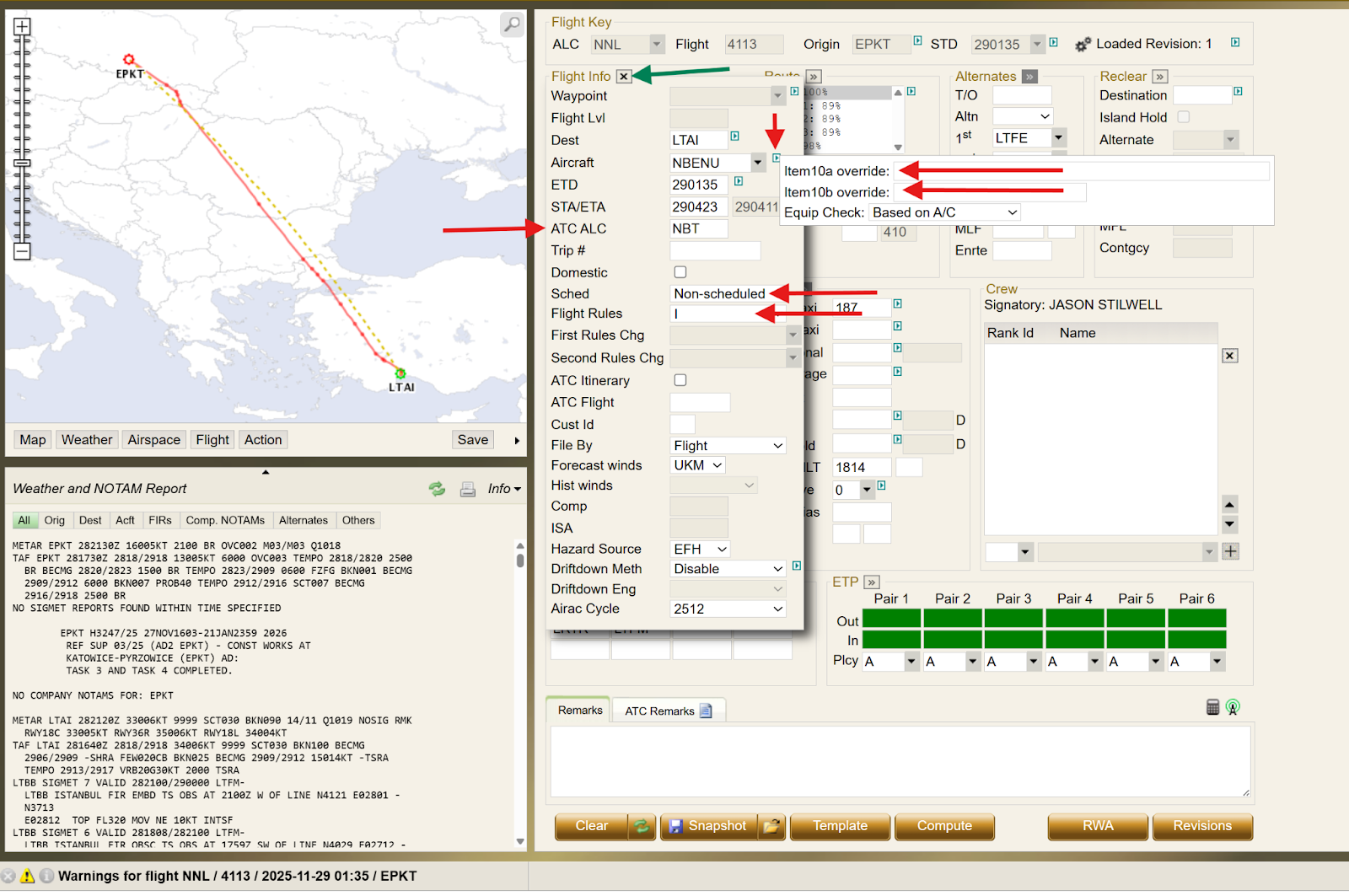
Image 2
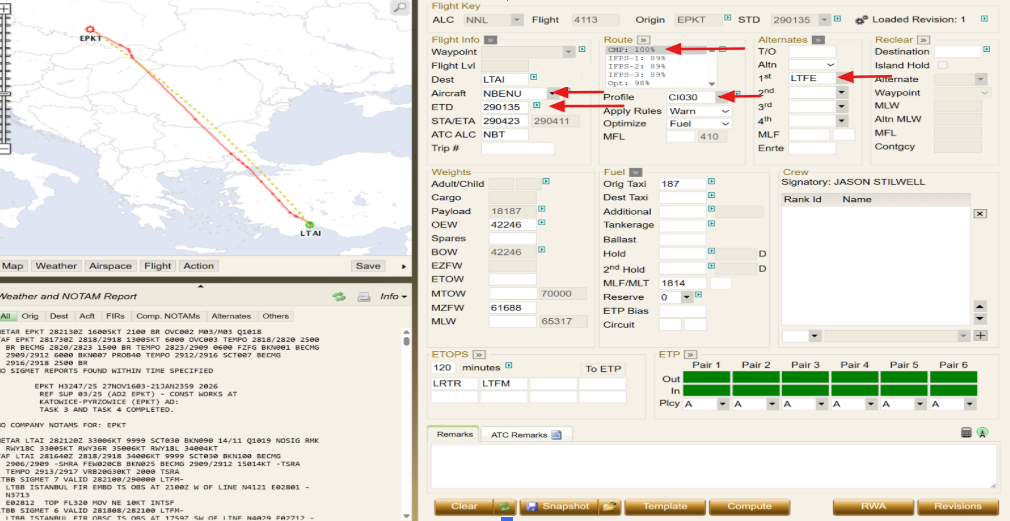
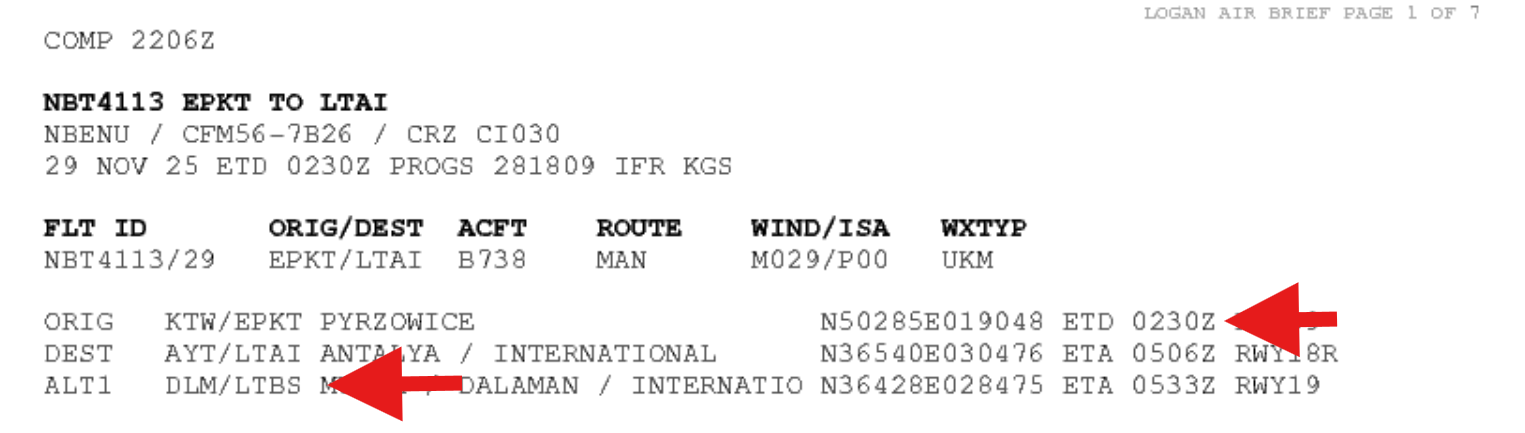
In the example below, a requirement displays to modify the DEPARTURE time and ALTERNATE.
The data fields for ETD and ALTERNATE are then updated to 0230 and LTBS, respectively. Once these changes are completed, the Flight Plan must be computed.
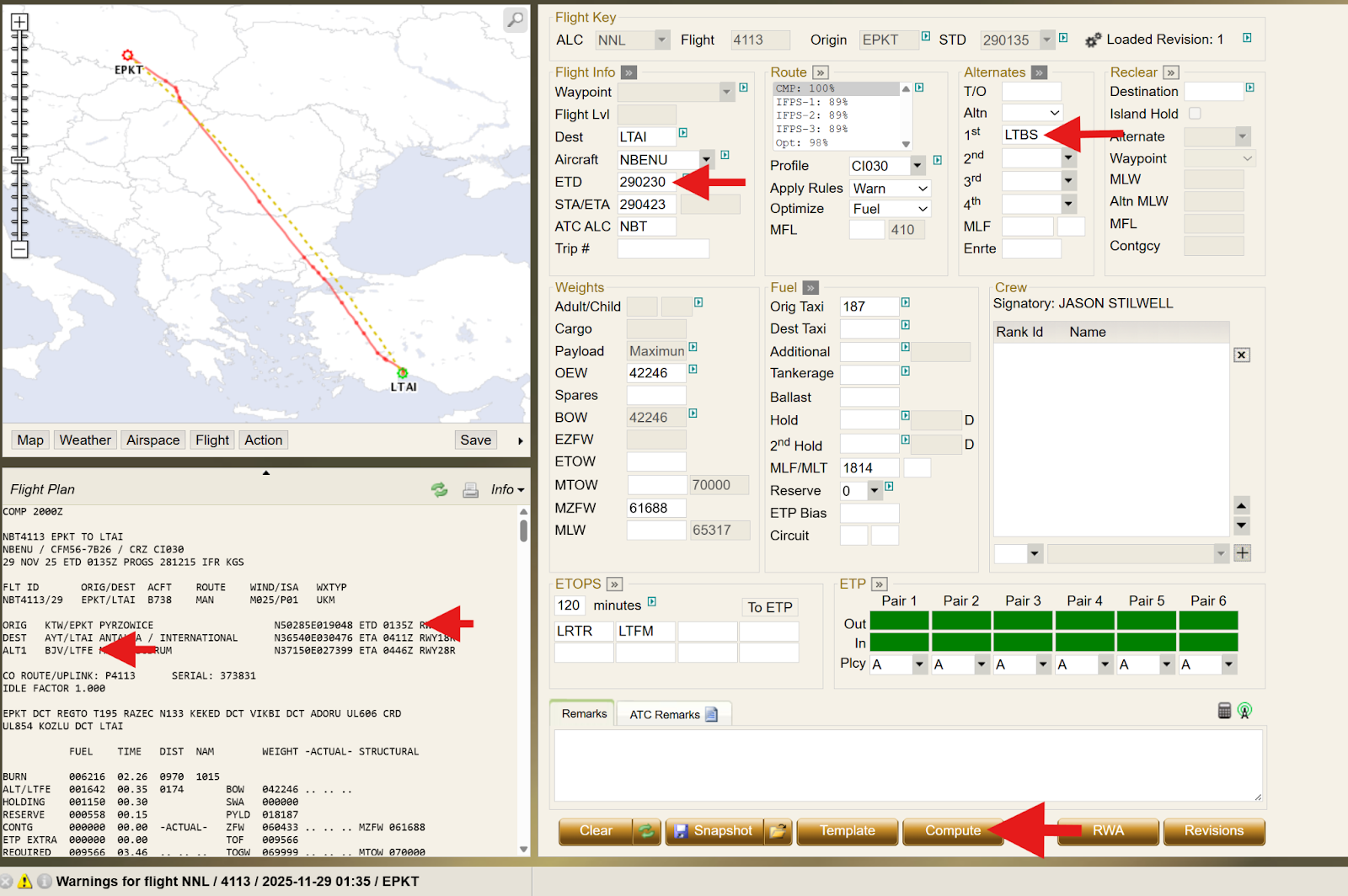
After compute, the changes are successfully applied and visible as expected.
Report Screen & IFPS Validate
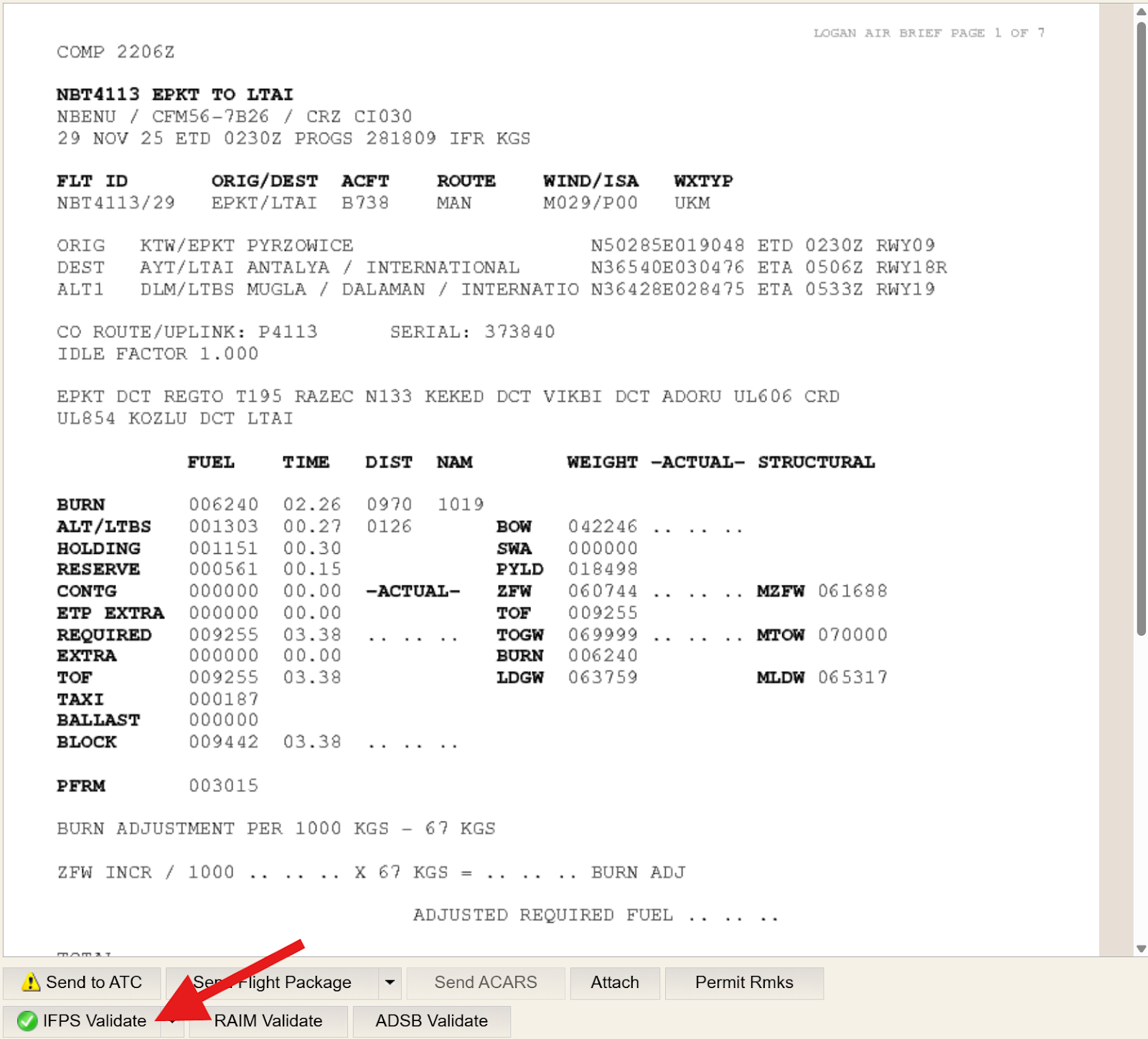
Once the revised Flight Plan has been computed, click REPORT to review the computed Flight Plan and perform an IFPS validation.
All Flight Plans must be validated before submission to Eurocontrol to minimize the risk of a rejected Flight Plan by NM.
As shown in the image below, click the IFPS Validate button.
Send to ATC
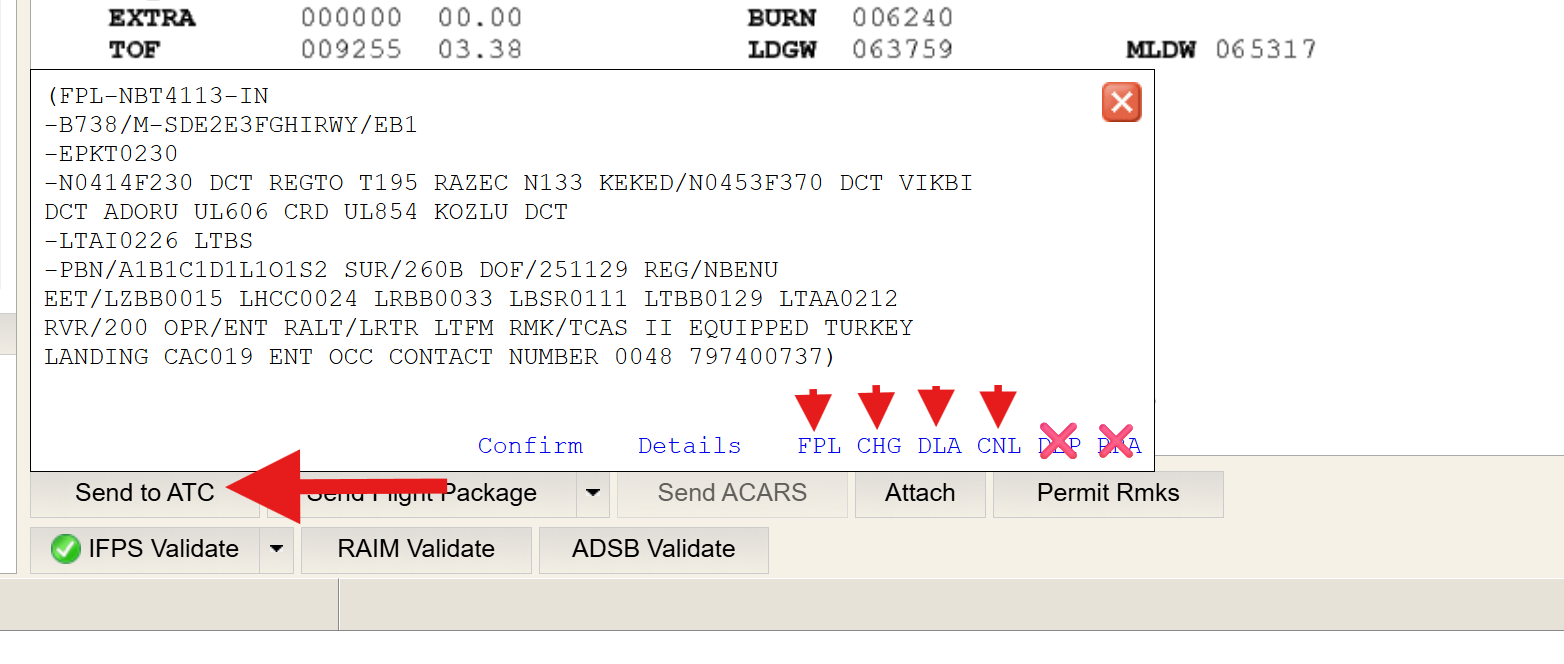
When ready to submit a Flight Plan change to NM, click the Send to ATC button.
Then, select the appropriate message type:
FPL (for new Flight Plan submissions)
CHG (for changes)
DLA (for delays)
CNL (for cancellations).
Note: the DEP, and RRA options are not currently supported for FF-ICE filings.
FPL (Flight Plan Message)
Intra Europe Flight, for flights wholly within the IFPZ FF-ICE mandated zone.
To submit a new Flight Plan message, N-FP will typically default to the FPL message type for most Dispatchers. If it does not, or if unsure, select FPL in the Send to ATC dialog box.
Then click the Details button.
Translation Request and Forwarding
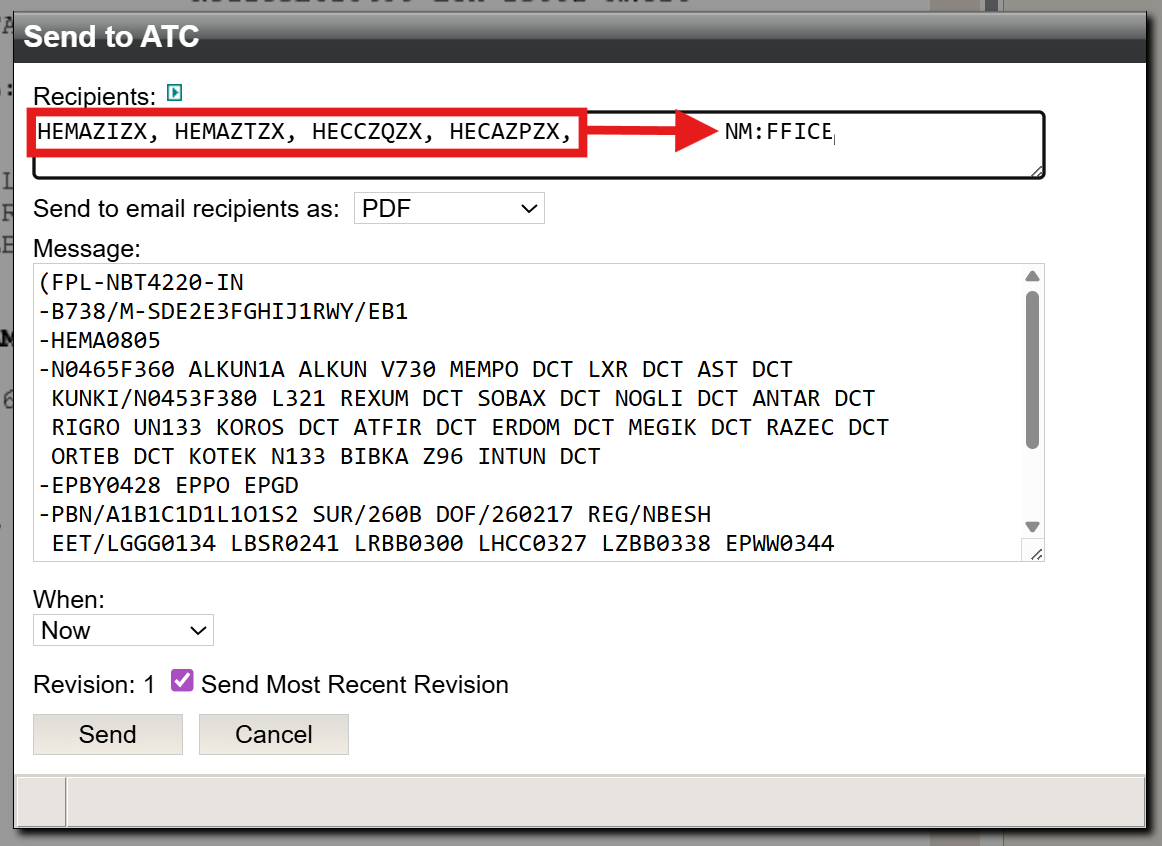
For flights operating outside both mandated and non‑mandated IFPZ zones, as well as in non‑IFPZ areas, AUs submitting an eFPL to the NM may request that the NM forward a copy of the Flight Plan. This can be done by specifying the upstream and downstream AFTN/SITA addresses in the RECIPIENTS window.
CHG (Change Message)
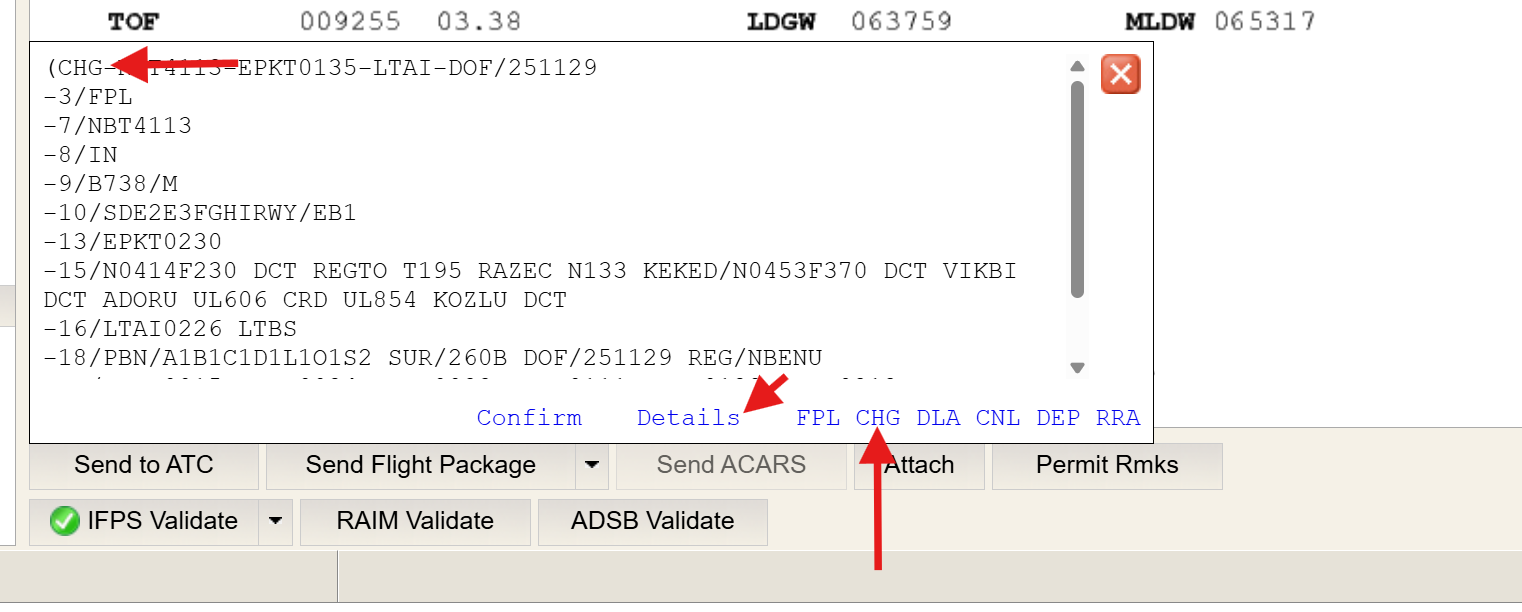
If a change to the Flight Plan is required, select CHG.
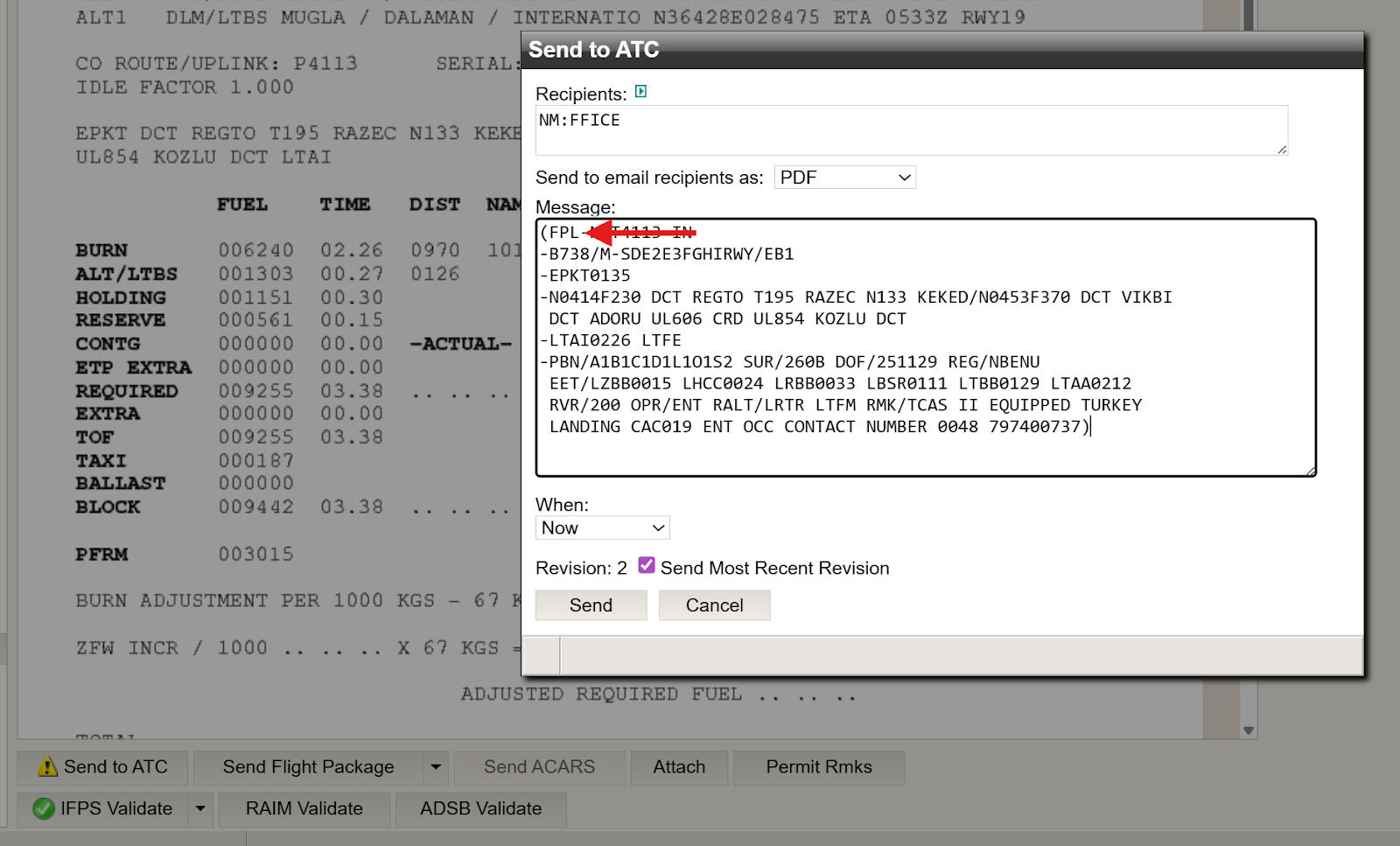
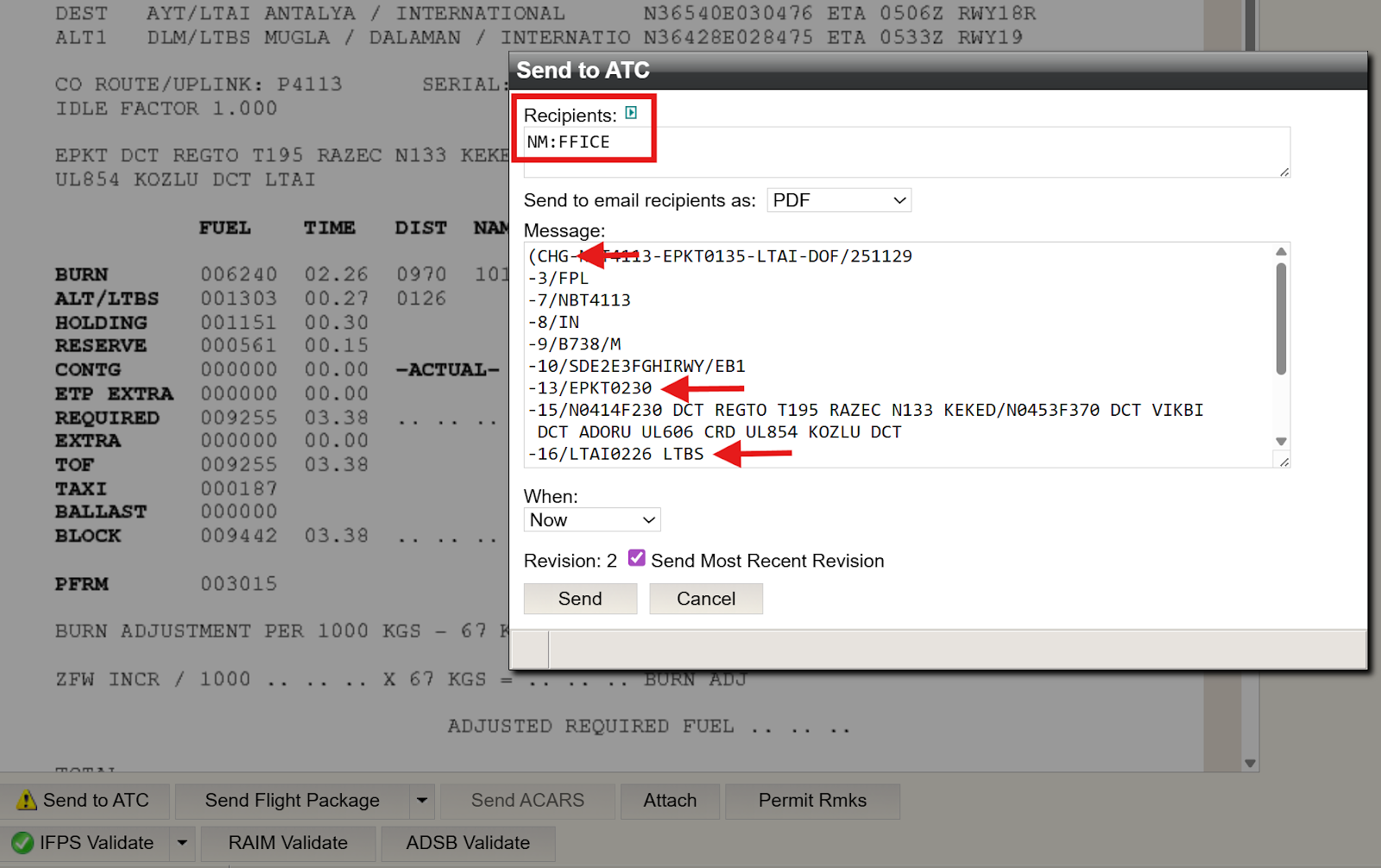
In this example, the computed Flight Plan change follows the steps outlined earlier. Note the change to departure time (from 0135 to 0230), and the change in alternate selection (LTBS). Once the Flight Plan has been computed and validated as described above, select CHG in the Send To ATC dialog box, then click Details.
An ICAO2012 configured CHG message displays, however N-FP will submit a FIXM formatted one that is not visible to Dispatchers.
Click Details when ready to proceed.
DLA (Delay message)
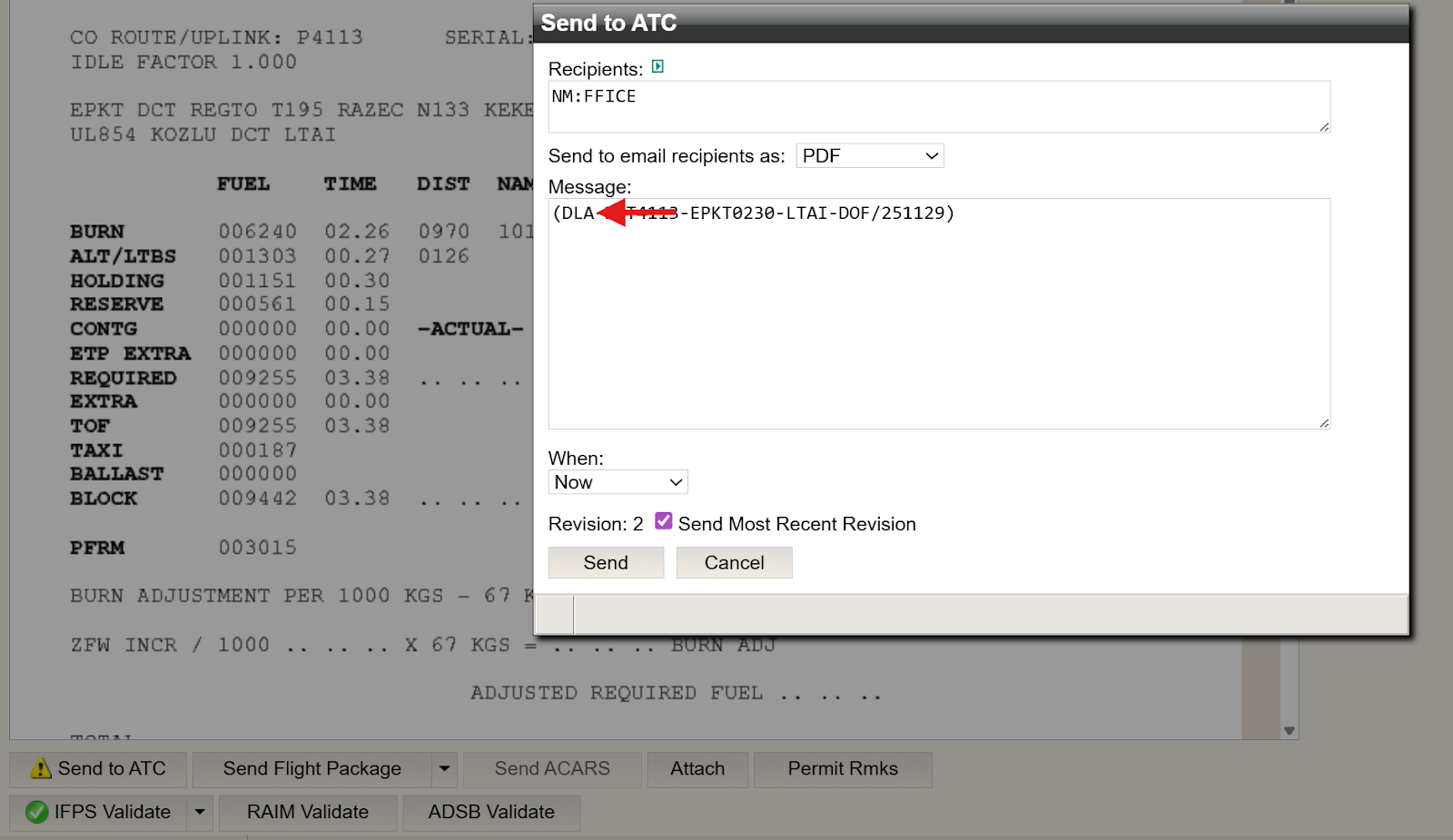
If a delay message needs to be filed, follow the same procedure as above, selecting DLA instead. Then click Details, followed by clicking the Send button.
Once Send is clicked, an FF-ICE/FIXM formatted DLA message will be submitted to NM.
CNL (Cancel message)
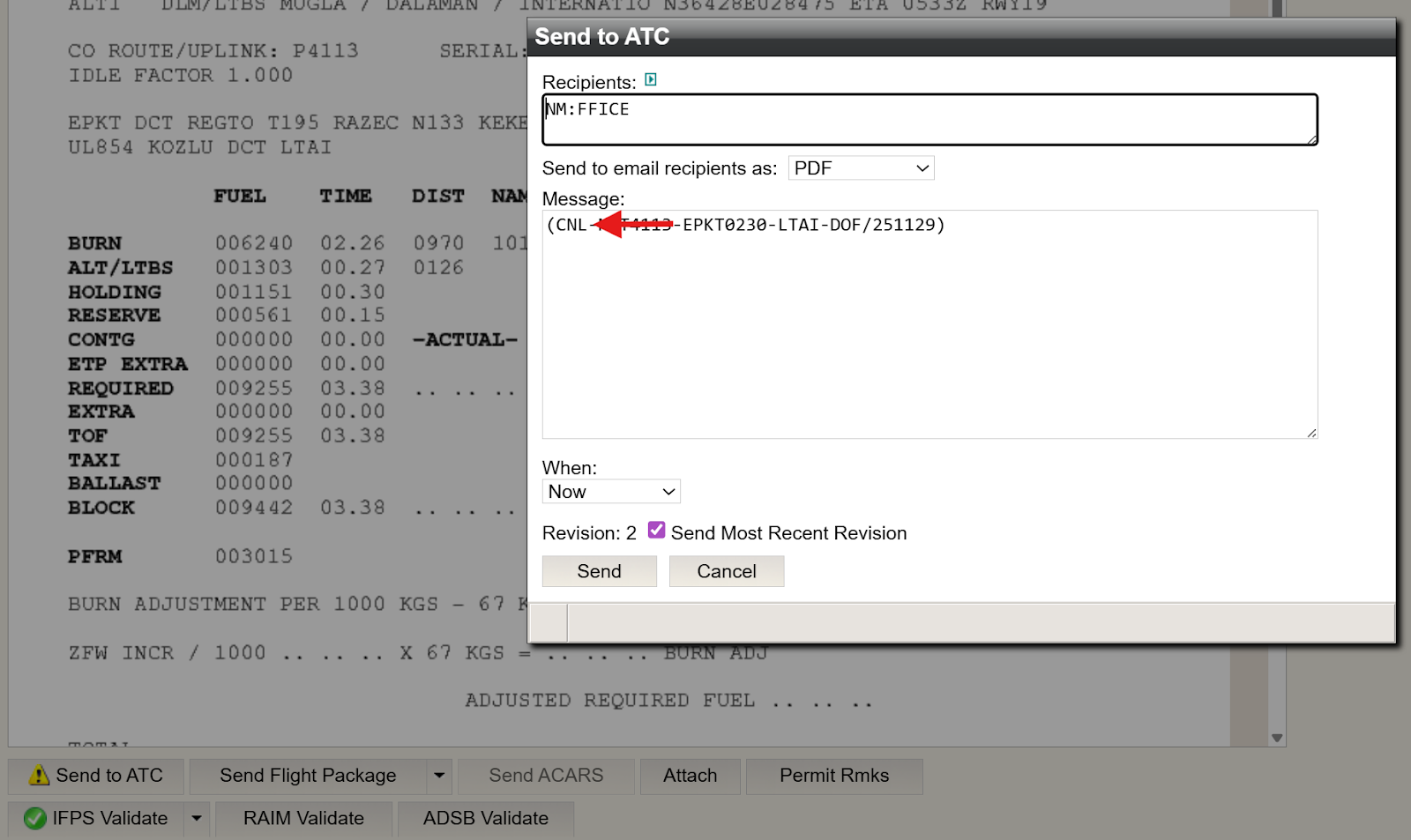
If a previously filed Flight Plan needs to be cancelled, follow the same procedure described above, selecting CNL instead. Then, click Details, followed by clicking Send.
Once Send is clicked, an FF-ICE/FIXM formatted CNL message will be submitted to NM.
Send
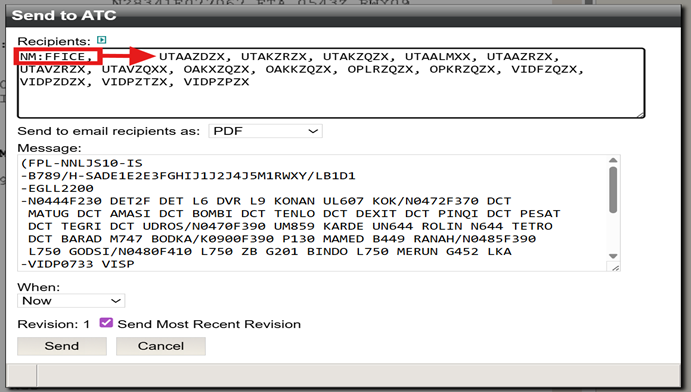
After clicking the Details button, a second dialog box appears, with the NM:FFICE address in the Recipients field. Additional AFTN and SITA addresses can also be populated, depending on the filing requirements of the flight.
Once all required information has been verified, click the Send button to submit the FF-ICE compliant, FIXM formatted message to Eurocontrol (NM). In this example, a CHG message is being submitted.
For any addresses that are AFTN or SITA, only an ICAO2012 formatted Flight Plan will be submitted simultaneously to those recipients (addresses).
Although N-FP displays the Flight Plan in ICAO2012 format for all types filing, rest assured that a FIXM formatted message is being submitted to NM through the NM B2B network. This process uses the Ops Certificate used in the Flight Planning system.
Note: the green circle with the white checkmark indicates the Flight Plan message is submitted.
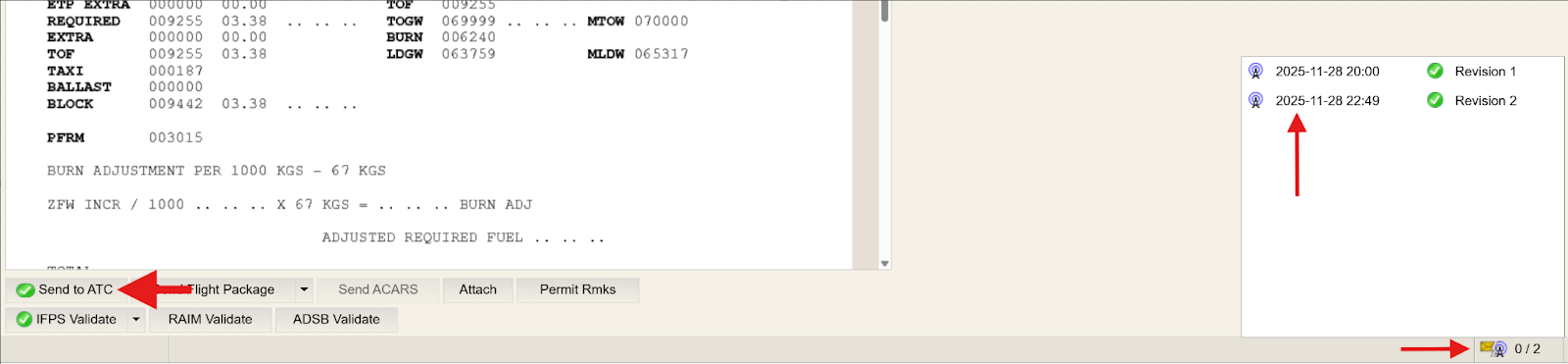
Congratulations! You have now submitted an FF-ICE compliant/FIXM formatted eFPL message successfully to Eurocontrol (NM).
Message Response
Chapter 03
3.1 Introduction
OPERATIONAL RESPONSE MESSAGE (ORM)
Once an FF-ICE / FIXM formatted eFPL Flight Plan message has been submitted to Eurocontrol (NM), Dispatchers can now review the OPERATIONAL RESPONSE MESSAGE (ORM) from NM to confirm the status of the submitted eFPL.
As outlined in the IFPS Users Manual, and FPDE Manual, feedback from NM following the filing or updating of an eFPL (FF-ICE / FIXM Formatted Flight Plan) includes the following information:
a Submission Response (ACK, MAN, REJ) and
a Filing Status
The possible combinations of Submission Response and Filing Status for ASSOCIATED MESSAGES are:
ACK + ACCEPTABLE (including the agreed trajectory)
MAN –followed by either an ACK or a REJ (see notes below)
REJ - accompanied by Errors and Warnings.
Notes:
When manual modification/intervention is completed, the filing status changes to either ‘Operationally Acceptable’ or ‘Operationally Not Acceptable’.
When manual modification is applied, it is performed by Flight Plan staff at the route level (not the trajectory level), and as a result, the filed trajectory is discarded.
3.2 Detailed Explanation
List Screen
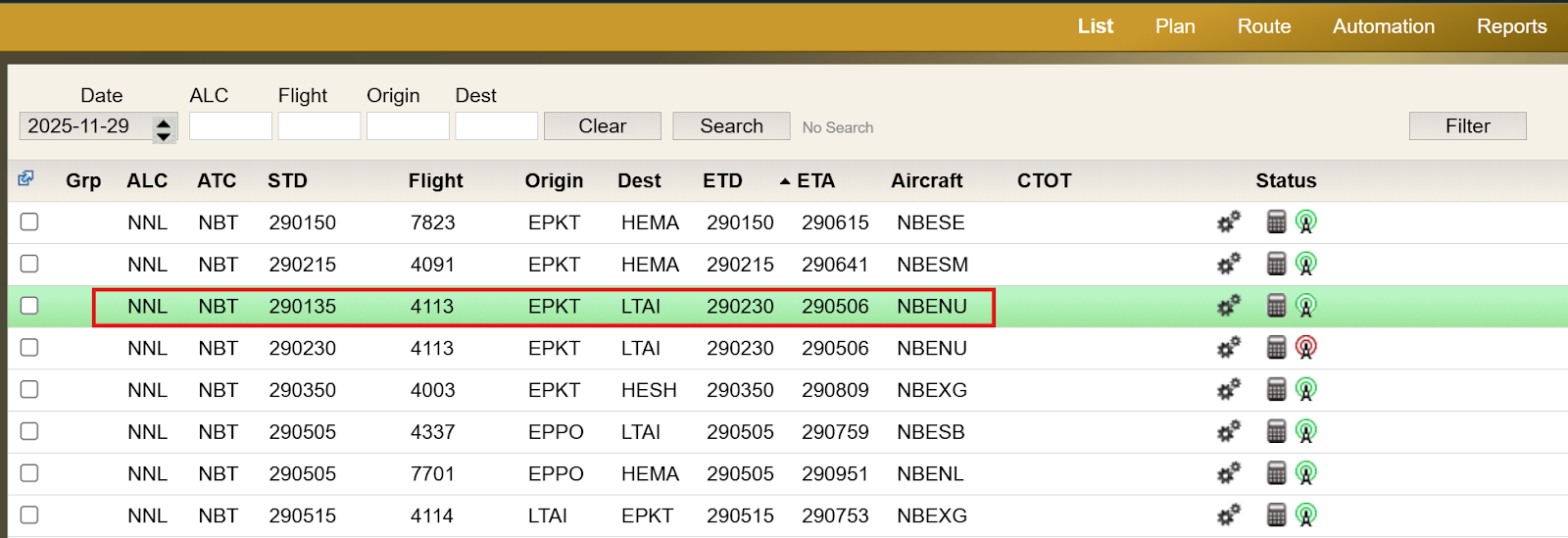
To view the response message from Eurocontrol (NM) after submitting an eFPL, return to the List screen in N-FP.
Info window
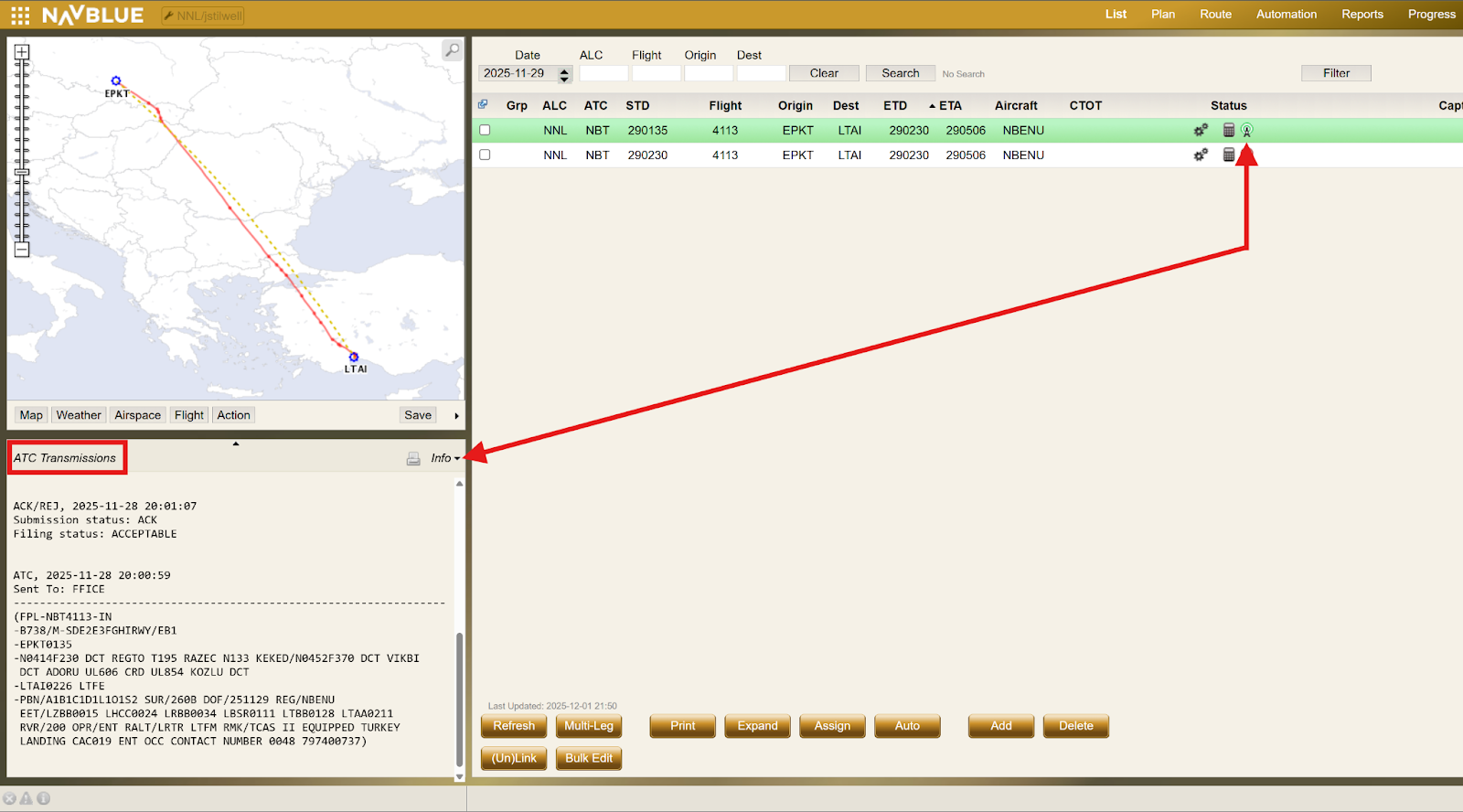
From the List screen, click the flight you want to review. In this example, the selected flight is NBT 4113 flight with a STD of 290135.
Then, under the Status column, click the radio antenna icon.
Info window continued
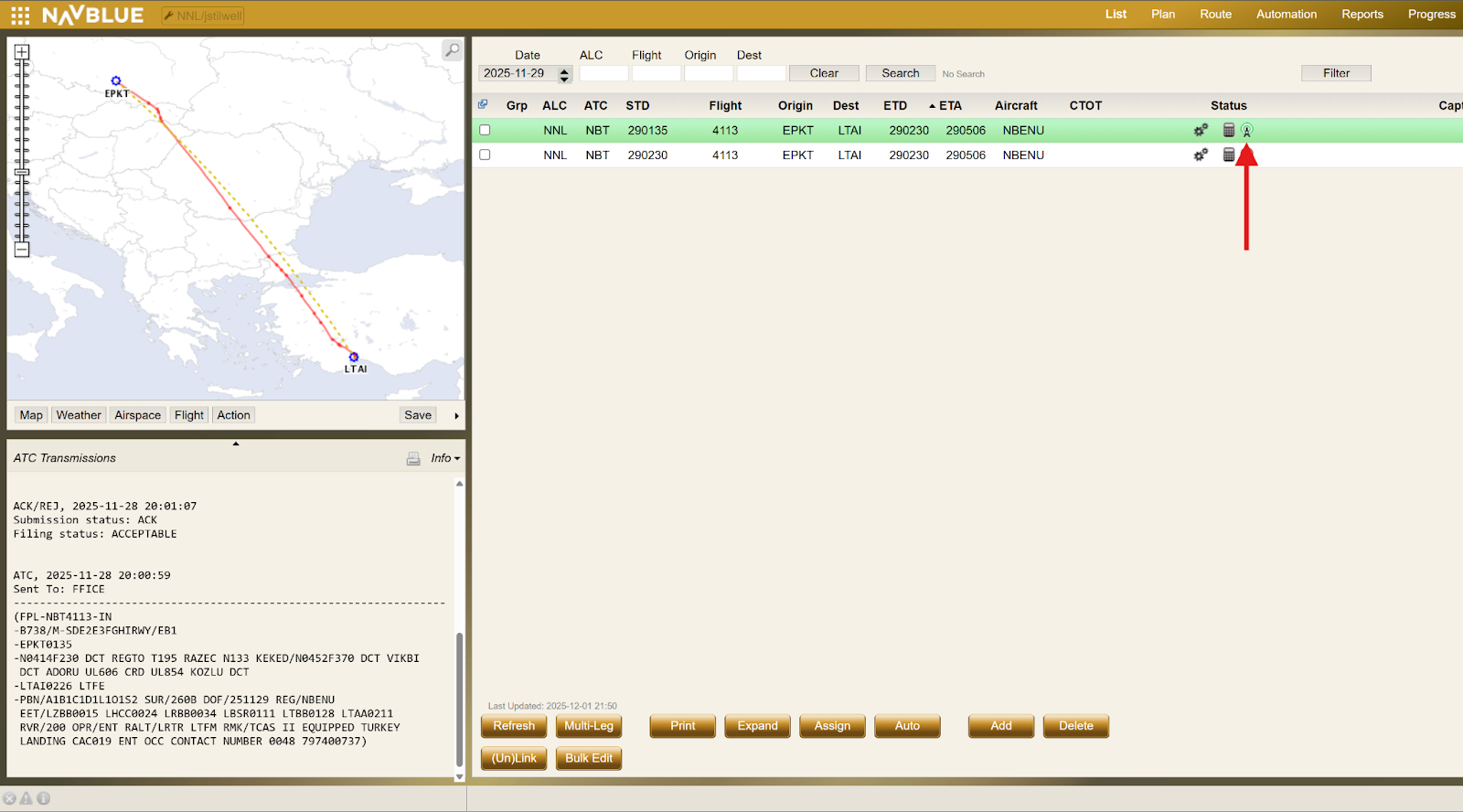
After clicking the icon, refer to the Info window on the left side of the N-FP dashboard to view the Message Response from Eurocontrol.
eFPL FPL (Initial Flight Plan Message Filing)
Once the Initial FPL is filed, the response message for the flight appears in the Info window, which may take a few moments to update after the Flight Plan (FP) is submitted. The response message format is the same whether the flight is submitted using automation or filed manually.
In this example, the Flight Plan is successfully acknowledged with ACK, indicating that the filing status is acceptable by IFPS.
eFPL CHG (Change/Update message filing)
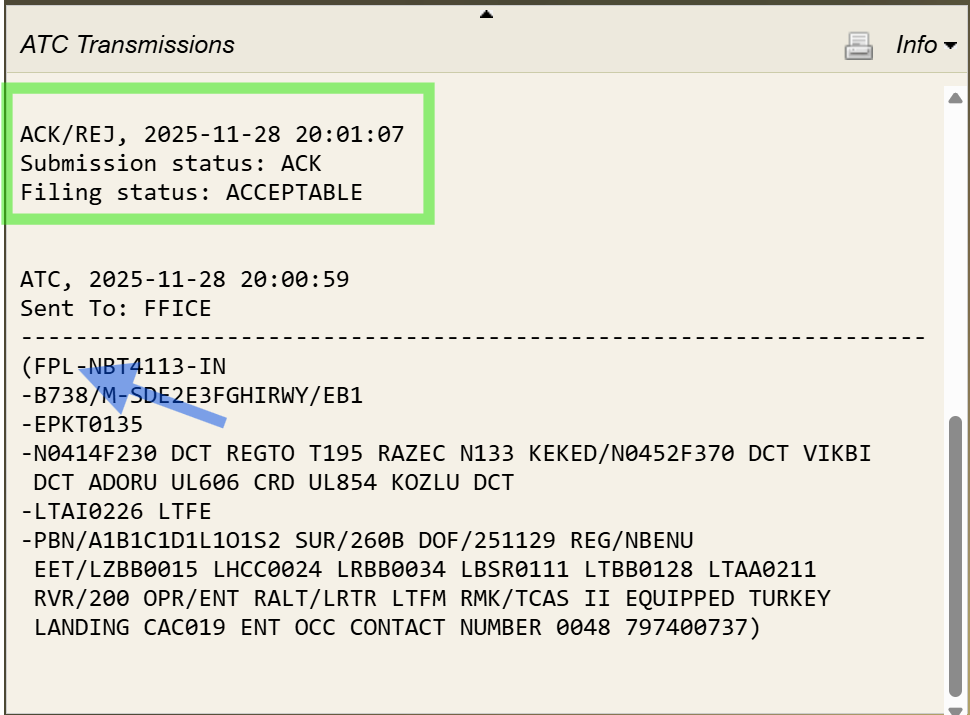
Once a FP has been filed, any Subsequent changes will appear in the Info window, with the most recent (newest) response(s) displaying at the top (scrolling up).
In this example, the FP is successfully acknowledged with ACK, and the filing status accepted by IFPS. As shown on line (ITEM13), the revised departure time of 0230UTC is indicated and illustrated in section 13 above.
eFPL DLA (Delay message filing)
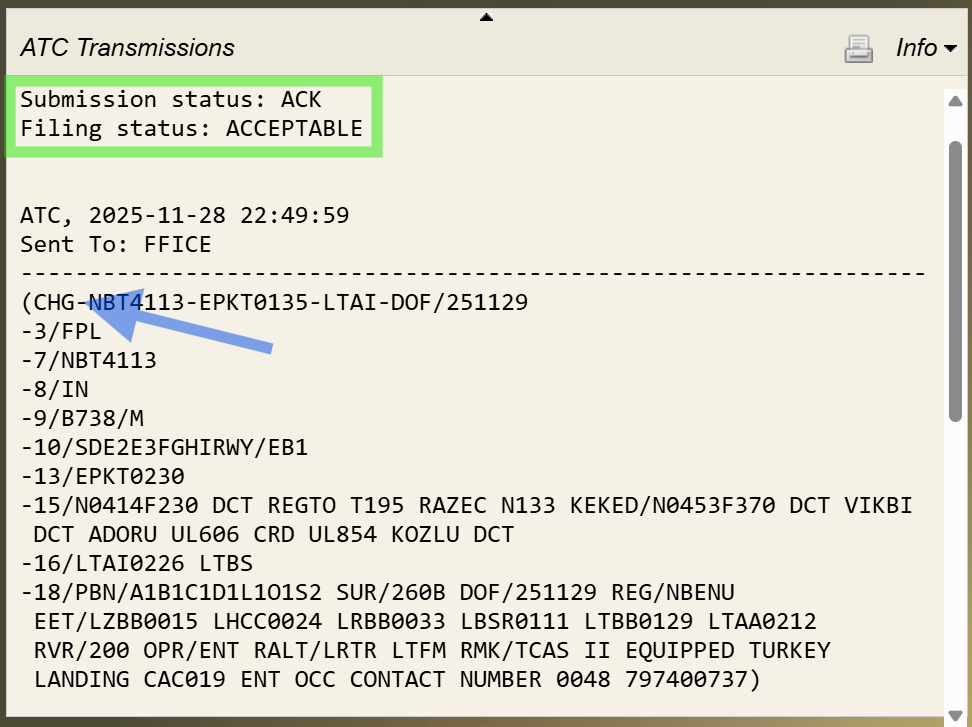
When submitting a delay message, as described in section 13, the message response from NM appears as shown in the image below. Similar to other message types, the DLA message displays in ICAO2012 format within the Info window.
In this example shown, a DLA message for a different flight was filed using the same process and successfully acknowledged with ACK, indicating the filing status as acceptable by IFPS.
eFPL CNL (Cancellation message filing)
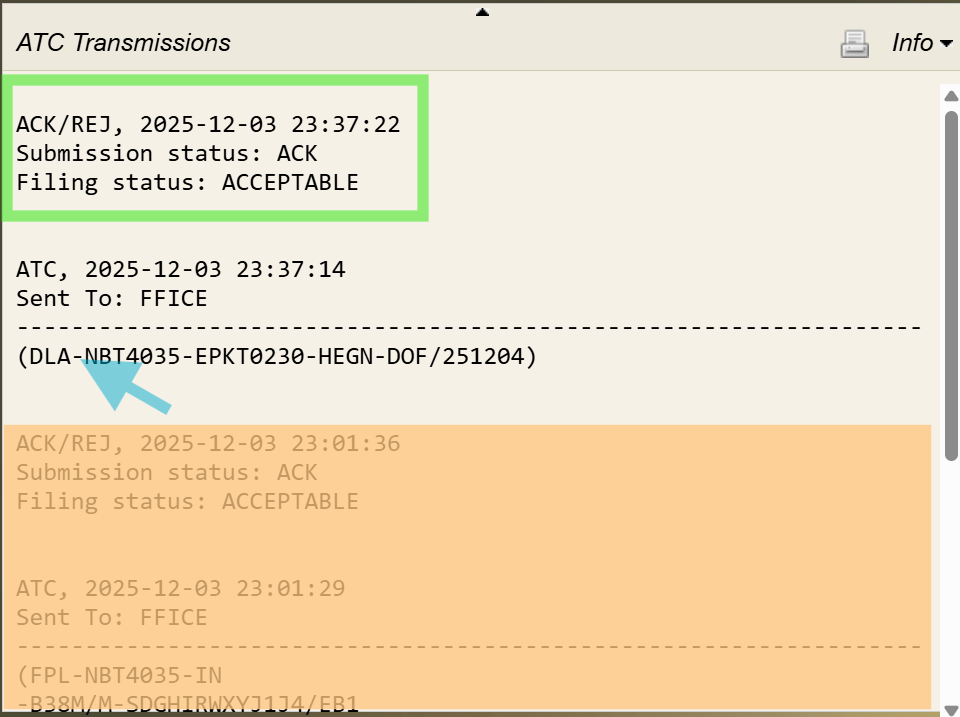
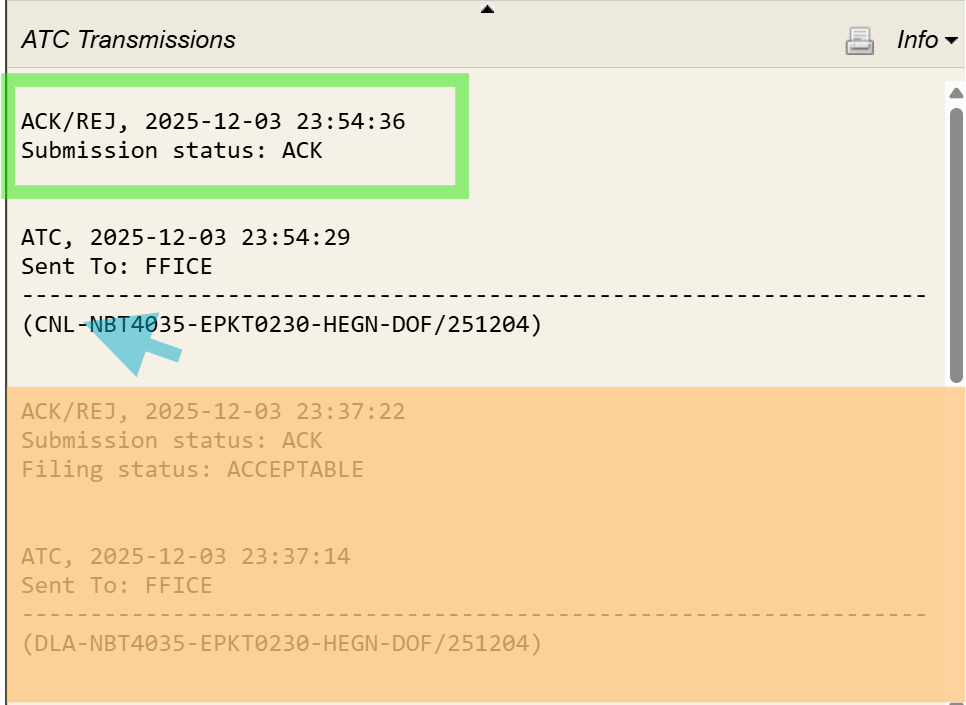
When a cancellation message is submitted as described above in section 14, the message response appears as shown in the image below.
In this example, a different flight was used to CANCEL, however, the same process applies. The CNL filed was successfully acknowledged with ACK, and the filing status was acceptable by IFPS.
Message Responses for (MAN/REJ)
It is not possible to include all potential error or REJ message types in this document. For detailed reference, Dispatchers are advised to refer to the Eurocontrol IFPS Users Manual. However, Dispatchers should remain familiar with common errors and know how to identify ERROR or IFPS MAN / REJ message responses.
The first and clearest indication of an error is the radio antenna icon in the Status column on the List screen in N-FP. A red icon indicates an error message.
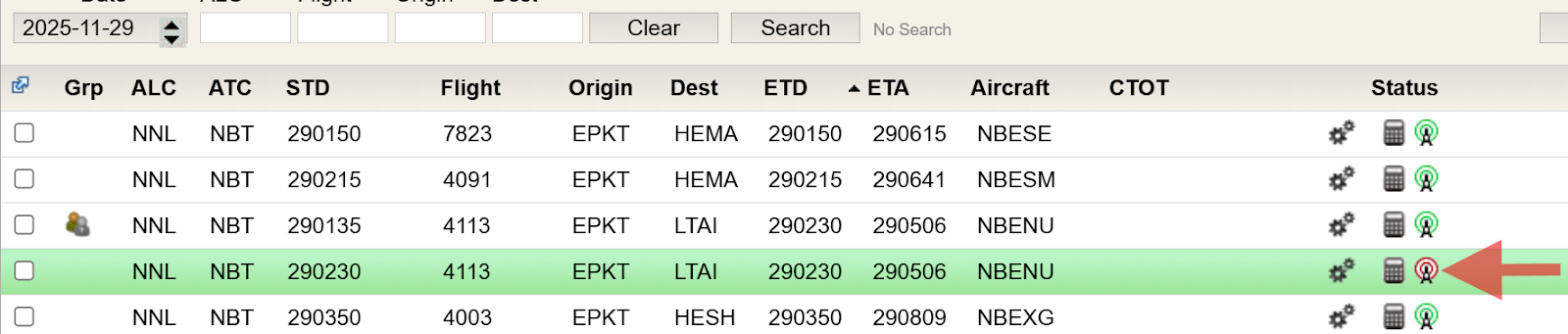
After clicking the icon, Dispatchers can view the message response from NM, which specifies the error type.
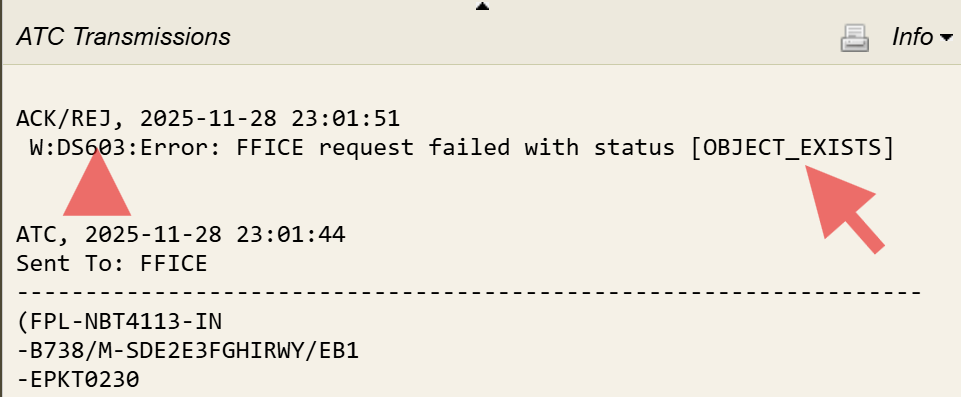
OBJECT_EXISTS
In the example below, the FP was accidentally submitted twice by the Dispatcher–once automatically (through AUTOMATION) and then MANUALLY–resulting in an OBJECT_EXISTS message from NM.
This serves as a reminder for customers using AUTOMATION to file FP (whether FF-ICE or non FF-ICE) to ensure automation is disabled or removed for any flight that requires manual intervention, in order to prevent duplicate filings.
PLEASE DO NOT DO THE FOLLOWING!
DO NOT submit a flight plan ( FPL) by using your direct access to the NM NOP portal. This process submits an ICAO2012 FPL, not an FF-ICE one.
If subsequent flight plans are filed from N-FP to the NM:FFICE address, this will result in a REJ.
This is due to elements from the ICAO2012 FPL already existing in the system.
Please only use N-FP to file your eFPL (extended flight plans) and no other source.
All changes requiring a (CHG) or (DLA) associated message, must have the change to data, or EOBT completed in the N-FP PLAN screen with a FULL COMPUTE. Only after this step can an FF-ICE/FIXM-formatted (CHG) or (DLA) message be filed to NM:FFICE.
Do not make any changes to the ICAO2012 template in the SEND TO ATC screen, as this will not update any FF-ICE data in the eFPL (the extended flight plan you submit to NM) and will result in a rejection (REJ).
Note: If any messages are received that can not be understood, or found in the IFPS Users Manual, please contact NAVBLUE Support for further assistance. For urgent issues, you may also contact the NM Support Desk through the public support portal.
FIXM Format
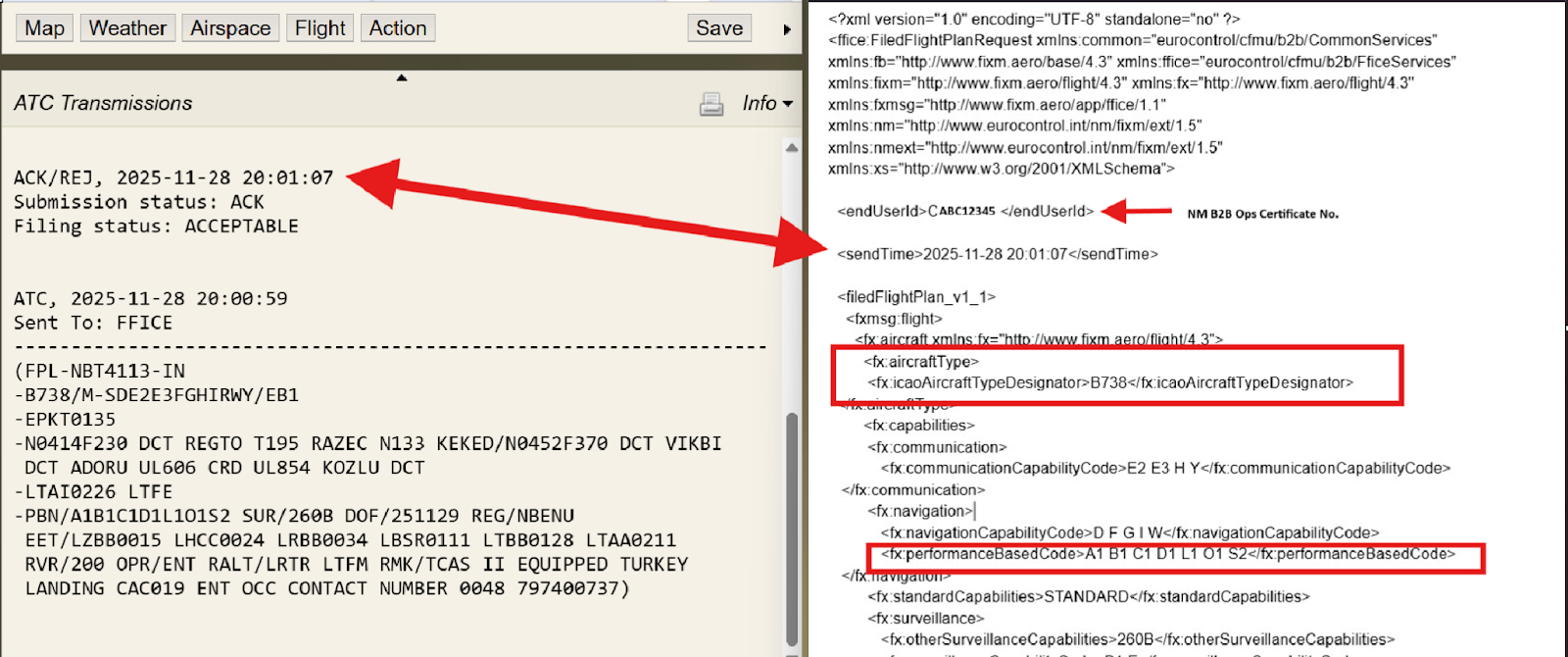
The image below shows a side-by-side comparison of the ICAO2012 FPL format displayed in the Info window–shown as part of the translated FF-ICE message response from NM– and the actual FF-ICE FIXM formatted message submitted to NM (shown on the right).
NAVBLUE will continue to use the ICAO2012 message format in both the Info window and the SEND TO window to make FP messages easier for Dispatchers to read and interpret.
While the FIXM format on the right is designed primarily for machine readability, many aspects are still recognizable to most Dispatchers. However, it is not an ideal format for a quick read.
For instance, fields such as the endUserId actually represent the NM B2B Ops certificate number, or fields such as aircraft designator/type, and performance based code.
Note: Additional details about FIXM standard for FF-ICE can be found in the FIXM User Manual available on the FIXM.aero website.
GUFI Number
The Global Unique Flight Identifier (GUFI), as defined by NM, represents a key innovation within FF-ICE. It provides a unique reference for each flight, enabling clear differentiation between similar flights and ensuring that all associated messages are correctly linked to the intended flights.
Some key aspects of the GUFI include:
Definition: An unchangeable data element associated with a flight that allows all eligible members of the ATM community to unambiguously reference information relating to
that flight.Purpose: Mandatory for cross-system traceability and interoperability
Function: Non-functional enabler that does not alter operational TWR decision-making
Generation: Created and allocated by operators*
Structure: Consists of UUID, namespace identifier, and creation timestamp
Responsibility: Operators are responsible to generate and allocate**
Overview: To provide a globally unique reference to a specific flight.
Each FP submitted to Eurocontrol is assigned a unique GUFI. When a FP is computed in N-FP for the purpose of filing an FF-ICE compliant/FIXM formatted eFPL to NM, the GUFI number is generated in the FIXM format.
If an eFPL (FF-ICE Flight Plan) is cancelled (CNL) and subsequently refiled (FPL) with NM, a new GUFI number is assigned to the Flight Plan when recomputed in N-FP.*, **
A GUFI generated in N-FP appears as shown below, following the FIXM standard.
Translation & Forwarding Service
When configured to file an FF-ICE eFPL, N-FP can include a request for NM to translate the FPL to ICAO2012 and forward it to downstream, or upstream AFTN / SITA addresses outside the EU IFPZ. To file, Dispatchers must ensure AFTN/SITA addresses for a translated FF-ICE to ICAO2012 FPL are included in the Recipients box of the Send To ATC window. They must also add the NM:FFICE address.
The NM:FFICE address acts as the trigger for N-FP to file an FF-ICE FPL to NM. If this address is removed and/or replaced, N-FP will instead file only an ICAO2012 FPL to any AFTN/SITA addresses listed in the Recipients box.
Below is an example of an inbound flight to Europe departing from the US, all relevant AFTN addresses may be generated for Washington D.C. ARTCC, the Moncton Domestic FIR, and the Gander Oceanic FIR. In this case, NM translates the FF-ICE FPL to an ICAO2012 one and forwards it to the relevant FIRs indicated in the Recipients box.
Example: Inbound Flight
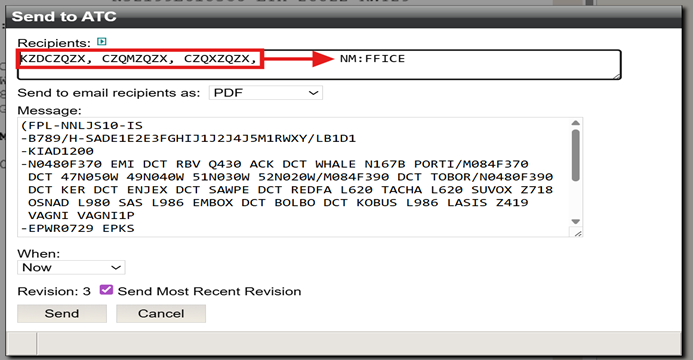
For the next flight, the NM:FFICE address displays first, however this has no effect on how an FF-ICE FPL is filed. Regardless of where the NM:FFICE address appears in the Recipients box, an FF-ICE FPL will still be filed.
In addition to the FF-ICE FPL being filed to NM, all downstream AFTN/SITA addresses listed in the Recipients box with the NM:FFICE address will also be filed.
This is done by NM who translates the FF-ICE FPL to ICAO2012 format, and forwards it to the specified AFTN/SITA addresses in the Recipients box.
The below image is an example of an outbound flight where NM translates the submitted FF-ICE FPL and forwards it as an ICAO2012 format message to the Ashgabat, Kabul, Lahore, and Delhi FIRs, and to Delhi Tower and Delhi ARO.
Example: Outbound Flight