
Airline Code Parameters - Minima Tab
Overview
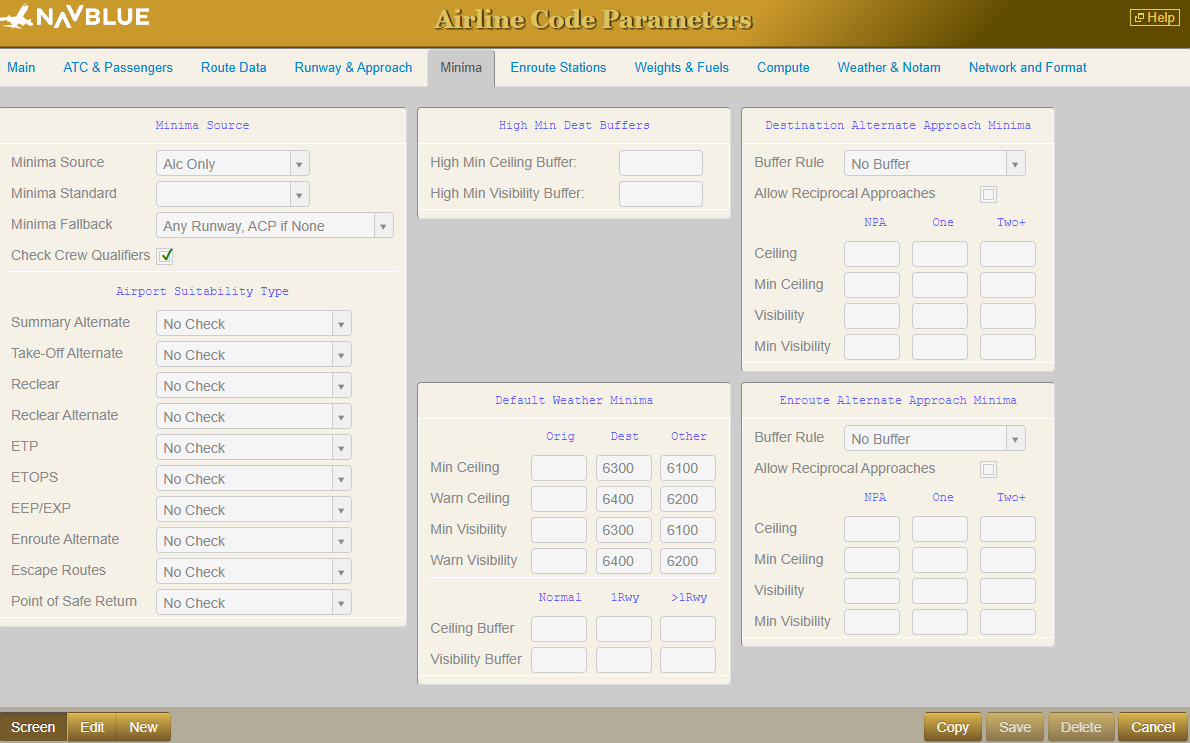
The Minima tab in Airline Code Parameters determines the Ceiling and Visibility requirements for using a station as a specific Alternate type.
Note: This information is also available in the FOMS 170 - Page 7 article.
Minima Source Section
Airport Suitability Type Section
The Airport Suitability Type section allows users to specify which minima checks to apply to different airport types, including:
Summary Alternates (i.e. any destination alternates included in the Flight Plan but not part of the four declared alternates)
Take-Off Alternate
Reclear
Reclear Alternate
ETP
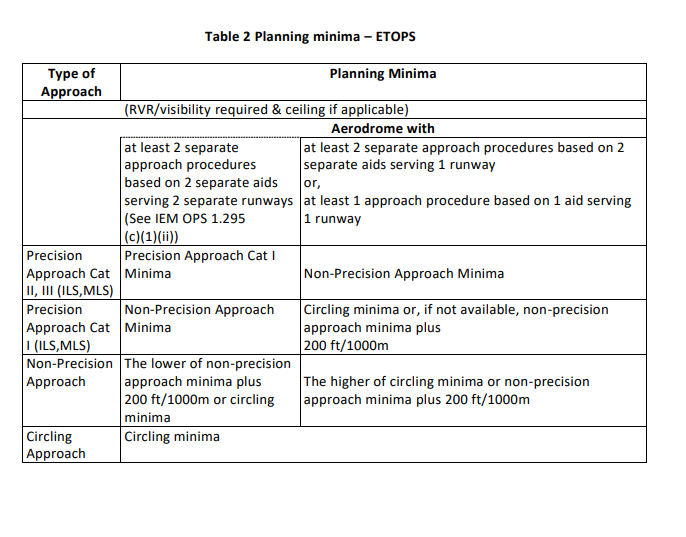
ETOPS
EEP/EXP
Enroute Alternate (EU-OPS ERA)
Escape Route
Point of Safe Return
The options are:
No check
Destination Minima
Uses the published minima as per minima source selection
[Destination] Alternate Minima
Uses the defined rules in the “Destination Alternate Approach Minima” section
Enroute Alternate Minima
Uses the defined rules in the “Enroute Alternate Approach Minima” section
High Min Dest Buffers Section
The High Min Buffer is applied when the crew (captain) assigned to the flight has the High Min flag set (see Crew Settings below). The High Min buffer applies only to the destination.
Destination and Enroute Alternate Approach Minima Sections
These sections are identical, and the descriptions below apply equally to both.
Buffer Rule
Options for the buffer rules are:
No Buffer
Buffer
Buffer with Minima Value
PART OPS
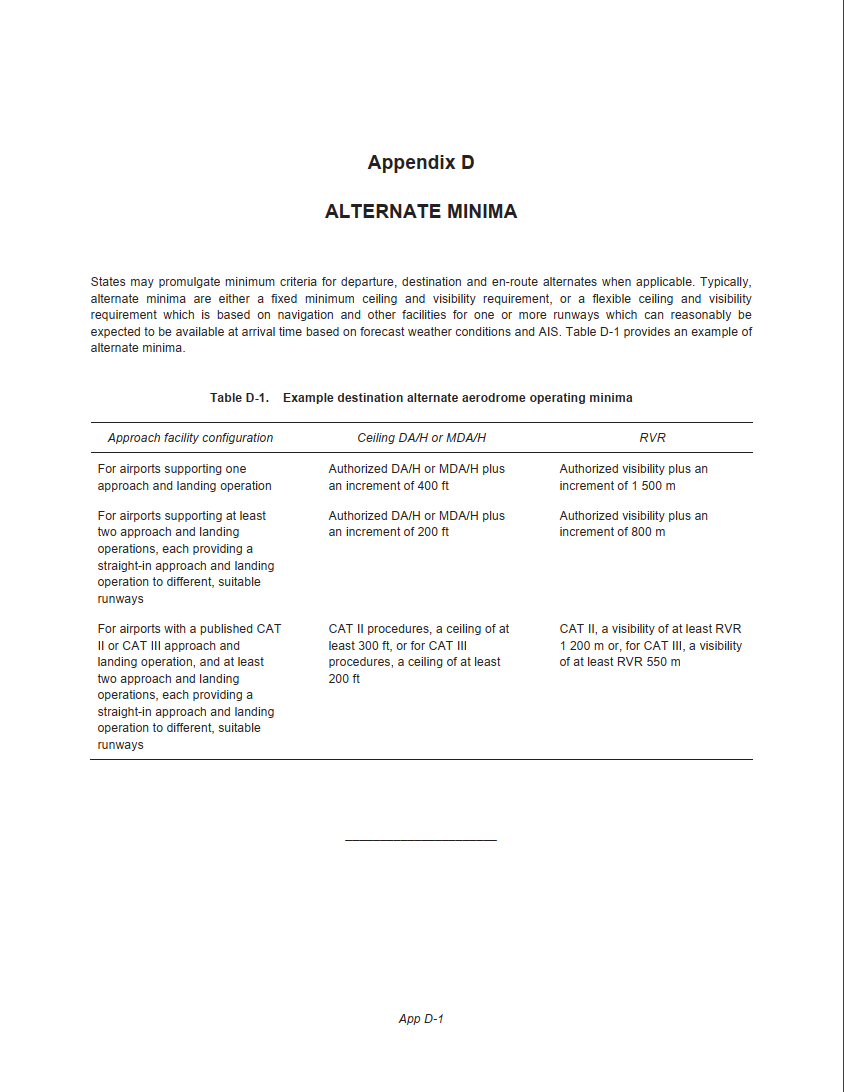
ICAO
UAE GCAA
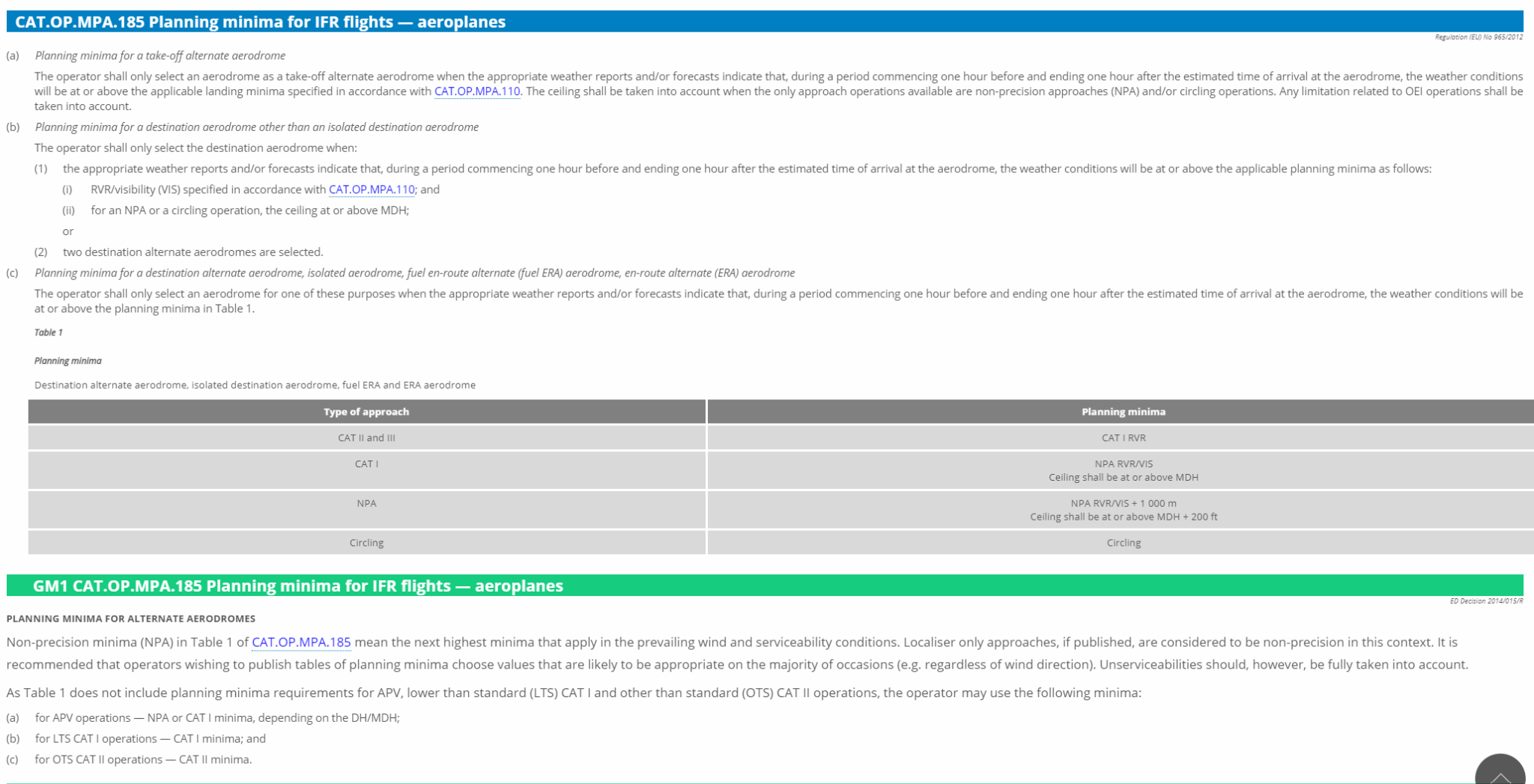
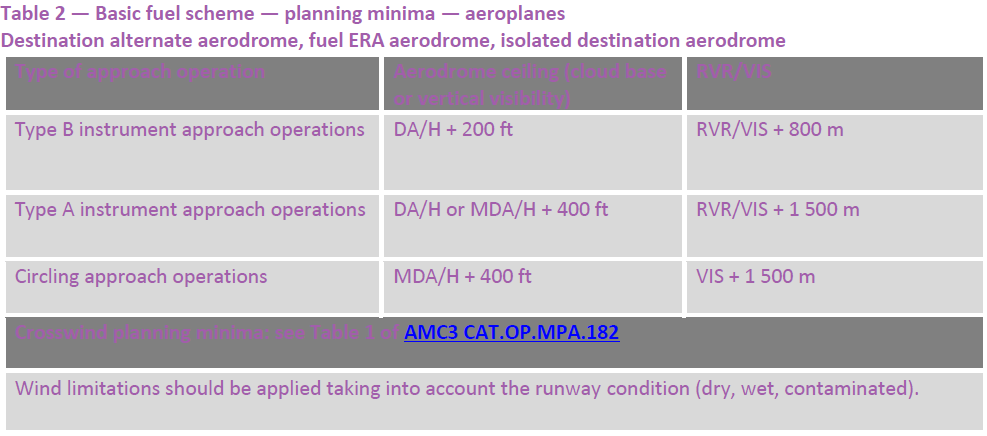
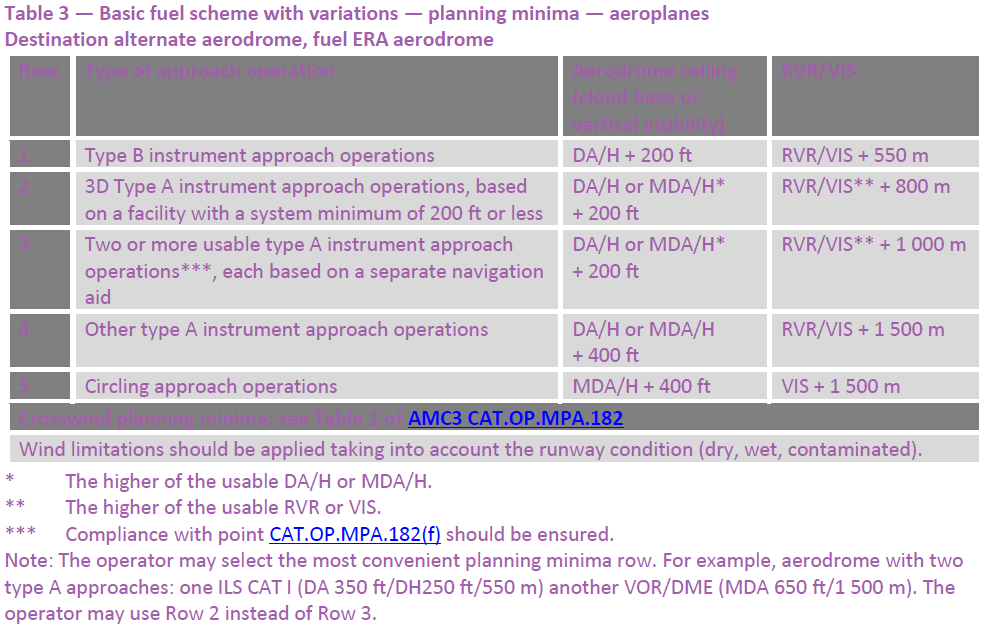
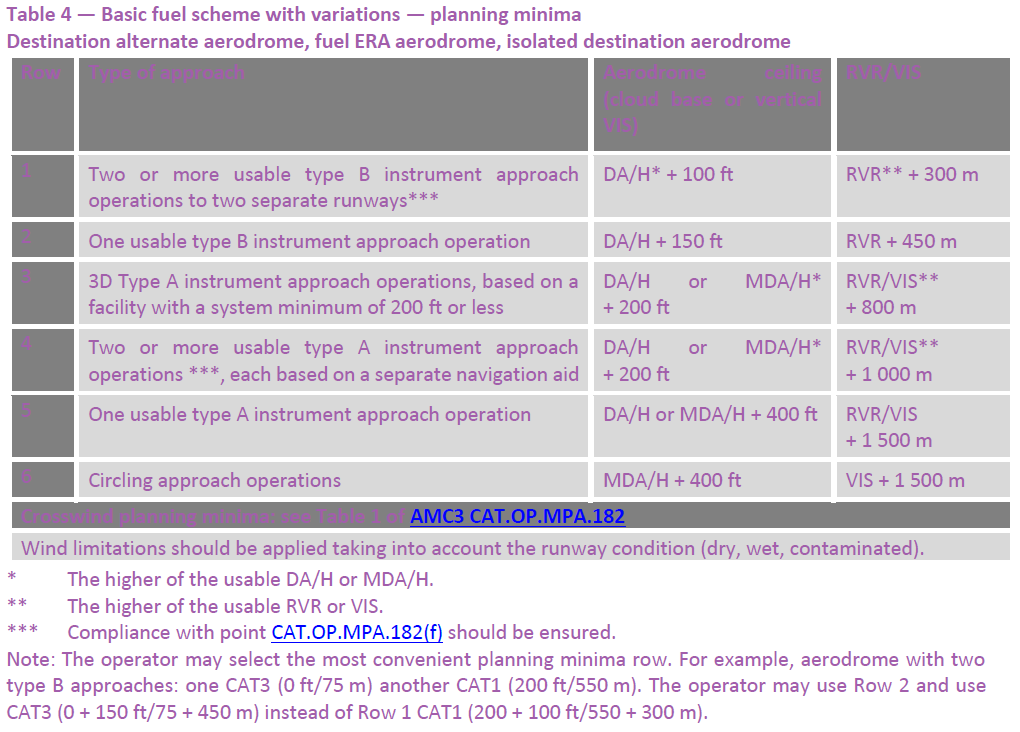
EASA AMC 6
EASA ACM 8
EASA AMC 9.
Other Settings
Allow Reciprocal Approaches determines whether the system can consider an approach to the reciprocal runway as part of the number of available approaches. The options are Y or N.
Note: This setting is only available with the Buffer, Buffer w/ Minimum Value, or ICAO buffer rule options.
Buffer Rule Table is enabled when selecting the Buffer or Buffer w/ Minimum Value buffer rule options.
The required Ceiling and Visibility at the alternate station is determined by:
The type/number of approaches available:
Non-Precision Approach only
One Precision ApproachTwo or more precision approaches
The the total Ceiling/Visibility required by adding the buffer values to the approach minima
If applicable, the higher of the total Ceiling/Visibility required OR the minimum Ceiling/Visibility
Default Weather Minima Section
Alt Rwy Mnm Buf Section
Information about this is also found in FOMS 170 Page 3.
Relevant Information - Factors Impacting Minima
Several settings within Aircraft Characteristics can affect Minima selection and availability. Most of which are located in the Performance tab within Aircraft Characteristics.
Max Climb Gradient (MCG)
The MCG value in the Performance group relates to the MAP (Missed Approach Point) gradient set on the Approach Minima. The MAP Gradient value in the Minima specifies the angle of climb required if the aircraft misses the Approach and needs to climb and reattempt the landing. The value in ACC is the MCG the aircraft is capable of so if the MAP Gradient of the minima exceeds this value, the minima can not be used and will be excluded from consideration.
ILS Category
The ILS Category value in the Equipment group specifies which precision approach minima the aircraft is authorized to use. The standard ILS Categories include CAT I, CAT II, CAT IIIA, CAT IIIB, and CAT IIIC. Note: The higher categories encompass the capabilities of lower ones.
For example, an aircraft set to CAT I can only use CAT I minima, while CAT II allows both CAT II and CAT I minima. Similarly, CAT IIIA permits CAT IIIA, CAT II, and CAT I, and so on.
Note: If ILS Category is blank, there is no restriction on these minima types.
CAT II OTS, CAT II SA, CAT I SA, ILS LTS
These special minima types also apply to ILS approaches, but are applied individually rather than by the ILS Category above. For example, to use minima with Minima Type CAT II OTS, the aircraft must have the CAT II OTS checkbox enabled.
Approach Speed Category (APP CAT)
The Speed Category can be either A, B, C, D, or E, corresponding to the Categories column in the minima data. If no Speed Category is specified for the aircraft, minima from any category may be used. However, if a category is specified, only minima matching the aircraft category are allowed. Unlike the ILS Category, there is no overlap—Speed Category C does not include Categories A or B.
RNP Level
The RNP Level represents the lowest (smallest) RNP level the aircraft is allowed to use. This applies to RNP minima types that specify a required RNP level. For example, if a minima record requires an RNP level of 0.25, the aircraft’s RNP Level must be set to 0.25 or below to use this minima.
ICAO2012 Equipment Codes
The Item10a equipment codes can restrict which approach types are valid for an aircraft. Even if an approach type is enabled in ACP Approach Types, it may still be removed if the aircraft is not allowed to use it.
The PBN codes from the aircraft’s ICAO Item18 values can also affect the validity of RNP values. Thus, the RNP of the minima must satisfy both the specified RNP Level and the PBN codes.
MEL/CDL Effects
As of release 25.3, MEL/CDL effects may impact minima availability. When an MEL/CDL is assigned, it can reduce the aircraft’s ILS Category, removing CAT II, CAT III, or both minima options, depending on the MEL effect. This overrides the aircraft’s settings in Aircraft Characteristics. Note: If the notify option is enabled, a compute warning displays to alert the user to the reduced minima.