
Airline Code Parameters - Route Data Tab
Routes Section
Field | Description |
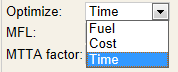
Optimum Method | This is the default route optimizer for the airline. Options are:
The option entered in this field impacts route selection and the route analysis process. Also, the Optimum route option uses the default optimizer to generate an MTTA (shown below). Note: Contact Support for more information.
|
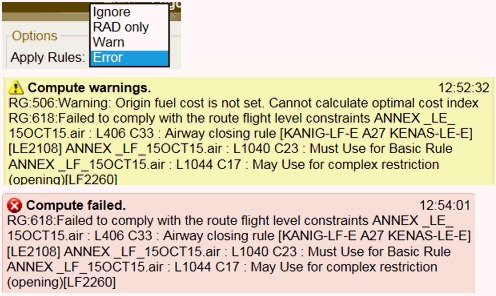
Rules Enabled | Options are Yes , Rad Only (RAD only), No (Ignore), or Error. You can manually change these options, but this parameter determines what the default setting is.
Note: The Apply Rules options are located in the Options Group on the Route Screen. |
Check RNP | Checks whether the navigation data within NFP taken from the ARINC 424 data has any associated RNP values stored within the appropriate segments or records. The RNP Check ensures that an aircraft has a PBN code that corresponds to the RNP level of the airway. Example: An RNP5 airway will require either the B1, B2, B3, B4, B5 or B6 PBN code. The MTTA will not use an airway if the aircraft has PBN codes and the required code is absent. Airport procedures will continue to be filtered based on the RNP LVL for the aircraft. The options are:
|
Check RNP Strict | When set to Yes, airways requiring RNAV equipment are avoided if the aircraft does not have the necessary RNAV equipment. |
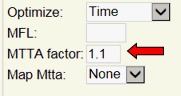
Mtta Factor | If blank, the default value is 1.1. Any other value entered (1.2 – 2.0) becomes the default MTTA factor in the NFP route screen. An increase in the search splay increases the number of waypoint/airway connections and increases the time required for MTTA route generation.
|
Always Avoid Uda | Use this checkbox to always avoid UDAs. When selected, the Avoid Uda menu is deactivated and is automatically set to Error. |
Avoid UDA | The Avoid UDA dropdown box has the following options, which also apply to Fixed Restricted Areas as defined below:
|
Avoid Restricted | The Avoid Restrict Drop-down box has the following options:
|
NOTAM Restricted Areas | This field separates NOTAM restricted areas from existing restricted areas. Allows you define and avoid NOTAM restricted areas. Options are:
You can enter any combination of these options into this field. |
Fixed Restricted Areas | This field allows you to define the areas that you want considered to be restricted. Options are:
You can enter any combination of these options into this field. This field cannot be blank if Avoid Restricted is set to Yes. Note: This field also applies to User Defined Areas (UDA). |
Restricted Buffer | This field enables you to add a buffer to extend the restricted time of a user defined restricted area. The time entered is added to the start and end of the restricted area time. Note: The buffer also affects published region alerts and avoidance of restricted areas when building a route. |
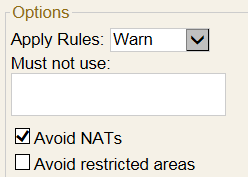
Avoid Tracks | This flag dictates whether you want to avoid the North Atlantic tracks (NATS) by default.
|
Analysis Types | Include in route analysis results. Options are:
Note: UK and Ireland SRD routes are included with FAA pref routes when P (pref) is used. |
IFPS Routes | Enter the number of IFPS routes to request during route analysis. Refer to CMFU Route Retrieval for more information. |
IFPS 8.33 Check | Options are Yes or No.
|
Recalc if Winds change | Check to perform a recalculation of the route analysis when new routes arrive for a computed flight within a time range of ETD-6 to ETD+18. |
Stay in ERA Circles | When checked, the system builds a route that keeps a MTTA route within the 60 min EEP/EXP or ETOPS circles. Note: Must have ETOPS enabled to use the checkbox. |
AIRAC Cycle Buffer | Enter a buffer time from 0000z for the next AIRAC cycle to become effective. Use a negative number to move the buffer prior to 0000z and a positive number extends the current AIRAC cycle. If blank, the next AIRAC cycle becomes effective at 0000z. |
Alternate Settings Section
Field | Description |
Burn Method | Options are:
Note: Alternate fuel required on the flight plans are based on the option selected. |
Restrict Distance | Options are Yes or No.
|
Distance Bias | Entry field is numeric (distance in NM). Example below shows 25NM.
|
Hold in Min Alt Fuel | Options are Y (yes) or N (no).
|
Use AWYs to ALT | Options are Yes or No.
|
Convert High Mins | Options are Yes or No.
|
Use Main Cruise | Options are Yes, No or Specific.
Note: This field cannot be blank. |
Default Cruise profile | To use this field, the Use Main Cruise field must be set to Specific.
|
Takeoff Alt Failures | Options are Error, Warning, and Except MLW.
|
Allow no Alt | Options are Y (yes), N (no), D (Domestic Only), I (International Only) or A (Auto if no Alts).
|
No Alt Time/No Alt Fuel – used with alternate selection = NONE | Enter a numeric value in minutes. NFP calculates an alternate burn based on time value entered at TOD fuel flow. |
No Alt Display Location – used with alternate selection = NONE: | Options are Alt or Hold (Alt = Alternate / Hold = Hold).
|
Min Rnav Separation Dist | Minimum Distance in Nautical Miles (NM) between Dest and Alt RNAV Approaches. |


Alternate Defaults Sections
Field | Description |
Populate List From/ Max Search Radius | Options are M (Menu 110 only), R (Radius only), or B (Both – if menu 110 is unsuitable).
Example: The field is set to 50NM, NFP searches for suitable alternates within a 50NM radius around the destination station. NFP does not look at FOMS 110 since R is set. If blank, the same behavior as B occurs. |
Min List Size | Enter a numerical value in this field.
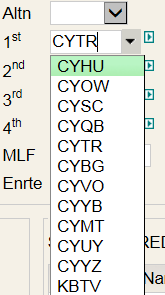
NFP provides a specific number of alternate choices based on this setting. These appear in NFP’s plan screen as shown below:
|
Max Search Radius | Refer to Populate List From. |
Default Count | Options are a numerical value (0-4), D (Domestic), I (International), or N (never set).
Note: The standard default count functionality is used only when the Dynamic Alternates is not in use. For information about Dynamic Alternates, see below. |
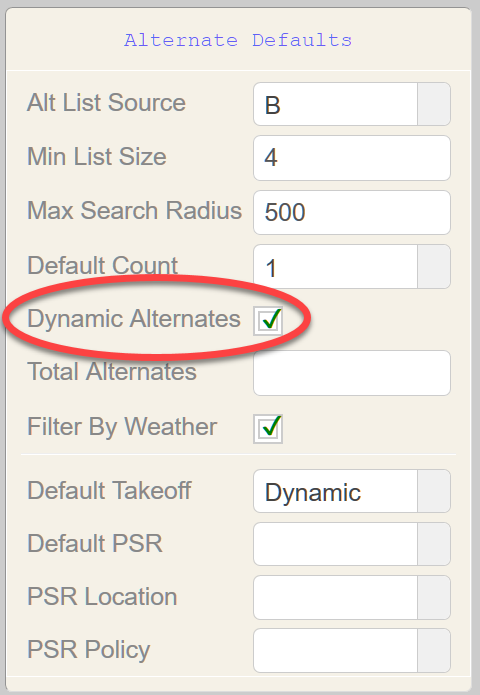
Dynamic Alternates | The Dynamic Alternates check-box triggers functionality for alternate selection and filtering based on weather criteria.
When Dynamic Alternates is selected:
Note: The thresholds for the number of required Alternates is detailed under Dynamic Alternates Criteria. The Default Takeoff Alternate selection now includes an option for Dynamic, in addition to the options of Yes and No.
Note: When the Dynamic Alternates checkbox is deselected, current functionality for Alternate selection and filtering remains in place. |
Total Alternates | Enter the number of alternates to show in the Flight Package (up to 9). The additional alternates are selected based on the Alt List Source and Max Search Radius fields. These fields are located in the Alternate Defaults group, within the Route Data tab, on the Airline Code Parameters WebFOMS screen. Note: Alt List Source is called Populate List From on the FOMS 170 menu. The alternates are not included in burn calculations. Note: A format change is required for this functionality, contact support for more information. |
Filter By Weather | Options are Yes or No.
|
Default Takeoff | Options are Yes or No.
Note: The Takeoff Alternate Max Distance setting in FOMS 220 may impact NFP’s choice. |
Default PSR | Options are Yes, No or ISLD.
Note: PRS is the furthest waypoint along a route of flight which guarantees a safe return to the PSR station, with the minimum landing fuel on board. For this option, a format change is required, please contact Support. |
PSR Location | Choose whether to find a PSR near the origin or destination airport. |
PSR Policy | Enter a policy to use for PSR calculations. Note: A policy can contain up to 6 scenarios and each scenario can create a PSR location. |

Inflight/Reclear Section
Field | Description |
Auto Reclear Fuel | Options are Yes or No.
|
Reclear MLW Error (MLW = max landing weight) | Options are Yes or No.
|
Reset Reclear for Inflight | Options are Yes or No.
|
Inflight MLW Warning - for inflight revisions only | Options are Yes or No.
|
ETOPS/ETPS Inflight | Options are Yes or No.
Note:
|
Use FAR/RLF –FAA arrival fuel / Recommended landing fuel | This field impacts in-flight revisions only. Options are Y or N.
|
Dynamic Alternates Criteria Section
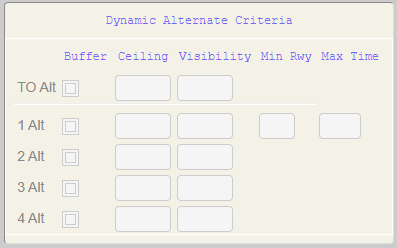
For each of the below Alternate type/counts, users have the below options:
Buffer - Options are Checked or Unchecked. If Checked, the Ceiling/Visibility value entered is applied as a buffer to the Destination minima. If Unchecked, the value is treated as static/absolute.
Ceiling - Enter a Ceiling value in feet
Visibility - Enter a Visibility value in meters
TO Alt - Require TKOF ALTN when Ceiling (and Visibility) below value
1 Alt - Require 1 alternate when Ceiling (and Visibility) below value
Optionally, also add a minimum number of runways at destination. 1 Alt will be required when the number of runways is fewer than stated.
Optionally, also add a maximum enroute time to destination. 1 Alt will be required when the enroute time exceeds the stated value.
2 Alt - Require 2 alternate when Ceiling (and Visibility) below value
3 Alt - Require 3 alternate when Ceiling (and Visibility) below value
4 Alt - Require 4 alternate when Ceiling (and Visibility) below value
Note: Users can select an enroute alternate—or none at all—based on the operational requirements of the operator for IFR flights.
In addition to using the Ceiling and Visibility criteria from the Weather Minima group within the Weather & NOTAM tab to determine Alternates, you can now define distinct criteria for alternate selection. These new fields provide greater flexibility to configure weather triggers for the appropriate number of alternate airports.
Check Curfew For Section
The following options are available for Curfew check:
Alternates
Reclear Destination
Reclear Alternate
ETP
ETOPS
Take-Off Alternate
Note: All options are either Y(es) or N(o).