
Introduction to FF-ICE
Chapter 01
Welcome,
This article provides an overview of how to apply for an NM B2B Ops certificate with Network Manager (NM) / Eurocontrol using the NM Requests site.
The NM B2B Services is an interface provided by the EUROCONTROL Network Manager (NM) for system-to-system access to its services and data. It allows users to retrieve and integrate this information into their own systems.
These services are central to the NM Interoperability Strategy, which aligns with the Single European Sky Aviation Research (SESAR) and the International Civil Aviation Organisation (ICAO) System-Wide Information Management (SWIM) principles. The goal is to achieve global, real-time information exchange and support collaborative Air Traffic Flow and Capacity Management (ATFCM).
N-FP is configured to submit both Flight Plans (FPLs) and FF-ICE (eFPLs) through the B2B network connection, as well as receive service messages from NM on the status updates of submitted Flight Plans.
1.1 Key Points
Understand how to apply for an NM B2B Ops or Pre-Ops certificate.
Learn why a certificate is required and how to obtain one.
Gain knowledge about B2B services that extend beyond Flight Plan filing.
1.2 FF-ICE
To comply with the FF-ICE EU CP1 Mandate effective January 1st 2026, all FPLs filed to Eurocontrol for departures, overflights, and arrivals by an air operator or CFSP must be FF-ICE compliant and formatted according to FIXM.aero FPL standards.
Note: A NM B2B connection is required to submit an FF-ICE (eFPL). To establish this connection, a NM B2B Ops certificate must be obtained (is required).
1.1.A Certificates
NAVBLUE currently holds a valid Pre-Ops certificate, and Ops certificate for filing ICAO2012 FPLs through B2B. Approval for FF-ICE on both certificates is expected soon. Customers filing eFPLs under the NAVBLUE NM B2B Ops certificate must be listed with NM in their Declaration of Use database.
1.2.A Existing Certificate Holders
NAVBLUE customers with existing certificates must apply for FF-ICE approval on their existing certificate. This process is similar to applying for a new certificate.
Note: Applying for a certificate renewal, does not count as an FF-ICE approval; this is a separate request that must be submitted to NM.
1.3.A Applying for a New Certificate
NAVBLUE customers planning to apply for a new NM B2B Ops certificate, or are currently in process of applying for one, must indicate that they are using NAVBLUE as their CFSP, and want to delegate their certificate to NAVBLUE for use.
Note: The steps for this process are demonstrated below.
1.4.A Pre-Ops Certificates
NM also offers an option for a Pre-Ops certificate, which allows FPLs and other services to be tested on the Pre-Ops platform with NM.
For NAVBLUE customers, using a UAT environment for N-FP is recommended when applying the Pre-Ops certificate.
There are some caveats with Pre-Ops testing, such as the modification of the AO ARCID (ATC ALC) and AIRCRAFT REGISTRATION to avoid any complications with live production flights filed on the Ops platform at NM.
Note: The process for applying for a Pre-Ops certificate is the same as applying for an Ops Certificate, and AOs may apply for both at the same time if needed.
B2B Services Explained
Chapter 02
2.1 Introduction
FF-ICE/Release 1 (R1) introduces six pre-departure services supported by harmonized procedures and standardized messaging. These services allow stakeholders to plan, file, update, or cancel FPLs, provide data on specific flight events, and request or receive flight plan data.
The services include:
Filing Service: Allows submission, updates, and cancellation of FF-ICE Flight Plans (eFPLs) that include 4D trajectory information, flight-specific performance data, and other key FF-ICE data elements such as the GUFI.
Trial Service: Enables airspace users to determine the validity and acceptability of FLPs and receive ATM feedback without filing the plan.
Flight Data Request Service: Provides access to obtain detailed flight information such as the complete FPL, supplementary FPL data, or the filing status of a FPL already submitted.
Notification Service: Allows users to send and recieve departure and
arrival information.Data Publication Service: Provides flight data such as Flight Plans, flight plan updates, flight plan cancellations, etc. to subscribed users.
FF-ICE/Release 2 (R2) will focus on post-departure negotiation between airspace users and Air Traffic Management (ATM) service providers, however, the mandate for R2 has not yet been released.
2.2 B2B Services Supported by NAVBLUE
For the current FF-ICE mandate effective 01 January 2026, NAVBLUE will support only the Filing and Trial Services. Support for the additional services within N-FP will be determined at a later date.
FF-ICE supports the same FPLs types (Filing Services Only) as the legacy B2B service (FPL, CNL, CHG, DLA, DEP), however consolidates them into three actions:
Filing
Updating
Canceling.
Flight Plan validation (e.g., “IFPS Validate” in the N-FP Reports screen) will also be processed through FF-ICE services. Additional services information is available on the NM B2B services site as well as the SWIM registry.
Submitting a Request with NM
Chapter 03
To begin, below are the steps to submit a request for an NM B2B Ops or Pre-Ops certificate.
3.1 Select Your Request Section
To apply for an NM B2B Ops or Pre-Ops certificate, start by clicking the NM Request Site link (https://www.eurocontrol.int/form/nm-requests).
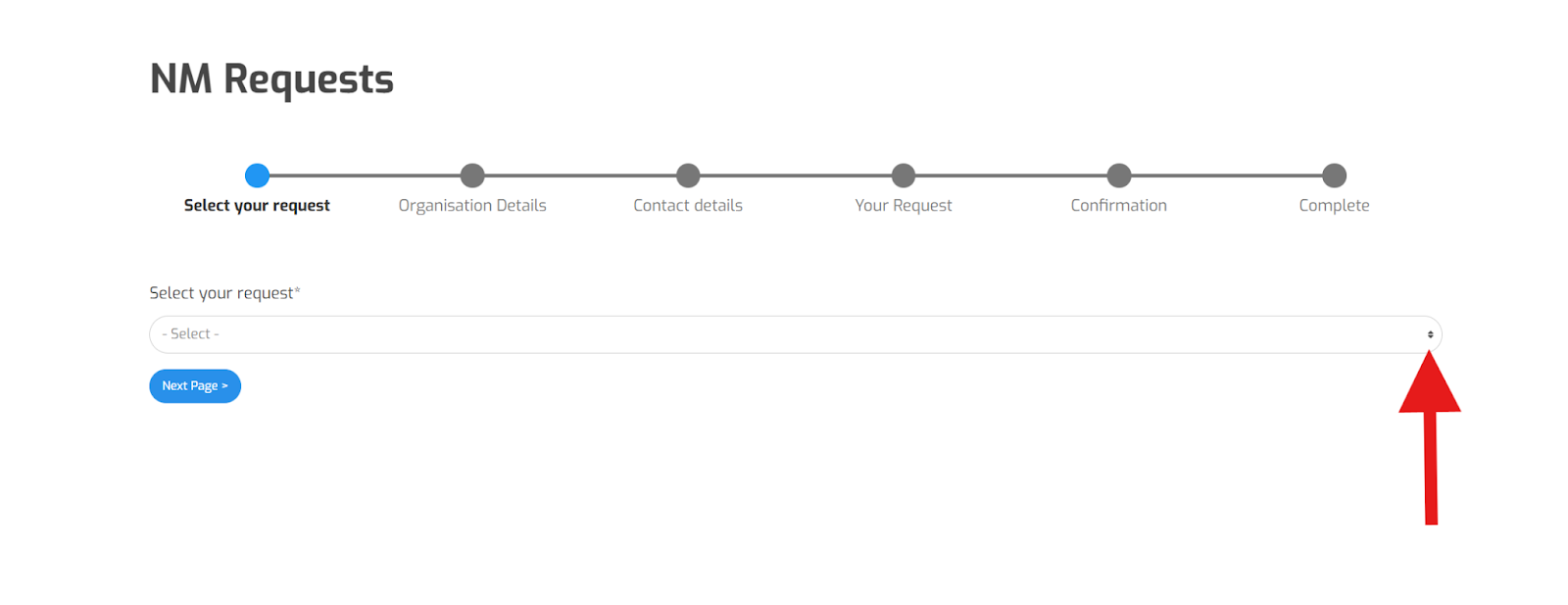
3.2 Select Your Request - Dropdown Menu
Once on the page, select the dropdown menu on the right (as shown by the arrow below).
Select your request.
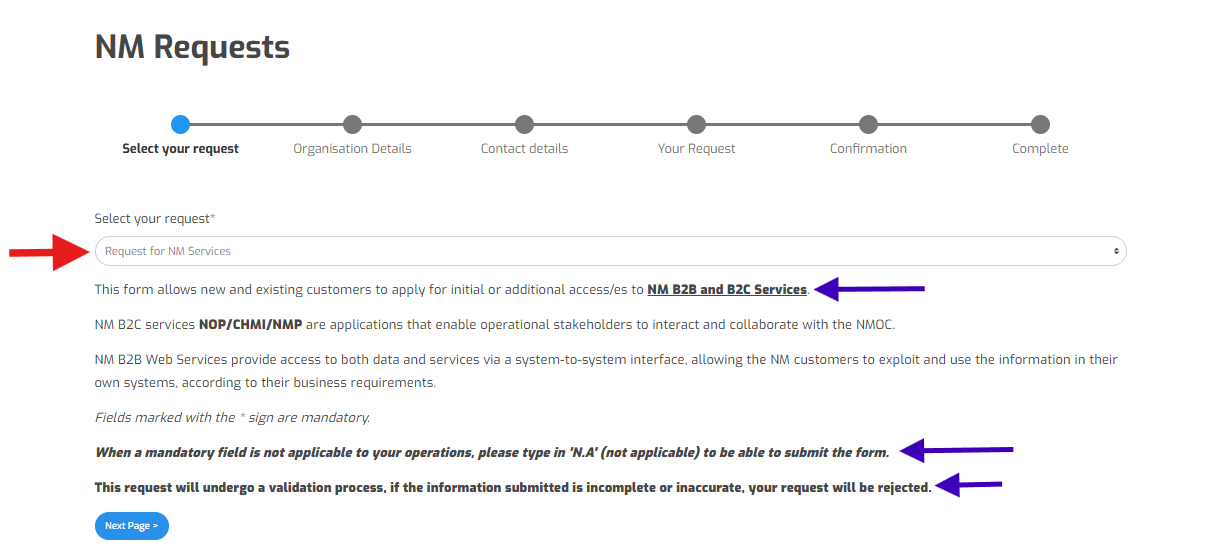
Note: For an Ops certificate application or FF-ICE approval on an existing certificate, select “REQUEST FOR NM SERVICES.”
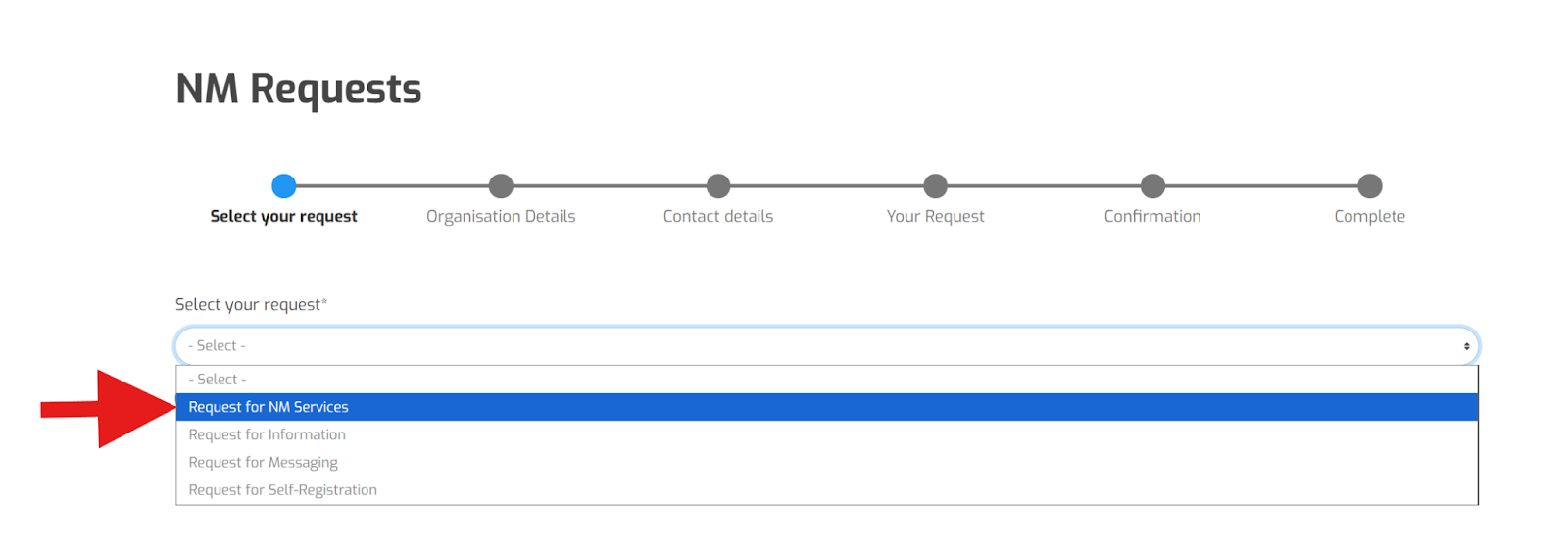
Click the “Next Page” button.
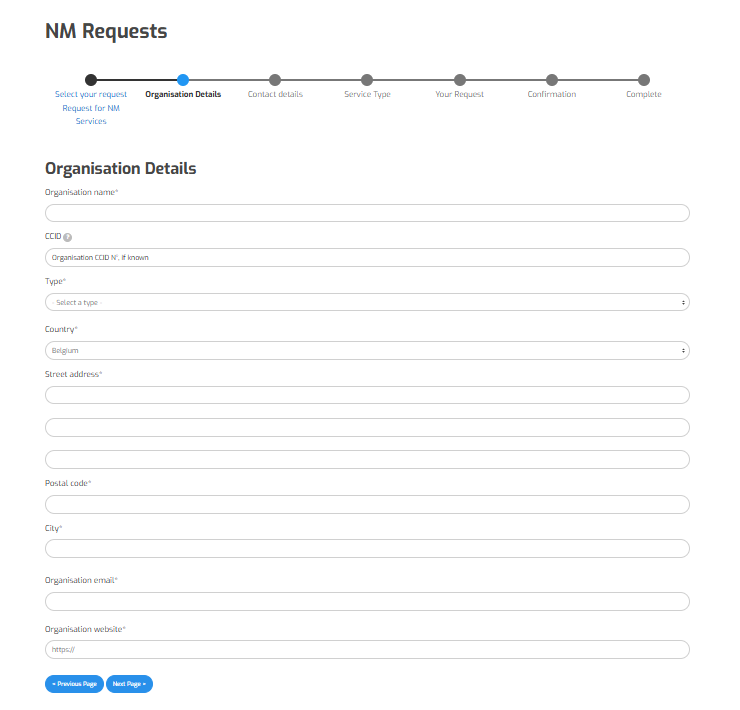
3.2 Organisation Details Section
Enter all Organisation details.
Note: For CCID Field enter your existing certificate number (CCID) if you have one.
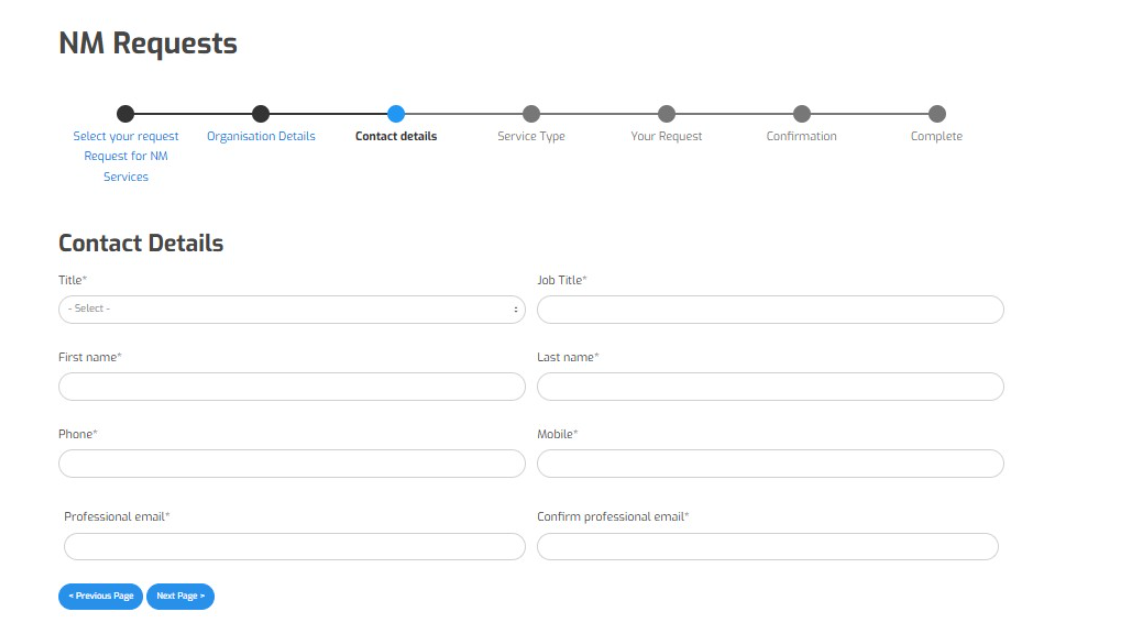
3.4 Contact Details Section
Enter all required contact details.
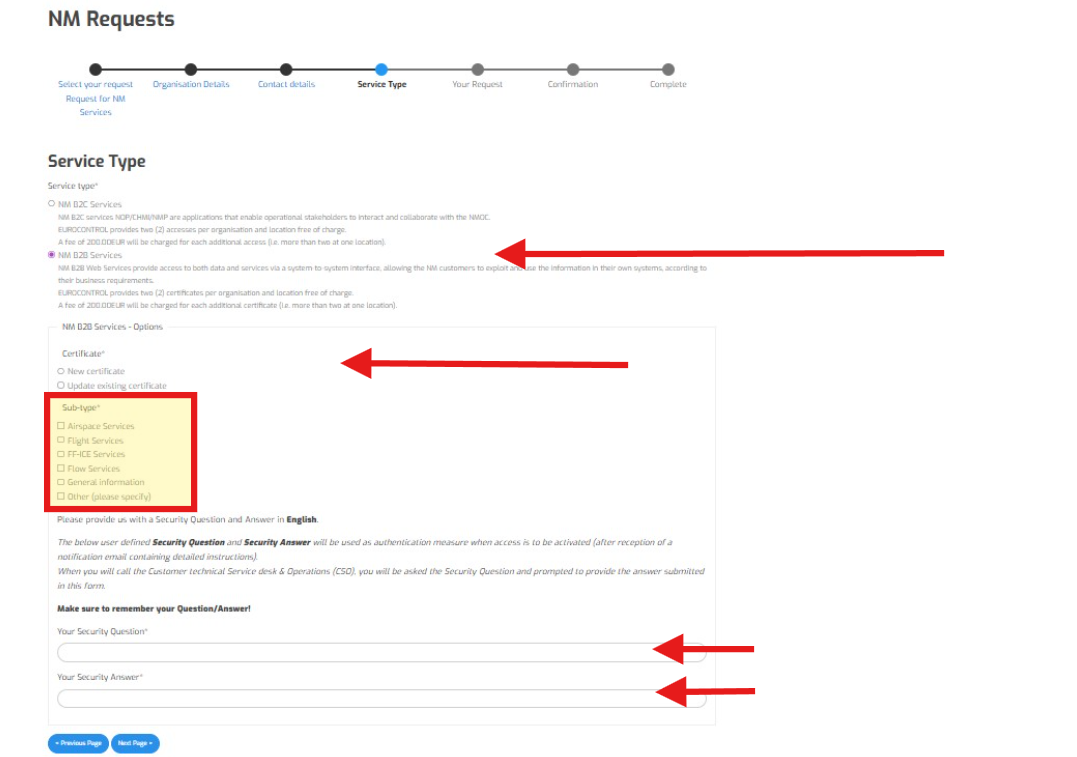
3.5 Service Type Section
Select the applicable “Service Type.” Note: For most it will be B2B.
Select the appropriate “Sub-Type”, along with a security question and answer.
3.6 NM Requests Section
In the “Purpose of request” input field, enter details and comments similar to the description shown in the image.
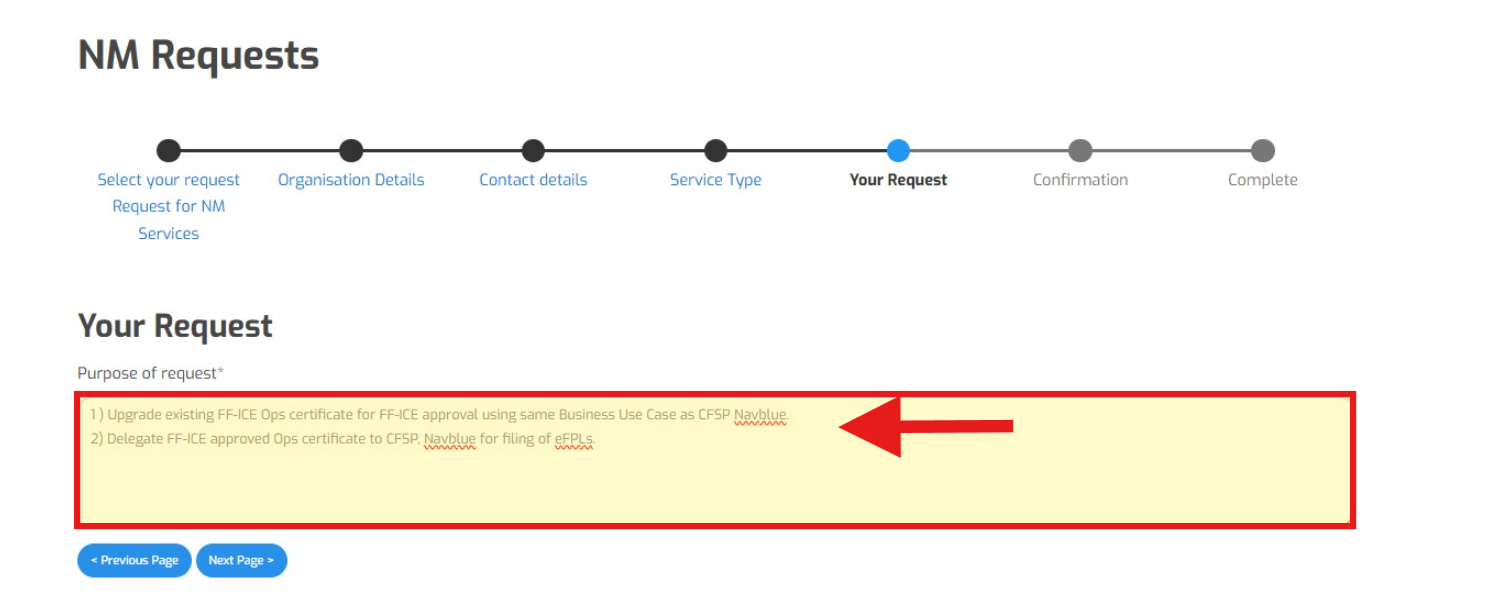
Example details and comments:
Upgrade Existing/New FF-ICE Ops certificate for FF-ICE approval using the same Business Use Case as CFSP NAVBLUE.
Delegate FF-ICE approved Ops certificate to CFSP NAVBLUE for filing of eFPLs - if required.
Note: For NAVBLUE customers using a 3rd party service to file eFPLs, you may indicate NAVBLUE as your CFSP, and the name of your 3rd party filing service for delegation. Including any relevant contact information for that service.
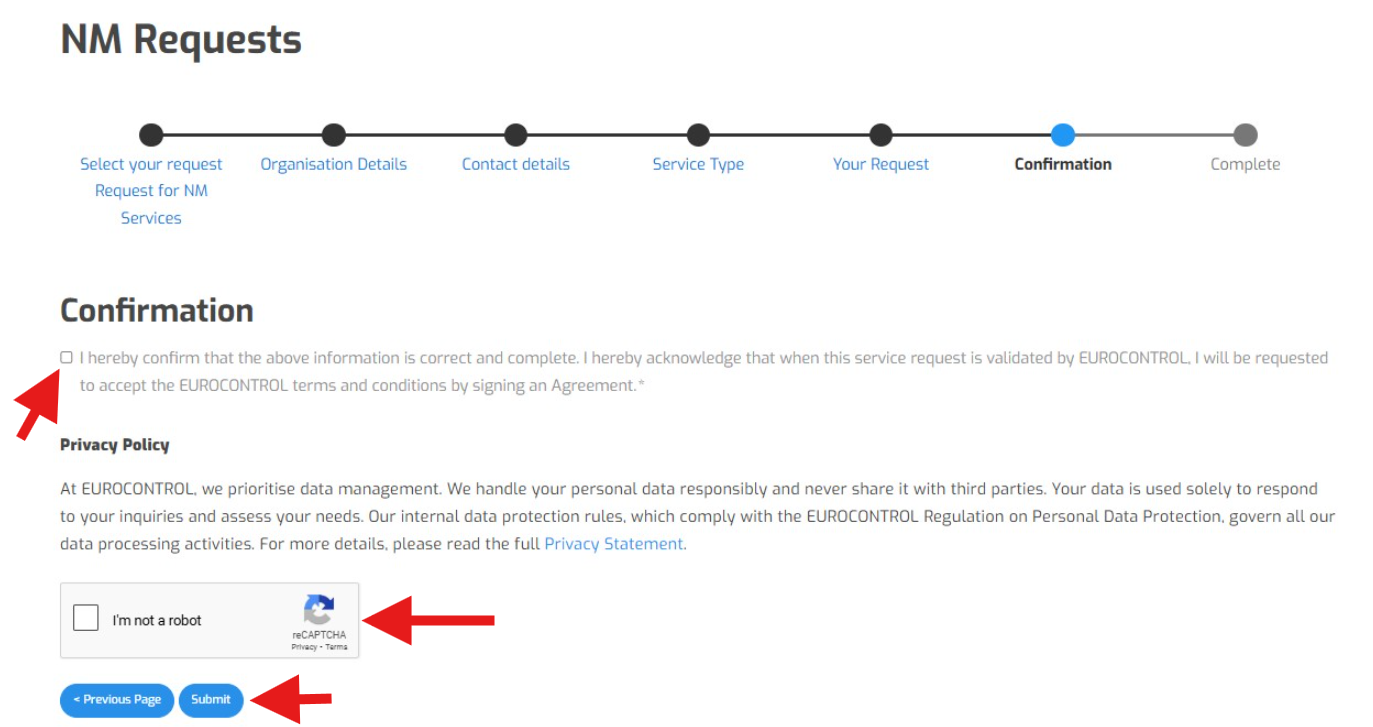
3.7 Confirmation Section
Checkmark the appropriate boxes.
Click "Submit."
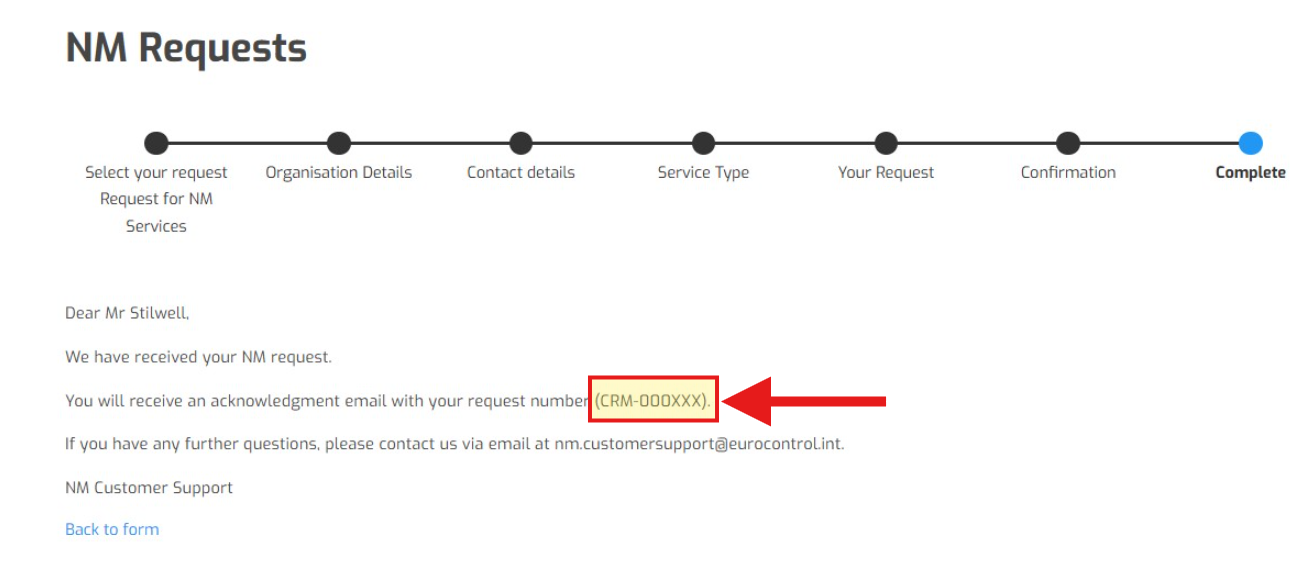
3.8 Complete Section
Once the completed screen appears, you are notified by email with a CRM number. Please include this number in any Support ticket with NAVBLUE when requesting FF-ICE configuration, along with any other relevant information.
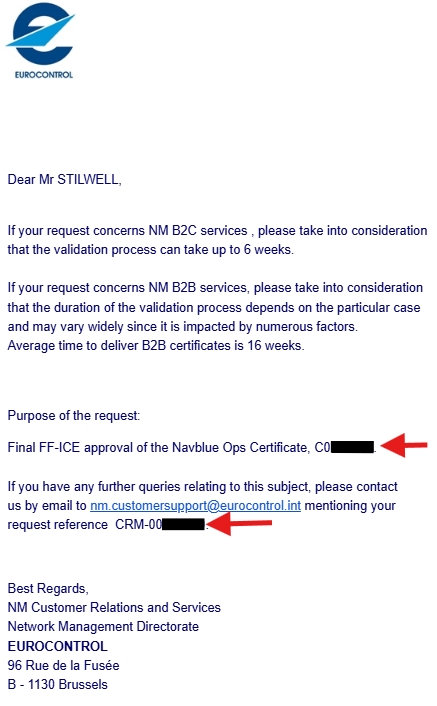
3.9 Email Confirmation from NM
In the example e-mail confirmation below, NM refers to a 16 week processing period. However, due to the approaching FF-ICE mandate, expedited processing may be accommodated if required.
For any further questions regarding this process, please contact NAVBLUE Support at support@NAVBLUE.aero