Best Practices for Manual Filing Process
Chapter 01
1.1 Quick Reference Document
1.1.A Introduction
The Quick Reference Document (QRD) applies only to the filing of Extended Flight Plan (eFPL) (FF-ICE / FIXM formatted) Flight Plans. The following QRD outlines the mandatory actions in N-FP for a Change (CHG), Delay (DLA), or Cancel (CNL) message associated with an FF-ICE / FIXM formatted eFPL.
Is your eFPL filed to NM:FFICE?
Not sure? Check the ATC Transmission window in the N-FP List screen for ACK, MAN, or REJ indicators.
ATTENTION: For an FF-ICE eFPL CHANGE, or DELAY message.
Do not modify the ICAO2012 Flight Plan (FPL) message in the Send To ATC / Details Screen.
Doing this will only modify the ICAO2012 FPL message and it will not be received by Network Manager (NM) when filing to NM:FFICE.
A N-FP Flight Plan (FPL) must be computed with changes, or delays in order for the FF-ICE / FIXM data to be updated and transmitted correctly to NM.
Please review the IFPS USERS MANUAL: IFPS Users Manual | EUROCONTROL for all relevant information related to FPL filing requirements with NETWORK MANAGER (NM).
1.1.B Associated Messages
CHANGE (CHG)

STEP 1: Is the eFPL FILED to NM? Options are: NO or YES?
If NO, further action is not required.
If YES, the eFPL is already filed.
Proceed to STEPS 2 and 3.
STEP 2: A CHG message must be sent for the following:
Aircraft Equipment Codes Override / FlightType / Flight Rules
Type / EOBT / Aircraft(reg/type)
Route(ITEM15)
Alternate EET (ex.Cost Index)
ITEM 18 (RMK/STS) / ITEM 19 and any additional relevant data expected in the eFPL.
Note: For further information refer to the IFPS USERS MANUAL.
ATTENTION: You must compute a modified FPL with modified CHG data in the Plan and Route Screen.
Do not modify the ICAO2012 FPL message in the Send To ATC / Details Screen.
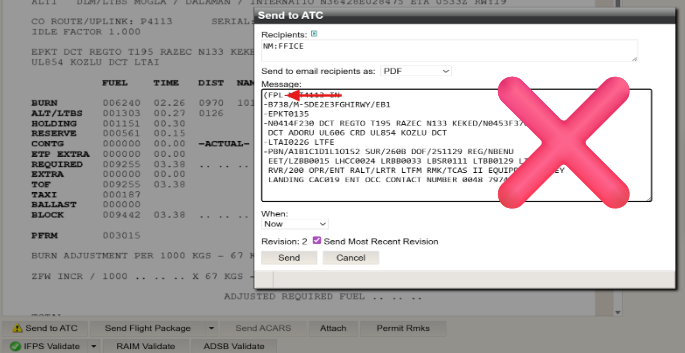
STEP 3: File revised eFPL to NM by selecting SEND TO ATC.
In Recipients field, click “NM:FFICE”
Select CHG
Select Send.
DELAY (DLA)

STEP 1: Is the eFPL FILED to NM? Options are: NO or YES?
If NO, further action is not required.
If YES, the eFPL is already filed.
Proceed to STEPS 2 and 3.
STEP 2: A DLA a message must be sent for:
a REVISED EOBT (20 HOURS MAX, EOBD excluded).
Note: For further information refer to the IFPS USERS MANUAL.
ATTENTION: You must compute a modified Flight Plan with modified CHG data in the Plan and Route Screen.
Do not modify the ICAO2012 FPL message in the Send To ATC / Details Screen.
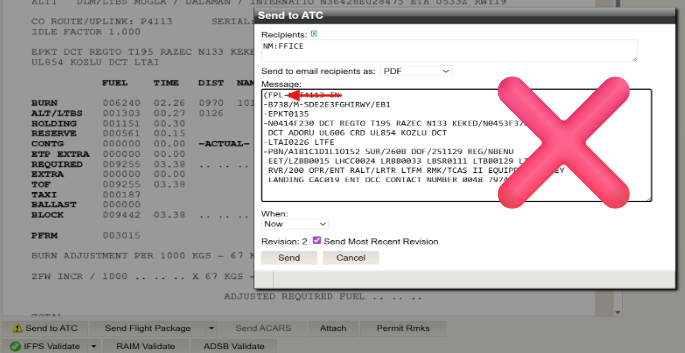
STEP 3: File revised eFPL to NM by selecting SEND TO ATC.
In Recipients field, click “NM:FFICE”
Select DLA
Select Send.
CANCEL (CNL)

STEP 1: Is the eFPL FILED to NM? Options are: NO or YES?
If NO, further action is not required.
If YES, the eFPL is already filed.
Proceed to STEPS 2 and 3.
STEP 2: A CNL message must be sent for:
an eFPL flight cancellation
change to EOBD / ARCID(ATC ID) / ADEP / ADES.
Note: For further information refer to the IFPS USERS MANUAL.
ATTENTION: You must compute a modified Flight Plan with modified CHG data in the Plan and Route Screen.
Do not modify the ICAO2012 FPL message in the Send To ATC / Details Screen.
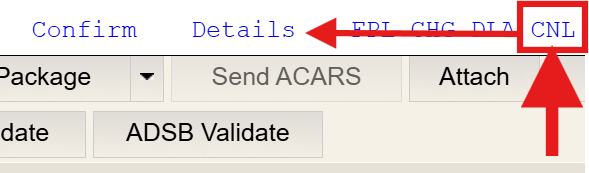
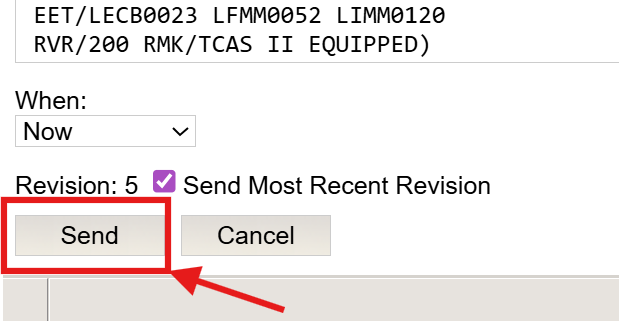
STEP 3: File revised eFPL to NM by selecting SEND TO ATC.
In Recipients field, click “NM:FFICE”
Select CNL
Select Send.
Check the ATC Transmissions message response in the Flight List for confirmation.
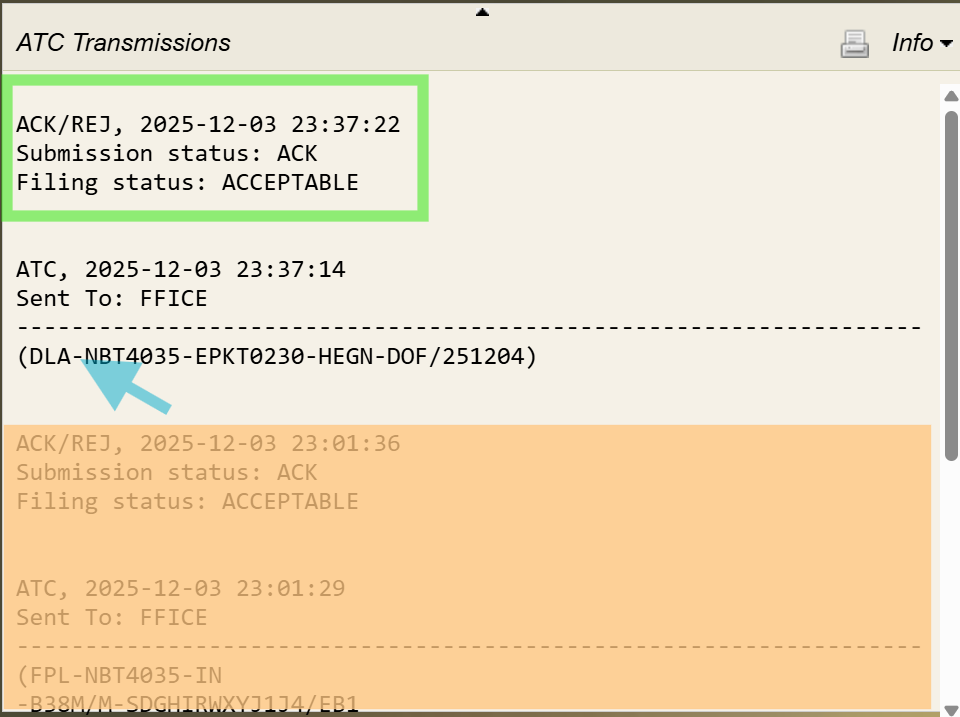
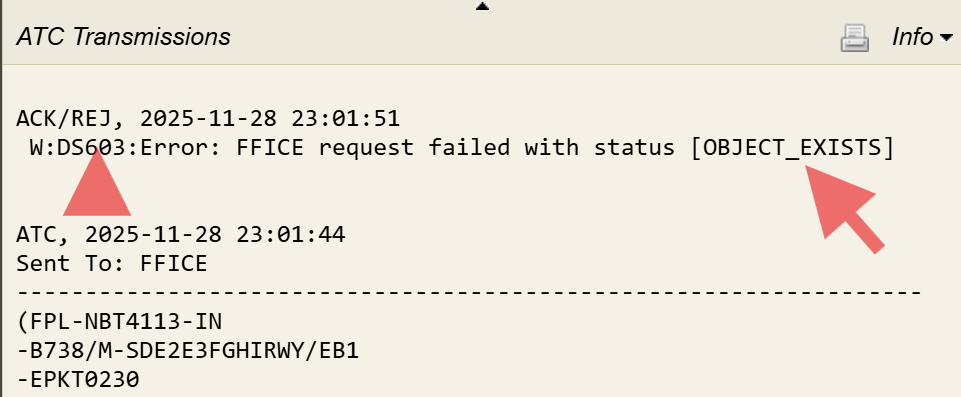
1.1.C WARNING! OBJECT_EXISTS
In the example below, the FPL was accidentally submitted twice by the Dispatcher–once automatically (through AUTOMATION) and then MANUALLY–resulting in an OBJECT_EXISTS message from NM.
This serves as a reminder for customers using AUTOMATION to file FPL, whether FF-ICE or non-FF-ICE, to ensure that automation is disabled or removed for any flight requiring manual intervention. Doing this prevents duplicate filings.
ATTENTION: Please Do Not Do the Following:
Submit a FPL directly through the NM NOP portal. This method submits an ICAO2012 FPL, not an FF-ICE one.
If subsequent FPLs are filed from N-FP to the NM:FFICE address, these will be Rejected (REJ) because the ICAO2012 FPL data already exists in the system.
Note: Only use N-FP to file your eFPL (extended flight plans)--no other submission methods should be used.
Making Changes to Existing Flight Plans
All changes (change in data, or EOBT) requiring a (CHG) or (DLA) message must be made in the N-FP PLAN screen with a FULL COMPUTE.
Only after performing a FULL COMPUTE can an FF-ICE/FIXM-formatted (CHG) or (DLA) message be sent to NM:FFICE.
Do not make changes in the SEND TO ATC screen to the ICAO2012 template. This will not modify any of the FF-ICE data in the eFPL (extended flight plan you submit to NM) and will result in a (REJ).
Note: Please contact NAVBLUE Support for further assistance if you receive any messages that you can not understand, or are not covered in the IFPS Users Manual. For urgent issues, contact the NM Support Desk through the public support portal.
1.1.D Translation & Forwarding Service
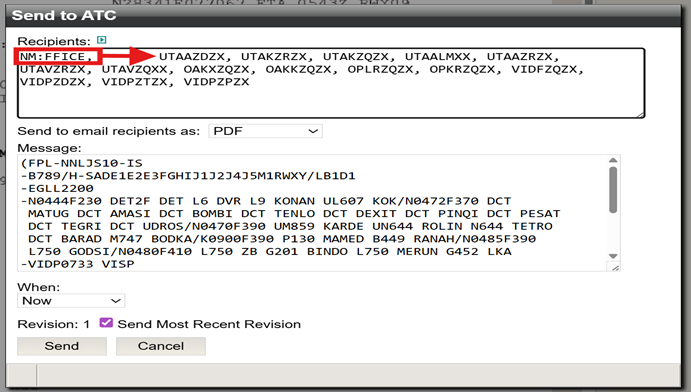
When configured to file an FF-ICE eFPL, N-FP can include a request for NM to translate the FPL to ICAO2012 and forward it to downstream, or upstream AFTN / SITA addresses outside the EU IFPZ. To file, Dispatchers must ensure AFTN/SITA addresses for a translated FF-ICE to ICAO2012 FPL are included in the Recipients box of the Send To ATC window. They must also add the NM:FFICE address.
The NM:FFICE address acts as the trigger for N-FP to file an FF-ICE FPL to NM. If this address is removed and/or replaced, N-FP will instead file only an ICAO2012 FPL to any AFTN/SITA addresses listed in the Recipients box.
The below image is an example of an inbound flight to Europe departing from the US, all relevant AFTN addresses may be generated for Washington D.C. ARTCC, the Moncton Domestic FIR, and the Gander Oceanic FIR. In this case, NM translates the FF-ICE FPL to an ICAO2012 format and forwards it to the relevant FIRs indicated in the Recipients box.
Example: Inbound Flight
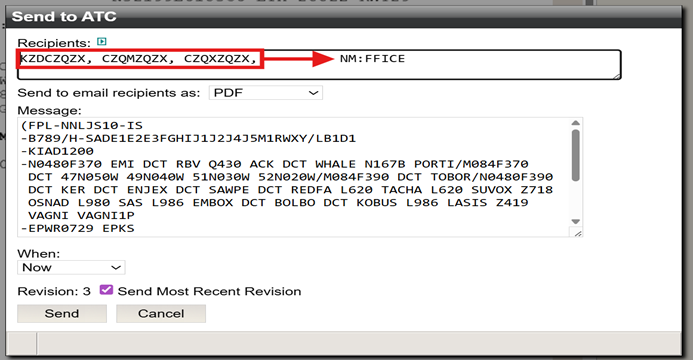
For the next flight, the NM:FFICE address displays first, however this has no effect on how an FF-ICE FPL is filed. Regardless of where the NM:FFICE address appears in the Recipients box, an FF-ICE FPL will still be filed.
In addition to the FF-ICE FPL being filed to NM, all downstream AFTN/SITA addresses listed in the Recipients box with the NM:FFICE address will also be filed.
This is done by NM who translates the FF-ICE FPL to ICAO2012 format, and forwards it to the specified AFTN/SITA addresses in the Recipients box.
The below image is an example of an outbound flight where NM translates the submitted FF-ICE FPL and forwards it as an ICAO2012 format message to the Ashgabat, Kabul, Lahore, and Delhi FIRs, and to Delhi Tower and Delhi ARO.
Example: Outbound Flight